




Here's how it works



How to use or fill out glock inspection form with our platform

- Click ‘Get Form’ to open the Glock Inspection Form in the editor.
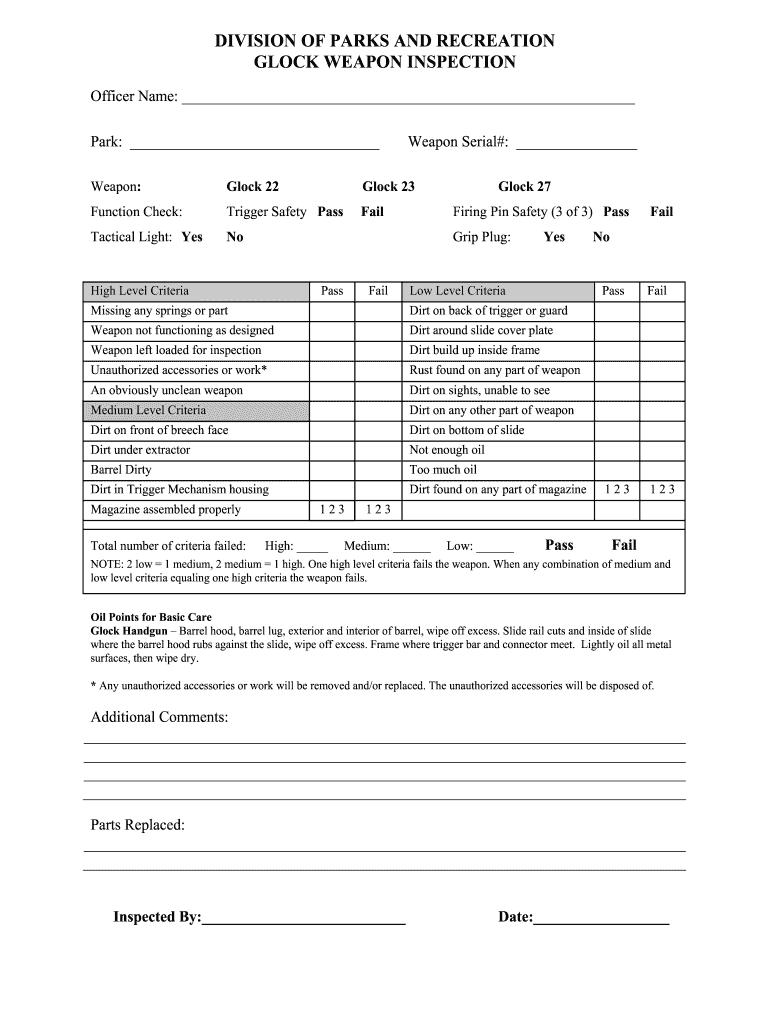
- Begin by entering the Officer Name and Park in the designated fields. Ensure accuracy for proper record-keeping.
- Input the Weapon Serial Number, selecting from the options provided (Glock 22, Glock 23, Glock 27) as applicable.
- Conduct a function check by marking 'Pass' or 'Fail' for Trigger Safety and Firing Pin Safety. Indicate if a Tactical Light is present.
- Evaluate the weapon against High, Medium, and Low Level Criteria. Mark 'Pass' or 'Fail' for each criterion based on your inspection findings.
- In the Additional Comments section, provide any relevant notes regarding the inspection process or findings.
- Finally, fill in Parts Replaced, Inspected By, and Date to complete the form before saving or sharing it.
Start using our platform today to streamline your Glock inspection process for free!
It's free
Got questions?
How do I sign my firearm inspection checklist free of charge?
Most eSignature solutions require users to have a paid subscription. With DocHub, there are two ways for you to add an electronic signature to your firearm inspection checklist at no cost:
- You can do it during a 7-day trial period;
- You can sign up for a free plan.
The second option, though, has limitations on the number of signatures, sign requests, emails, and forms for editing available per month. You can check for full details here.
How to fill out and sign firearm inspection form online?
You can easily complete, edit, and even eSign your firearm inspection form utilizing DocHub. Create a new account and begin your free trial. After that, you can add the document with the form and simply make all the necessary edits. No need to print on paper or use a third-party application to sign it, as you can put your electronic signature on your document quicker via DocHub.
Does slide milling void warranty?
Did Navy SEALs switch to Glock?
What parts wear out on a GLOCK?
Security and compliance
At DocHub, your data security is our priority. We follow HIPAA, SOC2, GDPR, and other standards, so you can work on your documents with confidence.
Learn more


