




Here's how it works

01. Edit your oregon form 40 online
Type text, add images, blackout confidential details, add comments, highlights and more.

02. Sign it in a few clicks
Draw your signature, type it, upload its image, or use your mobile device as a signature pad.

03. Share your form with others
Send oregon form 40 printable via email, link, or fax. You can also download it, export it or print it out.
How to use or fill out Oregon Income Tax with our platform

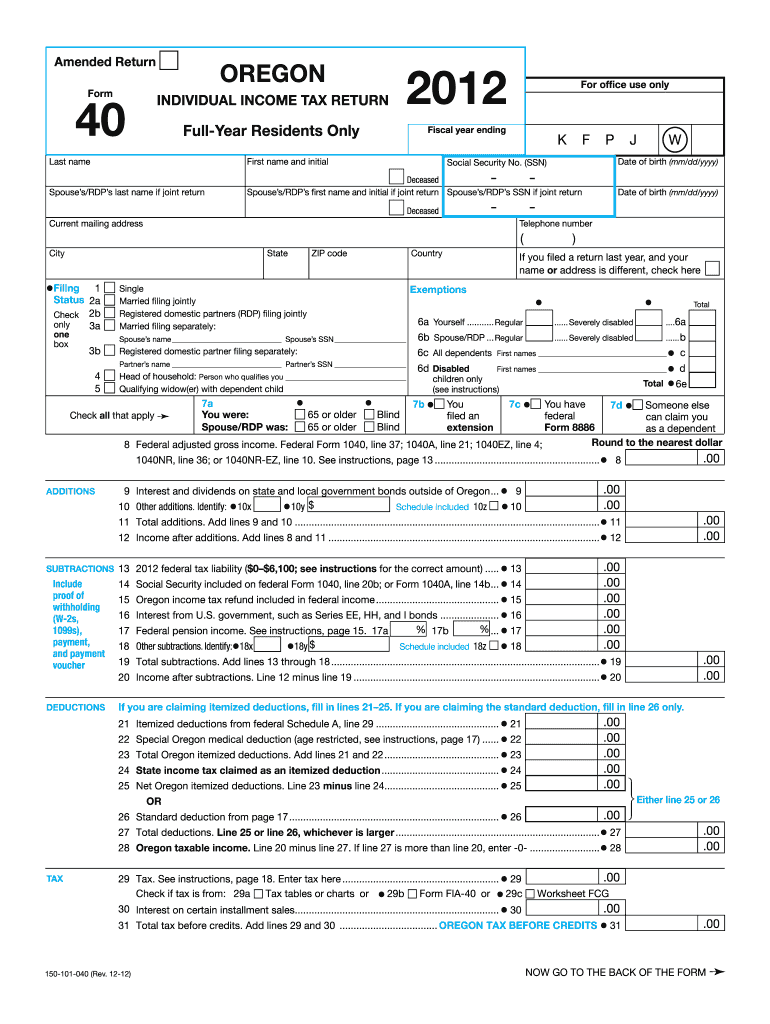
- Click ‘Get Form’ to open the Oregon Individual Income Tax Return in the editor.
- Begin by entering your personal information in the designated fields, including your last name, first name, and Social Security Number (SSN). If filing jointly, include your spouse's details as well.
- Select your filing status by checking the appropriate box. Options include Single, Married Filing Jointly, and Head of Household.
- Fill out the exemptions section by indicating if you or your spouse are blind or over 65 years old. List all dependents and their details as required.
- Report your Federal Adjusted Gross Income from your federal tax return. Ensure accuracy as this will affect your state tax calculations.
- Complete the additions and subtractions sections to determine your taxable income. Follow the instructions carefully for any specific deductions applicable to Oregon residents.
- Calculate your total tax liability based on the provided tax tables and apply any credits you qualify for before determining what you owe or what refund you can expect.
Start filling out your Oregon income tax form today using our platform for a seamless experience!
Fill out oregon income tax online
It's free
It's free
Security and compliance
At DocHub, your data security is our priority. We follow HIPAA, SOC2, GDPR, and other standards, so you can work on your documents with confidence.
Learn more


