Farmranch purchase agreement 2012 form-2025

Get Form
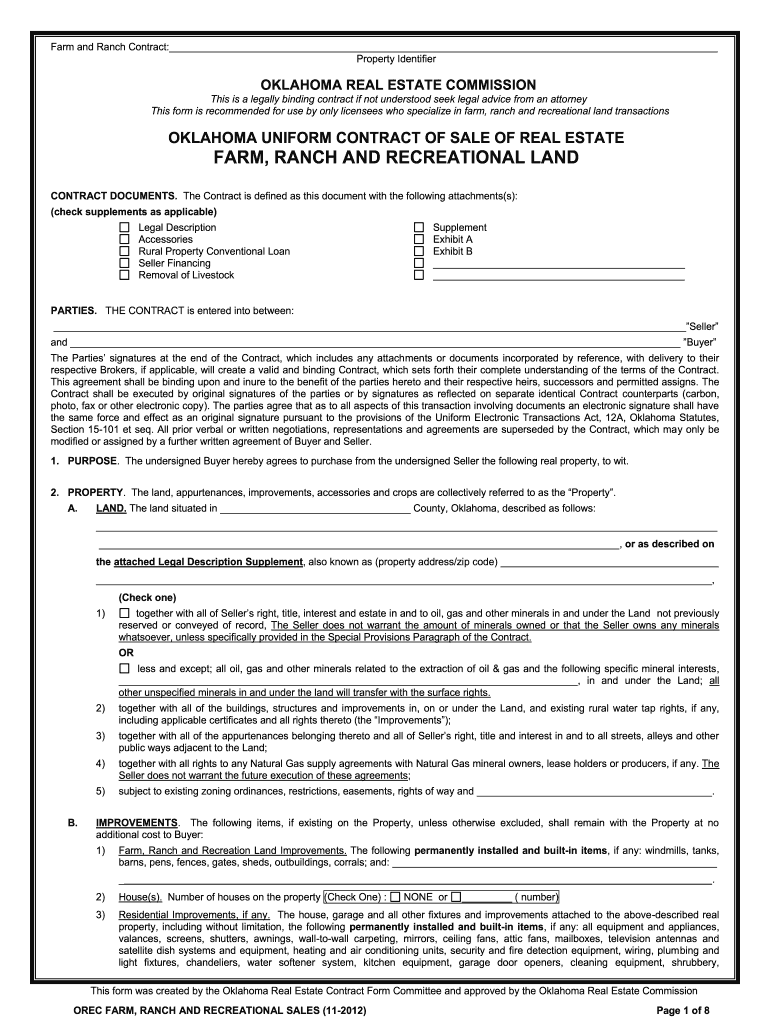
farm and ranch purchase agreement Preview on Page 1

Here's how it works

01. Edit your farm and ranch purchase agreement online
Type text, add images, blackout confidential details, add comments, highlights and more.
02. Sign it in a few clicks
Draw your signature, type it, upload its image, or use your mobile device as a signature pad.
03. Share your form with others
Send it via email, link, or fax. You can also download it, export it or print it out.

How to use or fill out farmranch purchase agreement 2012 form with our platform

Form edit decoration
9.5
Ease of Setup
DocHub User Ratings on G2
9.0
Ease of Use
DocHub User Ratings on G2
  1. Click ‘Get Form’ to open the farmranch purchase agreement 2012 form in the editor.
  2. Begin by filling in the 'Parties' section, where you will enter the names of the Seller and Buyer. Ensure that all parties involved are accurately represented.
  3. Proceed to the 'Property' section. Here, provide a detailed legal description of the property, including county and any specific identifiers. Use our platform's tools to easily input this information.
  4. In the 'Terms' section, specify the purchase price and details regarding earnest money. Make sure to check applicable financing options and fill in any required fields related to payment methods.
  5. Review sections on inspections and disclosures carefully. Utilize our platform’s commenting feature for notes or questions about specific clauses.
  6. Finally, ensure all signatures are collected electronically using our signing feature, which is legally binding under Oklahoma law.

Start editing your farmranch purchase agreement today for free on our platform!

See more farmranch purchase agreement 2012 form versions

We've got more versions of the farmranch purchase agreement 2012 form form. Select the right farmranch purchase agreement 2012 form version from the list and start editing it straight away!
Versions Form popularity Fillable & printable
2014 4.8 Satisfied (81 Votes)
2012 4 Satisfied (51 Votes)
be ready to get more

Complete this form in 5 minutes or less

Get form

Got questions?

We have answers to the most popular questions from our customers. If you can't find an answer to your question, please contact us.
Contact us

With DocHub, it’s pretty simple. The service offers users an add-on called DocHub for Gmail, which you can find in the Google Workspace Marketplace without being charged. Install it and give it access to your Google account. Open your email with your farmranch purchase agreement 2012 form attached and click on the add-on button in the right-side panel. Log in to your DocHub account, and import the file to our editor, where you can complete it and sign.

If you are searching for a state-specific farmranch purchase agreement 2012 form sample, you can find it in our DocHub Forms & Templates catalog. Use the search field, enter your form’s name, and search through the results for your state. You can also filter out irrelevant results while searching our catalog by groups.

Depending on your situation, any of these parties might draft your home purchase agreement: Real estate agents/brokers: Often provide standardized forms but cannot offer legal advice. Real estate attorneys: May be required in some states; they customize agreements to address specific legal needs.
Handwritten bills of sale are indeed contractual agreements so long as they have the right elements.
Who pays for the purchase contract? Fees associated with drawing up this contract are typically included in the buyers agents commission fee, which the buyer pays as part of the closing fees.
be ready to get more

Complete this form in 5 minutes or less

Get form

People also ask

Yes, you can absolutely write your own purchase agreement! But starting from scratch can be time-consuming and can get complicated quickly with legal language, required clauses, regional regulations, etc. The good news is that you dont have to start from ground zero.
Answer: When buying or selling a home, you may wonder does a real estate purchase agreement need to be docHubd. The answer is that real estate purchase agreements do not need to be docHubd or witnessed in order to be legally binding.
The agreement must be signed by both the buyer and the seller to be legally binding. Without signatures, the document is not enforceable.
What information do I need to make a Purchase Agreement? Buyer and seller information such as name, address, and whether they are an individual, business, or trust. What is being sold or a legal description of the property. Purchase price, amount of earnest money, and whether the buyer will be acquiring financing.

Related links