Type text, add images, blackout confidential details, add comments, highlights and more.
02. Sign it in a few clicks
Draw your signature, type it, upload its image, or use your mobile device as a signature pad.
03. Share your form with others
Send it via email, link, or fax. You can also download it, export it or print it out.
How to use or fill out vaf 1b 2011 form with our platform
Ease of Setup
DocHub User Ratings on G2
Ease of Use
DocHub User Ratings on G2
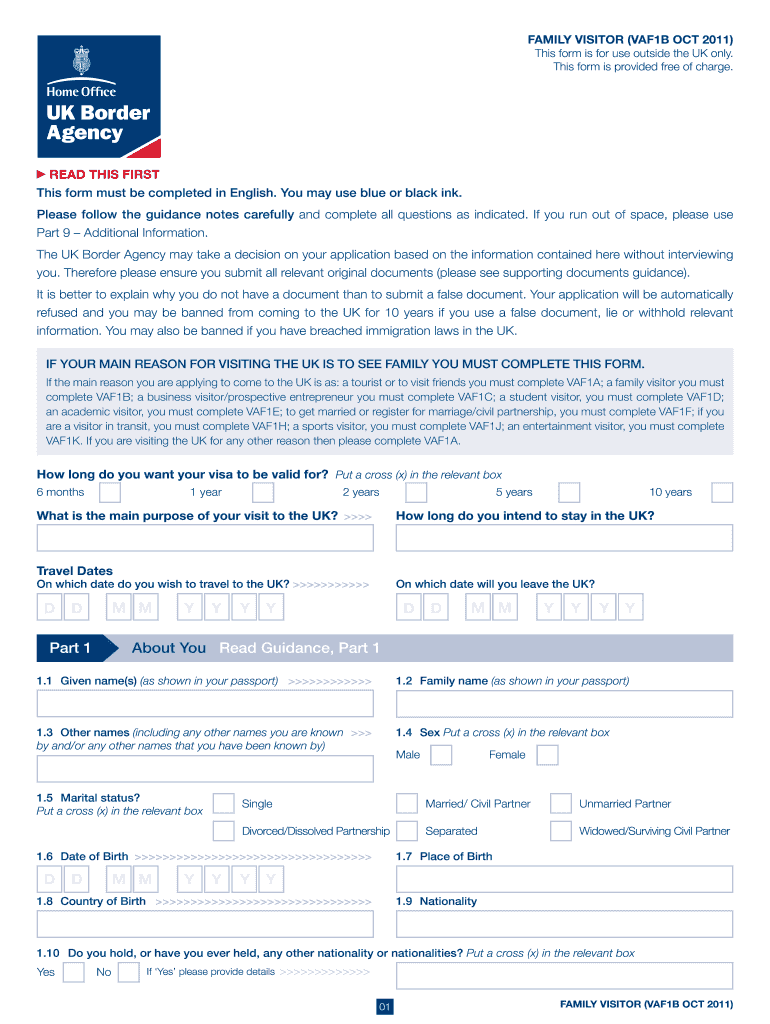
Click ‘Get Form’ to open the VAF 1B 2011 form in the editor.
Begin with Part 1, where you will provide your personal details. Fill in your given name(s), family name, and any other names you are known by. Ensure accuracy as this information is crucial for your application.
In Part 2, enter your passport information. This includes your passport number, place of issue, and dates of issue and expiry. Double-check these details to avoid any discrepancies.
Proceed to Part 3 for your contact details. Input your full residential address, telephone numbers, and email address. This ensures that the authorities can reach you if needed.
Continue through Parts 4 to 8, providing information about your family, finances, travel history, and the purpose of your visit. Use the additional information section if you need more space.
Finally, review all sections for completeness and accuracy before submitting. Our platform allows you to save progress and return later if needed.
Start filling out your VAF 1B form today for free using our editor!
Any and all rights and obligations of Volkswagen and its authorized dealers are subject to any applicable state or federal law or regulation. The manualRead more
If the student has never used or collected VA Education Benefits previously; the student must submit an online application by logging onto the VA Web site; andRead more
Cookie consent notice
This site uses cookies to enhance site navigation and personalize your experience.
By using this site you agree to our use of cookies as described in our Privacy Notice.
You can modify your selections by visiting our Cookie and Advertising Notice.