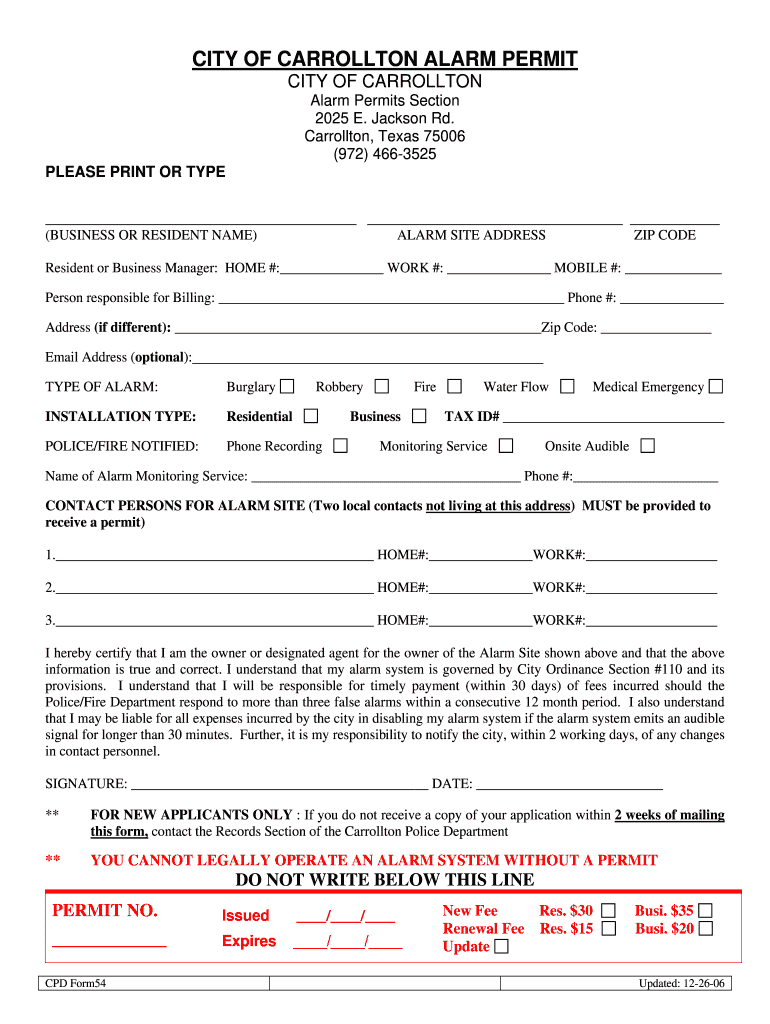
Tx city carollton alarm permit 2026

Get Form
clear alert Preview on Page 1

Here's how it works

01. Edit your clear alert online
Type text, add images, blackout confidential details, add comments, highlights and more.
02. Sign it in a few clicks
Draw your signature, type it, upload its image, or use your mobile device as a signature pad.
03. Share your form with others
Send city of carrollton alarm permit via email, link, or fax. You can also download it, export it or print it out.

How to use or fill out tx city carollton alarm permit with our platform

Form edit decoration
9.5
Ease of Setup
DocHub User Ratings on G2
9.0
Ease of Use
DocHub User Ratings on G2
  1. Click ‘Get Form’ to open the tx city carollton alarm permit in the editor.
  2. Begin by entering your name and the alarm site address in the designated fields. Ensure that you include the correct ZIP code for accurate processing.
  3. Fill in your contact information, including home, work, and mobile numbers. This is crucial for communication regarding your alarm system.
  4. Specify the type of alarm you are registering by selecting from options such as Burglary or Robbery. Additionally, indicate whether it is a residential installation.
  5. Provide details about your monitoring service, including the name and phone number of the service provider.
  6. List two local contacts who can respond to alarms at your site. Include their home and work numbers for verification purposes.
  7. Review all entered information for accuracy before signing and dating the form at the bottom.

Start filling out your tx city carollton alarm permit today using our platform for free!

See more tx city carollton alarm permit versions

We've got more versions of the tx city carollton alarm permit form. Select the right tx city carollton alarm permit version from the list and start editing it straight away!
Versions Form popularity Fillable & printable
2006 4.9 Satisfied (498 Votes)
be ready to get more

Complete this form in 5 minutes or less

Get form

Got questions?

We have answers to the most popular questions from our customers. If you can't find an answer to your question, please contact us.
Contact us
To get your insurance certificate using the Ring app: Open the app and tap on the. menu (). Settings. Monitoring. . Insurance Certificate. . Send Certificate. You will receive the certificate via email. Present the certificate to your insurance provider and ask about your eligibility for a policy discount.
Ring LLC is a manufacturer of home security and smart home devices owned by Amazon.
Residents can register their alarm system for free online at or by calling 1-855-725-7102.
Rings Monitoring center phone number is 833-209-2159. We recommend that you and your emergency contacts save that number as a contact under the name Ring Alarm to increase the likelihood that someone will answer the call.
To find out if a permit is required in your area, contact your local Police, Sheriff or Fire Department using their non-emergency telephone number, or look them up on the Internet. If a permit is required, you must provide ADT with your alarm permit/registration number.

Security and compliance

At DocHub, your data security is our priority. We follow HIPAA, SOC2, GDPR, and other standards, so you can work on your documents with confidence.

Learn more
ccpa2
pci-dss
gdpr-compliance
hipaa
soc-compliance

People also ask

Phone: (800) 656-1918.
A security alarm permit is required if you have a security alarm that is audible and/or monitored to provide police response. The annual permit fee is $50 for a residence and $100 for a business permit.
All alarm companies and alarm users in Montgomery County, Texas must file a Montgomery County Sheriffs Office Alarm Permit Application (MCSOALARM/MCTX) with the Montgomery County Sheriffs Office.

Related links