Transcation Dispute Form - Bankwest - Fill and Sign Printable 2026

Get Form
bankwest dispute form Preview on Page 1

Here's how it works

01. Edit your bankwest dispute form online
Type text, add images, blackout confidential details, add comments, highlights and more.
02. Sign it in a few clicks
Draw your signature, type it, upload its image, or use your mobile device as a signature pad.
03. Share your form with others
Send bankwest transaction dispute form via email, link, or fax. You can also download it, export it or print it out.

How to use or fill out Transcation Dispute Form - Bankwest - Fill and Sign Printable with DocHub

Form edit decoration
9.5
Ease of Setup
DocHub User Ratings on G2
9.0
Ease of Use
DocHub User Ratings on G2
  1. Click ‘Get Form’ to open it in the editor.
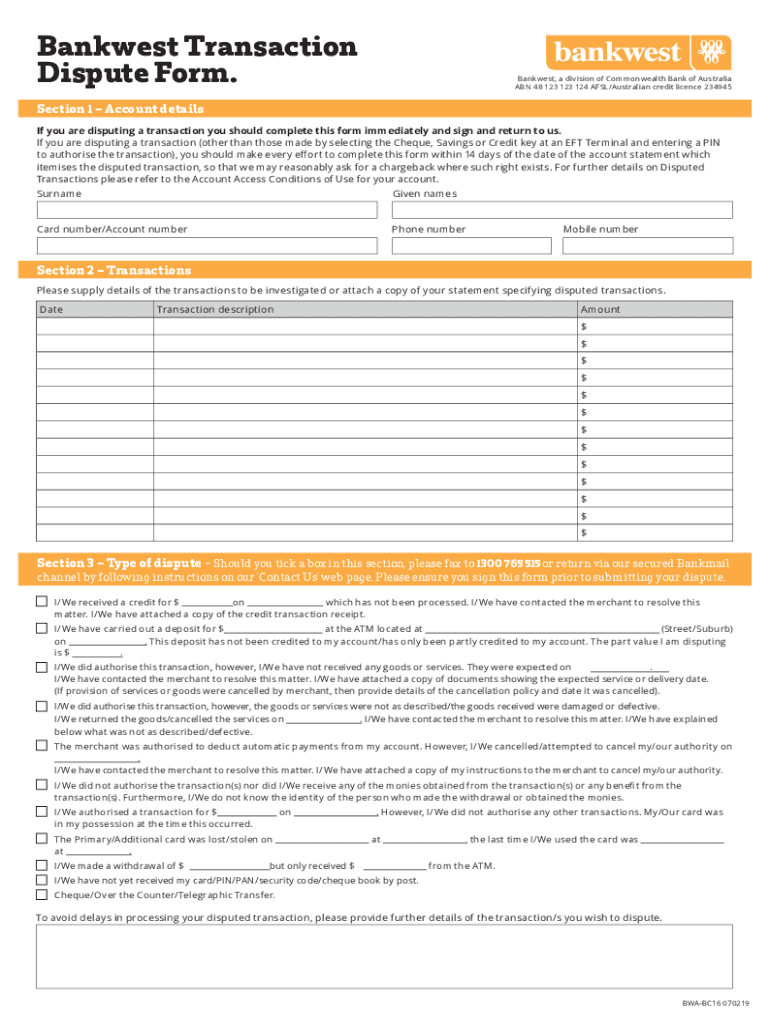
  2. Begin by filling out Section 1 – Account details. Enter your surname, given names, card number or account number, and contact numbers. Ensure accuracy for prompt processing.
  3. Move to Section 2 – Transactions. List the disputed transactions by providing the date, description, and amount for each transaction. If necessary, attach a copy of your statement.
  4. In Section 3 – Type of dispute, select the appropriate box that describes your issue. Be sure to include any relevant documentation as indicated.
  5. Complete Section 4 – Declaration by confirming that your PIN/security code was not compromised. Sign and date the form at the bottom.
  6. Once completed, save your document and submit it via fax or through a secured channel as instructed.

Start using our platform today to fill out your Transaction Dispute Form easily and for free!

See more Transcation Dispute Form - Bankwest - Fill and Sign Printable versions

We've got more versions of the Transcation Dispute Form - Bankwest - Fill and Sign Printable form. Select the right Transcation Dispute Form - Bankwest - Fill and Sign Printable version from the list and start editing it straight away!
Versions Form popularity Fillable & printable
2022 4.4 Satisfied (22 Votes)
2019 4.5 Satisfied (31 Votes)
2014 4.1 Satisfied (35 Votes)
be ready to get more

Complete this form in 5 minutes or less

Get form

Got questions?

We have answers to the most popular questions from our customers. If you can't find an answer to your question, please contact us.
Contact us
Send a Dispute Letter to Your Card Company your name and account number. the dollar amount of the disputed charge. the date of the disputed charge. an explanation of why you think the charge is incorrect.
Things to know about disputing a transaction Check that its not a purchase form a few days ago. There can be delays between payment and the transaction appearing. Contact the merchant directly to try and resolve the issue with the transaction. This is often the fastest way to resolve a transaction dispute.
A transaction dispute is a consumer complaint related to a credit or debit card purchase. Transactions are most commonly disputed because of fraud (unauthorized charges) and a lack of merchant follow-through (merchandise not as expected, services not performed, credit not issued, etc.).
TRANSACTION DATE MERCHANT/SHOP/ESTABLISHMENT NAME/ATM LOCATION TRANSACTION AMOUNT (Rs.) DISPUTED AMOUNT (Rs.) I am disputing transaction(s) mentioned above due to the following reasons (please tick the appropriate reason/s). Request you to resolve the dispute.
Contact the merchant directly and try to resolve the issue. This is usually the fastest way to resolve a transaction dispute. Get more details about the transaction by logging into your other payment gateways like PayPal, App Store, Google Play, Shopify or Uber.

Security and compliance

At DocHub, your data security is our priority. We follow HIPAA, SOC2, GDPR, and other standards, so you can work on your documents with confidence.

Learn more
ccpa2
pci-dss
gdpr-compliance
hipaa
soc-compliance
be ready to get more

Complete this form in 5 minutes or less

Get form

People also ask

How to fill out the Customer Dispute Form - Money Network? Provide your cardholder information including name and address. Specify the card number and nature of the dispute. Detail the transactions you are disputing. Attach supporting documentation where necessary. Submit the form as instructed for processing.
How to dispute transactions. If you dont recognise a transaction on your account, tap on it in the app for more details. Call us on 13 17 19 if you believe its suspicious. To dispute the transaction for a different reason, complete the transaction dispute form.

Related links