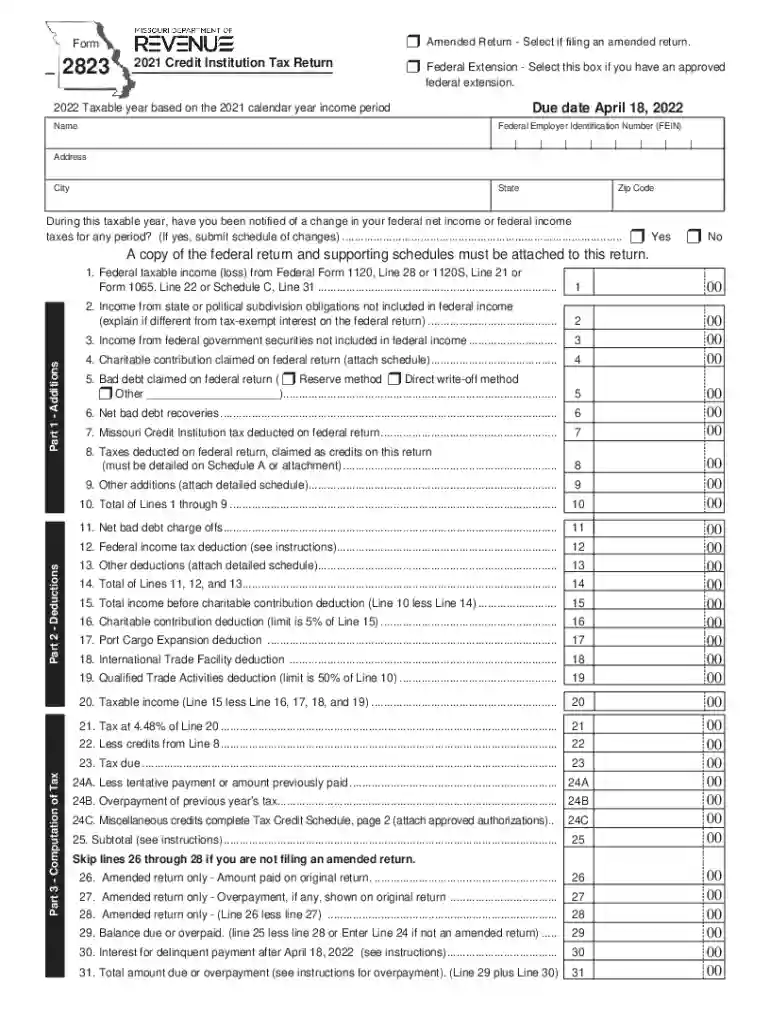
Form 2823 - 2021 Credit Institution Tax Return-2026

Get Form
Form 2823 - 2021 Credit Institution Tax Return Preview on Page 1

Here's how it works

01. Edit your form online
Type text, add images, blackout confidential details, add comments, highlights and more.

02. Sign it in a few clicks
Draw your signature, type it, upload its image, or use your mobile device as a signature pad.

03. Share your form with others
Send it via email, link, or fax. You can also download it, export it or print it out.

How to use or fill out Form 2823 - 2021 Credit Institution Tax Return with DocHub

Form edit decoration
9.5
Ease of Setup
DocHub User Ratings on G2
9.0
Ease of Use
DocHub User Ratings on G2
  1. Click ‘Get Form’ to open it in the editor.
  2. Begin by selecting if you are filing an amended return or if you have an approved federal extension at the top of the form.
  3. Fill in your name, Federal Employer Identification Number (FEIN), and address details accurately in the designated fields.
  4. Proceed to Part 1, where you will enter your federal taxable income and any applicable additions. Ensure to attach a copy of your federal return as required.
  5. In Part 2, list all deductions including bad debts and charitable contributions. Make sure to attach any necessary schedules for verification.
  6. Complete Part 3 by calculating your tax due based on the taxable income derived from previous sections. Double-check all calculations for accuracy.
  7. Finally, review the authorization and signature section before submitting your completed form through our platform.

Start using our platform today to fill out Form 2823 effortlessly and for free!

See more Form 2823 - 2021 Credit Institution Tax Return versions

We've got more versions of the Form 2823 - 2021 Credit Institution Tax Return form. Select the right Form 2823 - 2021 Credit Institution Tax Return version from the list and start editing it straight away!
Versions Form popularity Fillable & printable
2023 4.6 Satisfied (28 Votes)
2022 4.1 Satisfied (26 Votes)
2021 4.8 Satisfied (51 Votes)
2020 4.5 Satisfied (42 Votes)
be ready to get more

Complete this form in 5 minutes or less

Get form

Got questions?

We have answers to the most popular questions from our customers. If you can't find an answer to your question, please contact us.
Contact us
The IRS sends notices and letters for the following reasons: You have a balance due. The IRS changed your return - You are due a larger or smaller refund The IRS has a question about your tax return. The IRS needs to verify your identity. The IRS needs additional information.
HMRC is sending tax calculation letters also known as a P800 to people who are due an income tax refund. This could impact employees who receive their salary via PAYE, as well as pensioners, who may have overpaid tax on pension income.
Claim or transfer the 45X tax credit A company intending to claim the 45X will file IRS Form 7207 with their annual return. A separate form must be completed for each eligible facility owned or controlled by the taxpayer. 45X credits are eligible for direct pay and transferability.
If you choose not to e-file, you may print any Missouri tax form from our website at dor.mo.gov/forms. Questions? Contact us at Income@dor.mo.gov or PropertyTaxCredit@dor.mo.gov.
If you are due a refund or have no amount due, mail your return and all required attachments to: Department of Revenue, P.O. Box 500, Jefferson City, MO 65105-0500. If you have a balance due, mail your return, payment, and all re quired attachments to: Department of Revenue, P.O. Box 329 Jefferson City, MO 65105-0329.

Security and compliance

At DocHub, your data security is our priority. We follow HIPAA, SOC2, GDPR, and other standards, so you can work on your documents with confidence.

Learn more
ccpa2
pci-dss
gdpr-compliance
hipaa
soc-compliance

People also ask

Generally, the department collects and distributes only state and local sales and use taxes.
The Missouri Department of Revenue was created in 1945 by the Missouri Constitution to serve as the central collection agency for all state revenue. The primary duties of the Department are to collect taxes, title and register motor vehicles, and license drivers.
If you did not resolve the debt associated with the Notice of Adjustment or the Notice of Balance Due, the Department will issue an Assessment of Unpaid Tax. This is a statutory notice that assesses the tax, interest, and additions owed to the Department.

Related links