Type text, add images, blackout confidential details, add comments, highlights and more.

02. Sign it in a few clicks
Draw your signature, type it, upload its image, or use your mobile device as a signature pad.

03. Share your form with others
Send it via email, link, or fax. You can also download it, export it or print it out.

How to use or fill out FinCEN Form 105 with DocHub
Ease of Setup
DocHub User Ratings on G2
Ease of Use
DocHub User Ratings on G2
Click ‘Get Form’ to open it in the editor.
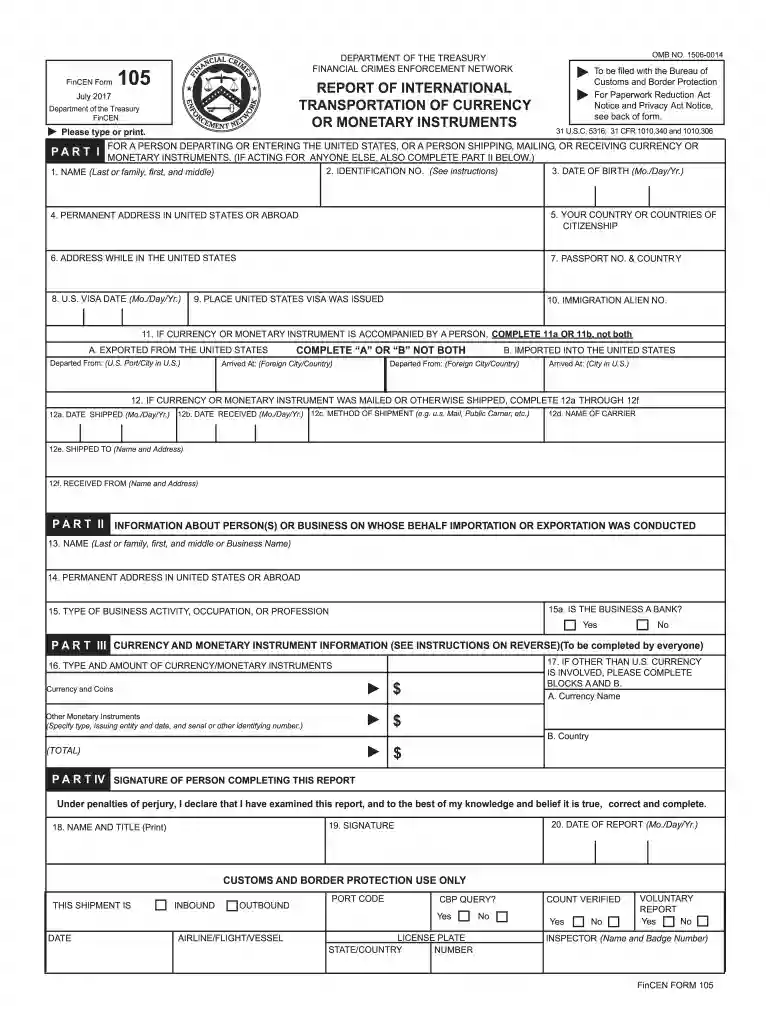
Begin with Part I. Fill in your name, date of birth, and identification number. Ensure accuracy as this information is crucial for identification.
Complete your permanent address and citizenship details. This section helps establish your identity and residency status.
If applicable, indicate whether you are exporting or importing currency by completing either section 11A or 11B. Be sure to provide the correct locations for departure and arrival.
In Part II, provide information about any person or business on whose behalf the transaction is conducted. This includes their name and address.
For Part III, specify the type and amount of currency or monetary instruments involved. If multiple currencies are present, complete blocks A and B accordingly.
Finally, sign and date the form in Part IV to certify that all information provided is accurate.
Start using our platform today to easily fill out FinCEN Form 105 for free!
Fincen form 105 pdfFinCEN Form 105 PDF free downloadWhat happens when you file FinCEN Form 105FinCEN Form 105 onlineFinCEN Form 105 exampleFinCEN Form 105 cmirFinCEN Form 105 downloadIs FinCEN Form 105 reported to IRS
Security and compliance
At DocHub, your data security is our priority. We follow HIPAA, SOC2, GDPR, and other standards, so you can work on your documents with confidence.
RecipientsEach person who receives currency or other monetary instruments in the United States shall file FinCEN Form 105, within 15 days after receipt of the
Cookie consent notice
This site uses cookies to enhance site navigation and personalize your experience.
By using this site you agree to our use of cookies as described in our Privacy Notice.
You can modify your selections by visiting our Cookie and Advertising Notice.