Type text, add images, blackout confidential details, add comments, highlights and more.
02. Sign it in a few clicks
Draw your signature, type it, upload its image, or use your mobile device as a signature pad.
03. Share your form with others
Send it via email, link, or fax. You can also download it, export it or print it out.
How to use or fill out Inquiries - toll free 1 with our platform
Ease of Setup
DocHub User Ratings on G2
Ease of Use
DocHub User Ratings on G2
Click ‘Get Form’ to open it in the editor.
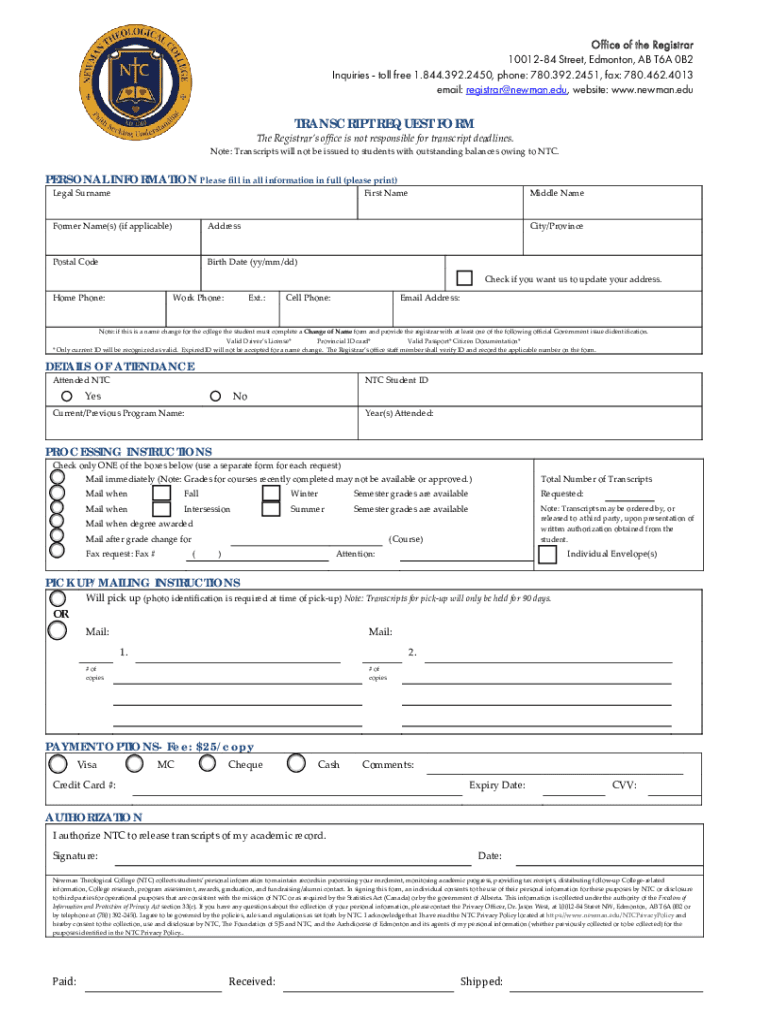
Begin by filling out the 'Personal Information' section. Ensure you provide your legal surname, first name, and any former names if applicable. Complete your address, postal code, birth date, and contact numbers accurately.
Indicate if you would like your address updated by checking the appropriate box. Provide your email address for further communication.
In the 'Details of Attendance' section, confirm whether you attended NTC and provide your student ID along with the program name and years attended.
Select your processing instructions by checking one of the boxes regarding when you want your transcripts mailed. Specify the total number of transcripts required.
Fill in the 'Pick Up/Mailing Instructions' section with either a pick-up option or mailing details. Include how many copies are needed.
Complete the payment options section by selecting your preferred method of payment and providing necessary credit card information if applicable.
Finally, authorize NTC to release your transcripts by signing and dating the form at the bottom before submitting it through our platform.
Start using our platform today to streamline your transcript request process for free!
We've got more versions of the Inquiries - toll free 1 form. Select the right Inquiries - toll free 1 version from the list and start editing it straight away!
Inquiries toll free 1 phone numberShould i answer a toll-free call866 toll-free numberIs a toll free call from jailWhy is a toll free number calling meAre toll-free numbers free internationallyBankMobile refund Customer service phone numberBankMobile phone number for students
Security and compliance
At DocHub, your data security is our priority. We follow HIPAA, SOC2, GDPR, and other standards, so you can work on your documents with confidence.
General Inquiries. 1-855-330-3955. Login Help (MyPortal). 1-855-763-5333 (toll free) General Inquiries. 1-800-700-1775 (toll free). Forgivable Loans. 1-800-Read more
by D BusinessCard Toll free number in the United States: 1-800-307-7309 call collect at 636-722-7111 I. You can call toll free from over 75 countries worldwide. call the United
Cookie consent notice
This site uses cookies to enhance site navigation and personalize your experience.
By using this site you agree to our use of cookies as described in our Privacy Notice.
You can modify your selections by visiting our Cookie and Advertising Notice.