




Here's how it works



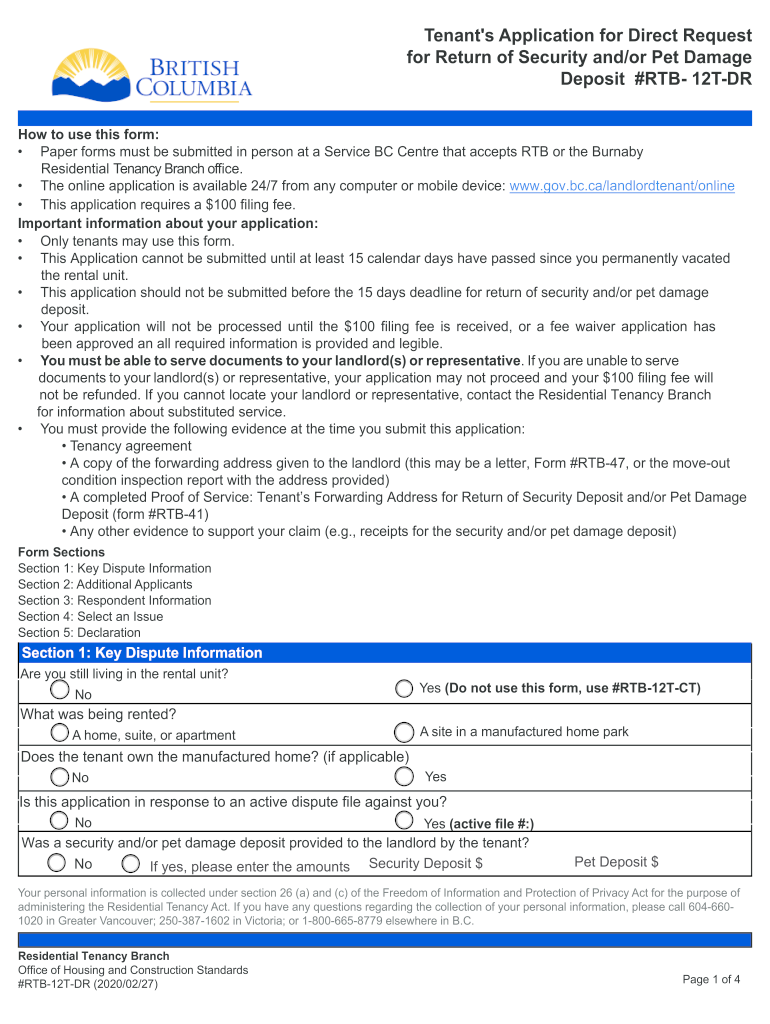
How to use or fill out Tenant's Application for Exp return of Deposit RTB-12T-DR

- Click ‘Get Form’ to open it in the editor.
- Begin with Section 1: Key Dispute Information. Indicate whether you are still living in the rental unit and provide details about the rental property, including the address and type of unit.
- In Section 2, if applicable, enter information for any additional applicants. Ensure all contact details are accurate for effective communication.
- Proceed to Section 3: Respondent Information. Fill in your landlord's or agent's contact details, ensuring that all fields are completed correctly.
- In Section 4, select the issues relevant to your request for deposit return. Clearly state the amounts you seek and provide a brief explanation for your request.
- Finally, complete Section 5: Declaration by signing and dating the form. This confirms that all provided information is true and complete.
Start using our platform today to easily fill out your application for free!
It's free
See more Tenant's Application for Exp return of Deposit RTB-12T-DR indd versions
| Versions | Form popularity | Fillable & printable |
|---|---|---|
| 2020 | 4.1 Satisfied (48 Votes) |
Got questions?
Is it secure to sign my rtb 12t ct electronically?
You need to use only trusted software solutions with strong data protection compliance to sign your documents electronically. DocHub is just the type of software you need! It stores data on Amazon Web Servers and complies with all required security requirements and eSignature laws, so it’s a reliable way to electronically sign your rtb 12t ct or other documents with this tool.
How do you modify security deposit dispute landlord tenant from Google Drive?
If you store your papers in Google Drive, there is no need to download your security deposit dispute landlord tenant on your computer and upload it back to our editor. A significantly simpler way is to set up a browser extension developed by DocHub to streamline this flow. The extension allows editing PDFs right in your web browser. Alternatively, you can integrate your DocHub and Gmail accounts for more efficient editing.
Security and compliance
At DocHub, your data security is our priority. We follow HIPAA, SOC2, GDPR, and other standards, so you can work on your documents with confidence.
Learn more


