




Here's how it works

01. Edit your maryland tax refund delay 2024 online
Type text, add images, blackout confidential details, add comments, highlights and more.

02. Sign it in a few clicks
Draw your signature, type it, upload its image, or use your mobile device as a signature pad.

03. Share your form with others
Send md state tax refund intercept via email, link, or fax. You can also download it, export it or print it out.
How to use or fill out State Tax Refund Intercept Program (TRIP) with our platform

- Click ‘Get Form’ to open the State Tax Refund Intercept Program (TRIP) in the editor.
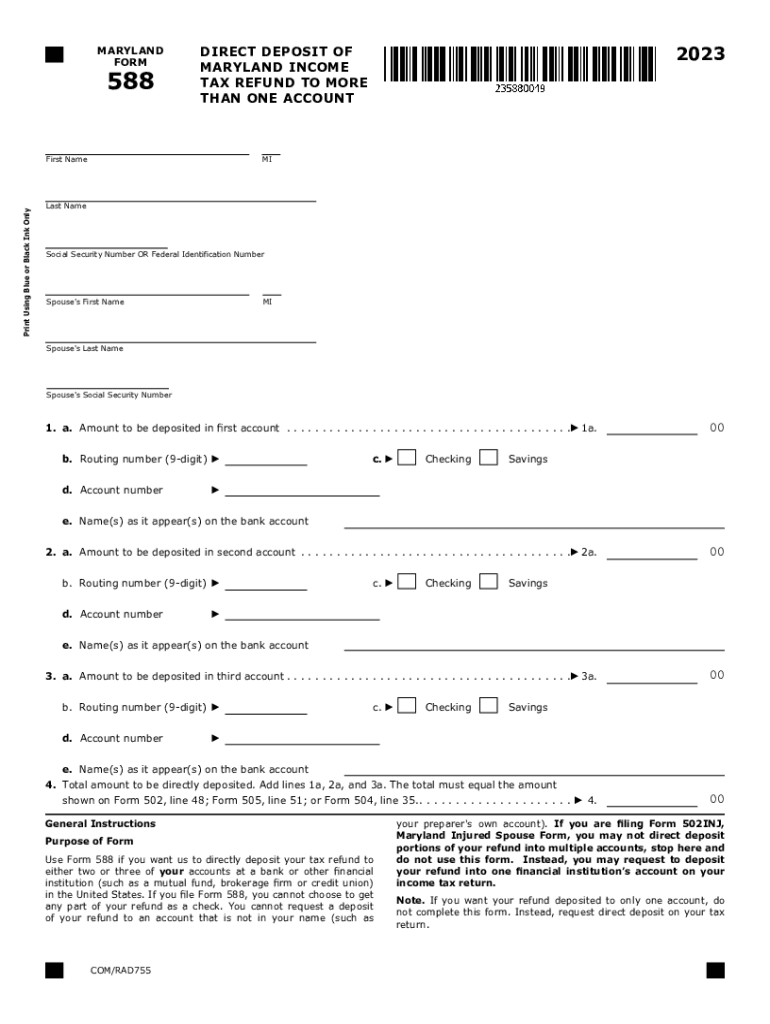
- Begin by entering your first name, last name, and Social Security Number in the designated fields. Ensure you use blue or black ink if filling out manually.
- For each account you wish to deposit your refund into, fill out the amount on lines 1a, 2a, and 3a. Remember that each deposit must be at least $1.
- Enter the corresponding routing number for each account on lines 1b, 2b, and 3b. Make sure these are nine-digit numbers as required.
- Select whether each account is a checking or savings account by checking the appropriate box on lines 1c, 2c, and 3c.
- Fill in the account number for each account on lines 1d, 2d, and 3d. Ensure there are no spaces or special characters.
- Finally, confirm that the total amount on line 4 matches your total refund amount as shown on your tax return to avoid any issues.
Start using our platform today to streamline your TRIP form completion for free!
Fill out State Tax Refund Intercept Program (TRIP) online
It's free
It's free
See more State Tax Refund Intercept Program (TRIP) versions
We've got more versions of the State Tax Refund Intercept Program (TRIP) form. Select the right State Tax Refund Intercept Program (TRIP) version from the list and start editing it straight away!
Security and compliance
At DocHub, your data security is our priority. We follow HIPAA, SOC2, GDPR, and other standards, so you can work on your documents with confidence.
Learn more




