HOME FOR THE AGED ACLF ADMINISTRATOR RENEWAL APPLICATION 2026

Get Form
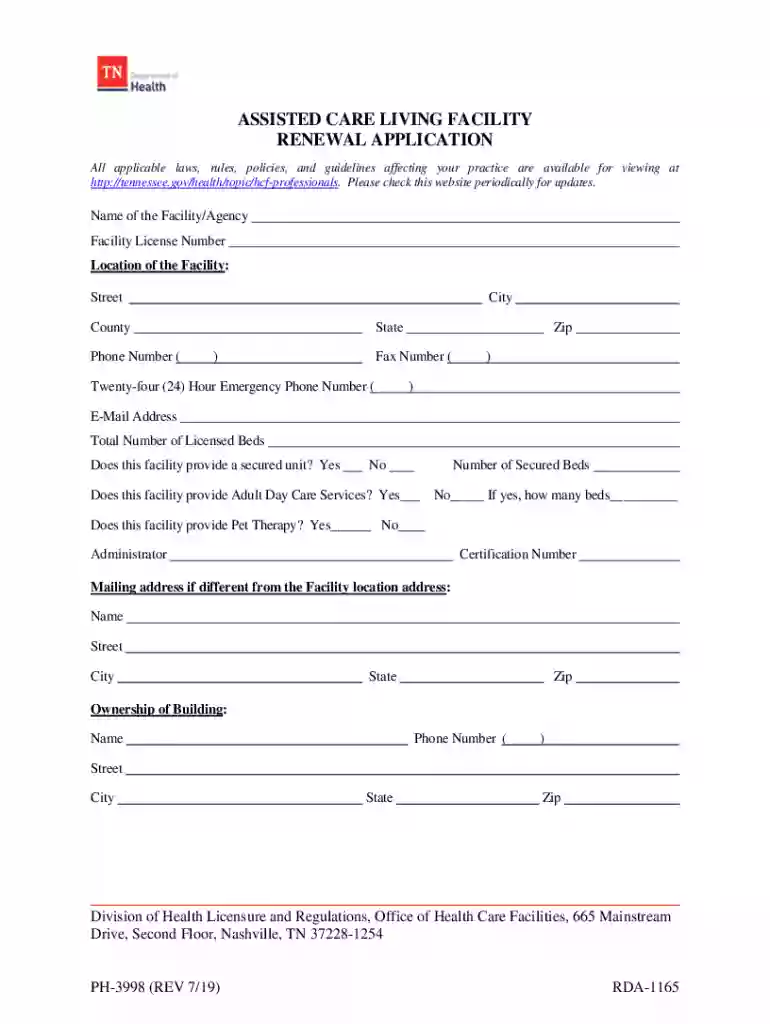
HOME FOR THE AGED ACLF ADMINISTRATOR RENEWAL APPLICATION Preview on Page 1

Here's how it works

01. Edit your form online
Type text, add images, blackout confidential details, add comments, highlights and more.

02. Sign it in a few clicks
Draw your signature, type it, upload its image, or use your mobile device as a signature pad.

03. Share your form with others
Send it via email, link, or fax. You can also download it, export it or print it out.

How to use or fill out HOME FOR THE AGED ACLF ADMINISTRATOR RENEWAL APPLICATION

Form edit decoration
9.5
Ease of Setup
DocHub User Ratings on G2
9.0
Ease of Use
DocHub User Ratings on G2
  1. Click ‘Get Form’ to open the HOME FOR THE AGED ACLF ADMINISTRATOR RENEWAL APPLICATION in our editor.
  2. Begin by entering the name of your facility and its license number in the designated fields. Ensure accuracy as this information is crucial for processing.
  3. Fill in the location details, including street address, city, county, state, zip code, and contact numbers. This ensures that your application can be easily verified.
  4. Indicate whether your facility provides a secured unit and adult day care services by selecting 'Yes' or 'No'. If applicable, specify the number of secured beds and adult day care beds.
  5. Complete the ownership section by checking the type of legal entity and providing necessary details about owners or partners. Use additional sheets if needed.
  6. Finally, review all entries for accuracy before signing and dating the application at the bottom. This verification confirms compliance with Tennessee regulations.

Start using our platform today to streamline your application process for free!

See more HOME FOR THE AGED ACLF ADMINISTRATOR RENEWAL APPLICATION versions

We've got more versions of the HOME FOR THE AGED ACLF ADMINISTRATOR RENEWAL APPLICATION form. Select the right HOME FOR THE AGED ACLF ADMINISTRATOR RENEWAL APPLICATION version from the list and start editing it straight away!
Versions Form popularity Fillable & printable
2019 4.9 Satisfied (33 Votes)
2013 4 Satisfied (38 Votes)
be ready to get more

Complete this form in 5 minutes or less

Get form

Got questions?

We have answers to the most popular questions from our customers. If you can't find an answer to your question, please contact us.
Contact us
In the State of California, Registered nurses are required by law (California Code of Regulations, Section 1451, Article 5) to complete 30 contact hours of continuing education every two years, in addition to paying the renewal fee, to maintain an active license.
Assisted Living Administrators are responsible for managing the day-to-day operations of the facility, including overseeing staff, managing budgets, and ensuring compliance with state and federal regulations.
How to Renew a Nursing Home Administrator License. To renew a nursing home administrator license, the licensee must submit the renewal fee, continuing education (CE) certificates, and the completed License Renewal Form (CDPH 512) (PDF) at least thirty (30) days prior to the licensees expiration date.
Home Care Aide Registration Renewal Access the Guardian Applicant Portal at . Home Care Organizations can submit renewal applications on behalf of Home Care Aides using their Guardian account at .
After earning a bachelors degree in the field, prospective nursing home administrators should complete an Administrator in Training (AIT) program. Most AIT programs take 6-12 months to complete or require 900-1,800 hours of training. Different states have various licensure requirements.

Security and compliance

At DocHub, your data security is our priority. We follow HIPAA, SOC2, GDPR, and other standards, so you can work on your documents with confidence.

Learn more
ccpa2
pci-dss
gdpr-compliance
hipaa
soc-compliance