Power of Attorney - (POA) Forms and Templates 2026

Get Form
Power of Attorney - (POA) Forms and Templates Preview on Page 1

Here's how it works

01. Edit your form online
Type text, add images, blackout confidential details, add comments, highlights and more.
02. Sign it in a few clicks
Draw your signature, type it, upload its image, or use your mobile device as a signature pad.
03. Share your form with others
Send it via email, link, or fax. You can also download it, export it or print it out.

How to use or fill out Power of Attorney - (POA) Forms and Templates with DocHub

Form edit decoration
9.5
Ease of Setup
DocHub User Ratings on G2
9.0
Ease of Use
DocHub User Ratings on G2
  1. Click ‘Get Form’ to open it in the editor.
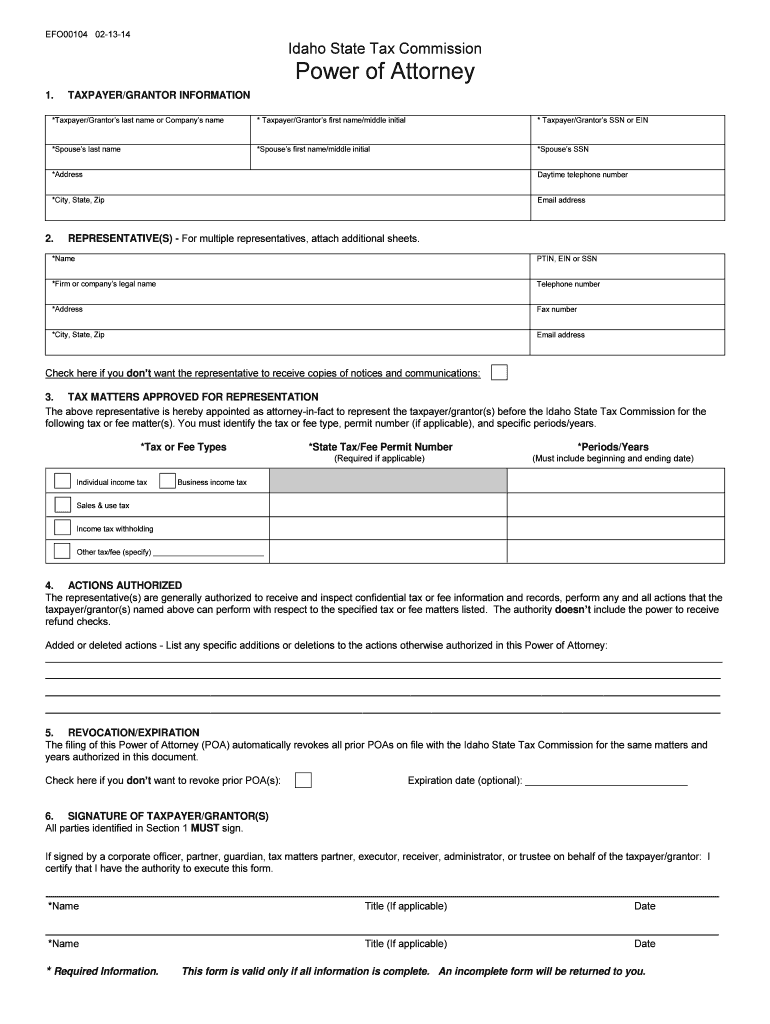
  2. Begin by filling out the Taxpayer/Grantor Information section. Enter the last name, first name, and SSN or EIN of the taxpayer/grantor. Include spouse details if applicable, along with the address and contact information.
  3. In the Representatives section, provide the name and PTIN, EIN, or SSN of your representative. Include their firm’s legal name and contact details. If you have multiple representatives, attach additional sheets as needed.
  4. Specify the Tax Matters Approved for Representation by detailing the tax types and permit numbers relevant to your situation. Ensure you include specific periods or years for which representation is granted.
  5. In the Actions Authorized section, confirm what actions your representative can perform on your behalf. Note any specific additions or deletions to these actions as necessary.
  6. Complete the Revocation/Expiration section by checking if you wish to revoke prior POAs and optionally providing an expiration date.
  7. Finally, ensure all parties identified in Section 1 sign in the Signature of Taxpayer/Grantor(s) section. If signed by a corporate officer or other representative, confirm their authority to execute this form.

Start using our platform today to easily complete your Power of Attorney forms online for free!

See more Power of Attorney - (POA) Forms and Templates versions

We've got more versions of the Power of Attorney - (POA) Forms and Templates form. Select the right Power of Attorney - (POA) Forms and Templates version from the list and start editing it straight away!
Versions Form popularity Fillable & printable
2014 4.8 Satisfied (55 Votes)
be ready to get more

Complete this form in 5 minutes or less

Get form

Got questions?

We have answers to the most popular questions from our customers. If you can't find an answer to your question, please contact us.
Contact us
64.2-1603. A power of attorney shall be signed by the principal or in the principals conscious presence by another individual directed by the principal to sign the principals name on the power of attorney.
Here are some ways the broker can validate a Power of Attorney: To the greatest extent possible, have POAs completed in person so the grantors unexpired government issued photo identification (drivers license, passport, etc.)
What Are the Legal Requirements of a Financial POA in Virginia? Mental Capacity for Creating a POA. Notarization Requirements. Create the POA Using Software or an Attorney. Sign the POA in the Presence of a Notary Public. Store the Original POA in a Safe Place. Give a Copy to Your Agent.
You can draft the document yourself and sign it according to your state laws to make it legally valid. People use durable powers of attorney to give a person (friend, family member) the legal authority to make important decisions for them if they develop an incapacity.
In Virginia, most powers of attorney dont need to be recorded unless they involve real estate transactions. If your agent will manage or sell real estate on your behalf, the power of attorney must be recorded with the circuit court in the county where the property is located.