




Here's how it works



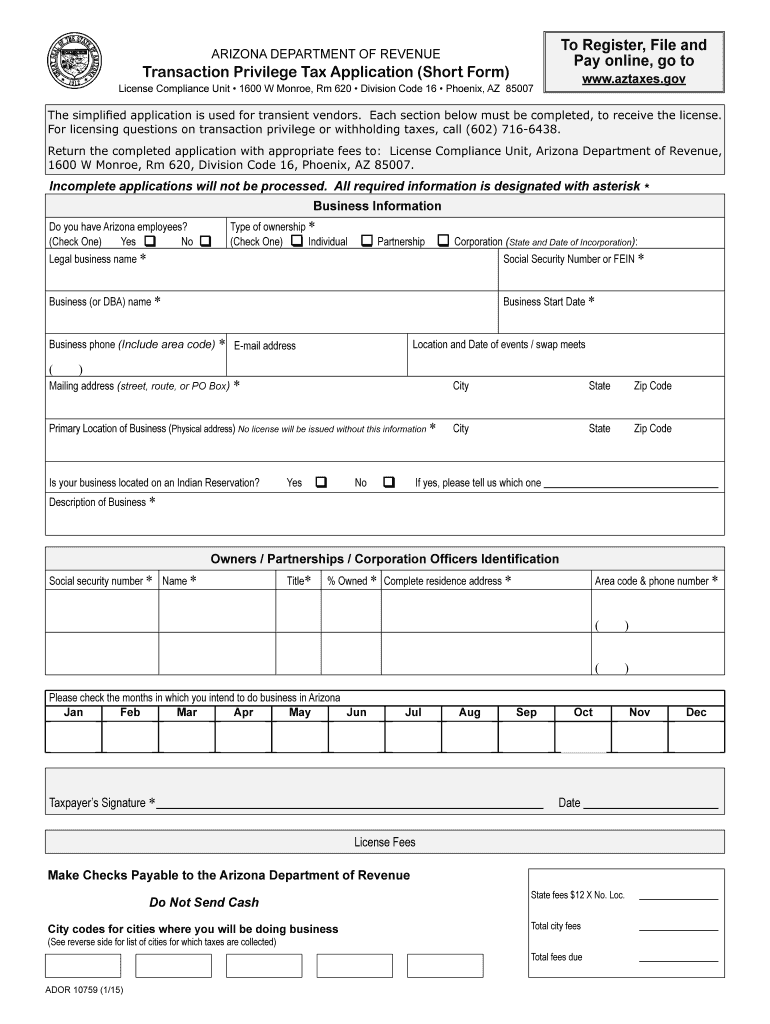
How to use or fill out Arizona Transaction Tax Application Short Template

- Click ‘Get Form’ to open it in the editor.
- Begin with the 'Business Information' section. Indicate if you have Arizona employees by checking 'Yes' or 'No'. Provide your legal business name, type of ownership, and Social Security Number or FEIN.
- Fill in your business (or DBA) name and start date. Include your business phone number and email address for correspondence.
- In the 'Location and Date of Events/Swap Meets' section, enter the address and date of your event. This is crucial for determining any additional licensing requirements.
- Complete the 'Mailing Address' and 'Primary Location of Business' fields with accurate physical addresses, ensuring compliance with state regulations.
- Describe your business activities clearly in the 'Description of Business' section to help determine your sales tax rate.
- List all owners or partners in the identification section, providing their social security numbers as required.
- Finally, sign the application, ensuring that all necessary fees are calculated correctly before submission.
Start filling out your Arizona Transaction Tax Application today using our platform for free!
It's free
See more arizona transaction tax application short template versions
Got questions?
How can I sign my tradlet online?
Log in to your DocHub account and add your tradlet to our editor using one of its upload methods - from your device, cloud storage, secure URL, or your DocHub folders if you have already processed your form before. Open our editor, click the Sign button in the top toolbar, and choose your signing method. You can use an image of your handwritten signature, draw it, type in your name, or utilize a QR code instead.
How to manage my ador forms from Gmail?
If your go-to electronic mail service is Gmail, it is simple to incorporate your DocHub editor into your work. Edit your ador forms with DocHub tools and connect it to your drafts in Gmail. See how effortless it can be to exchange papers and work together having a swift PDF editing solution at hand.
Security and compliance
At DocHub, your data security is our priority. We follow HIPAA, SOC2, GDPR, and other standards, so you can work on your documents with confidence.
Learn more




