Az revenue 2026

Get Form
az revenue form Preview on Page 1

Here's how it works

01. Edit your az revenue form online
Type text, add images, blackout confidential details, add comments, highlights and more.

02. Sign it in a few clicks
Draw your signature, type it, upload its image, or use your mobile device as a signature pad.

03. Share your form with others
Send arizona revenue form via email, link, or fax. You can also download it, export it or print it out.

How to use or fill out az revenue with our platform

Form edit decoration
9.5
Ease of Setup
DocHub User Ratings on G2
9.0
Ease of Use
DocHub User Ratings on G2
  1. Click ‘Get Form’ to open the az revenue document in the editor.
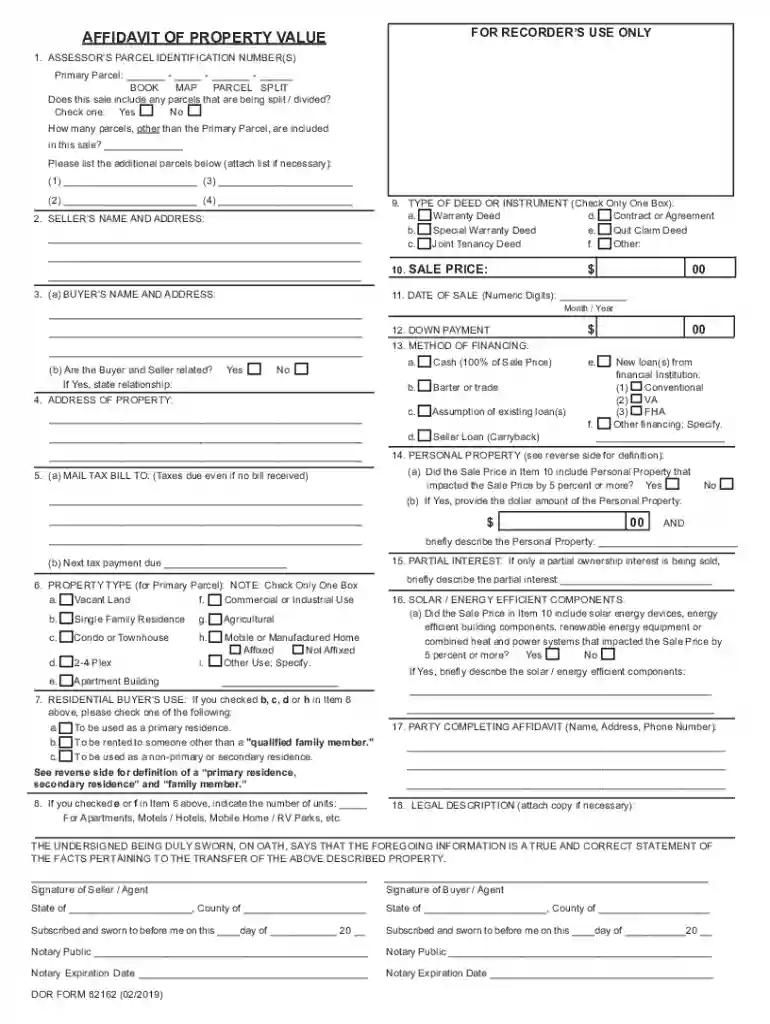
  2. Begin by entering the Assessor’s Parcel Identification Number(s) for the primary parcel. Ensure you fill in all sections accurately, including any additional parcels if applicable.
  3. Next, provide the Seller’s name and address. This information is crucial for identifying the parties involved in the transaction.
  4. Fill out the Buyer’s name and address in section 3(a). Make sure this matches official identification to avoid discrepancies.
  5. Indicate the type of deed or instrument by checking one box in section 9. This helps clarify the nature of the property transfer.
  6. Complete sections on sale price, date of sale, down payment, and method of financing. Be thorough to ensure compliance with local regulations.
  7. Finally, review all entries for accuracy before signing and notarizing at the end of the document. Use our platform's features to save your progress and make edits as needed.

Start using our platform today to streamline your az revenue form completion for free!

See more az revenue versions

We've got more versions of the az revenue form. Select the right az revenue version from the list and start editing it straight away!
Versions Form popularity Fillable & printable
2019 4.8 Satisfied (50 Votes)
2003 4.8 Satisfied (23 Votes)
be ready to get more

Complete this form in 5 minutes or less

Get form

Got questions?

We have answers to the most popular questions from our customers. If you can't find an answer to your question, please contact us.
Contact us
The Economy of Arizona had a total gross state product $508 billion in 2023. The composition of the states economy is moderately diverse; although health care, transportation and the government remain the largest sectors.
Individual income and sales and use taxes make up 81 percent of General Fund revenue.
Arizona ranks number 28 out of 63 states for salaries on ZipRecruiter. As of Mar 25, the average annual salary in Arizona is $53,444. Just in case you need a simple salary calculator, that works out to be approximately 25.69 an hour. This is equivalent of 1,027.77 a week or 4,453.67 a month.
The State of Arizona reported revenues of $63.4 billion and expenses of $60.8 billion. The State of Arizona derived approximately 51% of its total revenues from grants and contributions. The remaining balance of the State of Arizonas revenue comes primarily from taxes (35%), and charges for services rendered (12%).
Total Liabilities in State Governments StateAlabama Total Liabilities $12,992,621,000 Per Capita Total Liabilities $17,716 State Arizona Total Liabilities $24,785,156,000194 more rows Dec 19, 2024

Security and compliance

At DocHub, your data security is our priority. We follow HIPAA, SOC2, GDPR, and other standards, so you can work on your documents with confidence.

Learn more
ccpa2
pci-dss
gdpr-compliance
hipaa
soc-compliance

People also ask

How can I check the status of my refund? When it comes to Arizona income tax refunds, processing times vary and depend on how taxpayers file (e-file or paper) and the date the return was filed. Individuals waiting for refunds can check their status by visiting Wheres My Refund on AZTaxes.gov.
Taxpayers can call (602) 255-3381, and, after making the language selection, select Option 2 for refund status. Taxpayers should have their tax information ready before calling.

az property