




Here's how it works



How to use or fill out CITY OF AUBURN DOG LICENSE APPLICATION with our platform

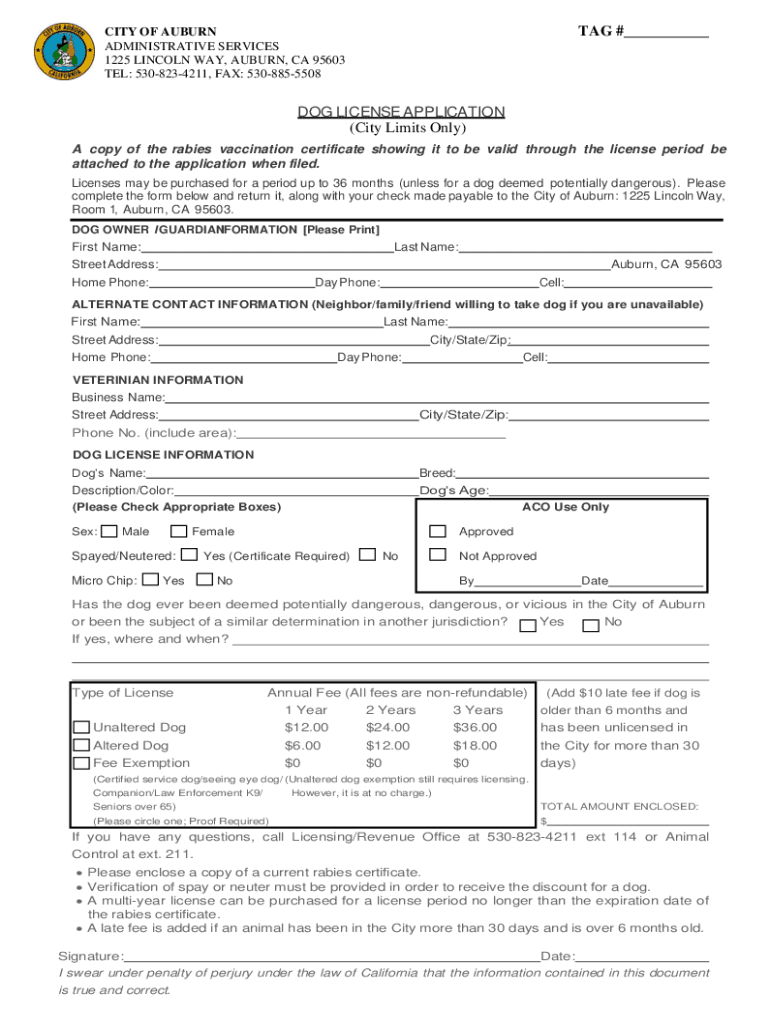
- Click ‘Get Form’ to open the CITY OF AUBURN DOG LICENSE APPLICATION in the editor.
- Begin by filling out the DOG OWNER I GUARDIAN INFORMATION section. Enter your first name, last name, and complete address including city and zip code. Provide your home, day, and cell phone numbers.
- Next, complete the ALTERNATE CONTACT INFORMATION section. This is for a neighbor or friend who can take care of your dog if you are unavailable. Fill in their details as required.
- In the VETERINARIAN INFORMATION section, provide the business name and address of your veterinarian along with their phone number.
- Proceed to DOG LICENSE INFORMATION. Fill in your dog's name, breed, description/color, age, and select the appropriate boxes for sex and spayed/neutered status.
- Indicate if your dog has ever been deemed potentially dangerous by answering 'Yes' or 'No' and providing additional details if applicable.
- Select the type of license you wish to apply for (1 Year, 2 Years, or 3 Years) and calculate the total amount enclosed based on the fees listed.
- Finally, sign and date the application at the bottom to confirm that all information is true and correct before submitting it along with any required documents.
Start using our platform today to easily fill out your CITY OF AUBURN DOG LICENSE APPLICATION online for free!
It's free
See more CITY OF AUBURN DOG LICENSE APPLICATION versions
Got questions?
Can I sign my service dog form on a mobile?
Yes, you’ll find numerous apps for this on the web. Nevertheless, if you need to eSign your service dog form without installing extra software, DocHub is the best choice you can make. This powerful editor works on mobile devices just as on desktops. Open our editor in any internet browser, register or log in to your account, and start processing your documents.
Can I print my service dog license template and finish it by myself?
When you go for analog ways of completing your service dog license template, it is simple to download your file for printing. Search DocHub’s Forms & Templates catalog to find the exact document template you need and open it for editing or download it on your device in the format of your liking. It is possible to complete your form electronically and place your handwritten signature on it after printing or eSign your document with DocHub.
Do you need a permit to have a dog in California?
Who is the dog officer in Auburn Mass?
How much does it cost to license a dog in California?
Security and compliance
At DocHub, your data security is our priority. We follow HIPAA, SOC2, GDPR, and other standards, so you can work on your documents with confidence.
Learn more


