WKC-13-A-E, Wage Information SupplementWKC-13-A-E, Wage Information SupplementWC Forms ListWC Forms 2026

Get Form
wkc 13 Preview on Page 1

Here's how it works

01. Edit your wkc 13 online
Type text, add images, blackout confidential details, add comments, highlights and more.

02. Sign it in a few clicks
Draw your signature, type it, upload its image, or use your mobile device as a signature pad.

03. Share your form with others
Send it via email, link, or fax. You can also download it, export it or print it out.

How to use or fill out WKC-13-A-E, Wage Information Supplement with our platform

Form edit decoration
9.5
Ease of Setup
DocHub User Ratings on G2
9.0
Ease of Use
DocHub User Ratings on G2
  1. Click ‘Get Form’ to open it in the editor.
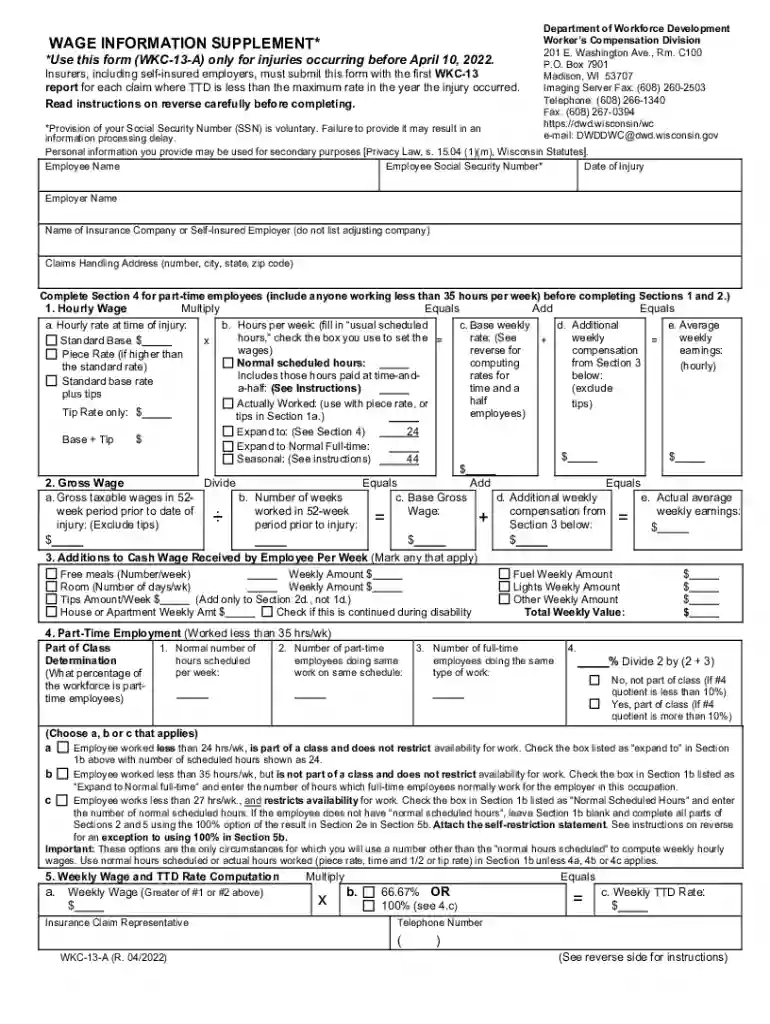
  2. Begin by entering the employee's name and Social Security Number (optional) in the designated fields. Ensure accuracy as this information is crucial for processing.
  3. Fill in the date of injury, employer name, and insurance company details. This section is vital for identifying the claim.
  4. For part-time employees, complete Section 4 first. Indicate hours worked per week and check applicable boxes based on employment status.
  5. In Section 1, calculate the hourly wage by multiplying the hourly rate at the time of injury with usual scheduled hours. Include any tips if applicable.
  6. Proceed to Section 2 to enter gross taxable wages and number of weeks worked prior to injury. This will help determine average weekly earnings.
  7. Complete Section 3 by marking any additional cash wages received weekly, such as meals or housing allowances.
  8. Finally, review all entries for accuracy before submitting your form through our platform for a seamless process.

Start using our platform today to fill out your WKC-13-A-E form easily and for free!

See more WKC-13-A-E, Wage Information SupplementWKC-13-A-E, Wage Information SupplementWC Forms ListWC Forms versions

We've got more versions of the WKC-13-A-E, Wage Information SupplementWKC-13-A-E, Wage Information SupplementWC Forms ListWC Forms form. Select the right WKC-13-A-E, Wage Information SupplementWKC-13-A-E, Wage Information SupplementWC Forms ListWC Forms version from the list and start editing it straight away!
Versions Form popularity Fillable & printable
2022 4.9 Satisfied (28 Votes)
2009 4 Satisfied (45 Votes)
be ready to get more

Complete this form in 5 minutes or less

Get form

Got questions?

We have answers to the most popular questions from our customers. If you can't find an answer to your question, please contact us.
Contact us
Employee Pay Rate Form is a template to capture the details of an employees pay rate. It is usually used by business owners who employ employees and want to keep track of what they are paid and when they are due for a raise.
A wage verification form is sent to an individuals employer to get information about their income and employment status. The form will ask the employer to relay the employees position, average pay, and duration of employment.
Employers are required by the Internal Revenue Service (IRS) to report employees wage and salary information on Form W-2. The amount of federal, state and other income taxes withheld from the employees paycheck during the calendar year is reported on the Form W-2.
Lenders, landlords, and many other entities use income verification documents to determine if someone is eligible for a loan, a service, or a rental. Income verification is equally important for financial institutions and lenders, allowing them to have an accurate overview of applicants financial status.

Security and compliance

At DocHub, your data security is our priority. We follow HIPAA, SOC2, GDPR, and other standards, so you can work on your documents with confidence.

Learn more
ccpa2
pci-dss
gdpr-compliance
hipaa
soc-compliance