Type text, add images, blackout confidential details, add comments, highlights and more.
02. Sign it in a few clicks
Draw your signature, type it, upload its image, or use your mobile device as a signature pad.
03. Share your form with others
Send recad via email, link, or fax. You can also download it, export it or print it out.
How to use or fill out Alabama RECAD form with our platform
Ease of Setup
DocHub User Ratings on G2
Ease of Use
DocHub User Ratings on G2
Click ‘Get Form’ to open the Alabama RECAD form in the editor.
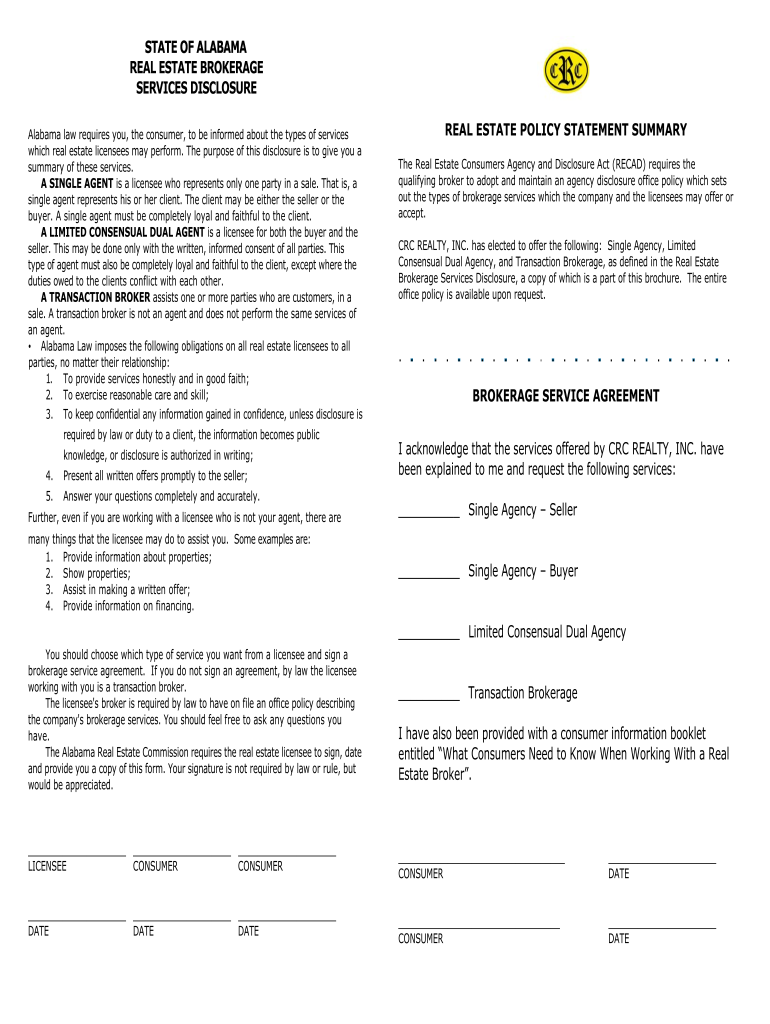
Begin by reviewing the types of services offered. Familiarize yourself with the definitions of Single Agent, Limited Consensual Dual Agent, and Transaction Broker to understand your options.
In the Brokerage Service Agreement section, select your preferred service type by checking the appropriate box for either Single Agency (Seller or Buyer) or Limited Consensual Dual Agency.
If you choose Transaction Brokerage, ensure you understand that this means no agency relationship exists unless an agreement is signed.
Provide your signature and date in the designated fields. Remember, while your signature is appreciated, it is not legally required.
Finally, review all entered information for accuracy before saving or exporting your completed form.
Start using our platform today to fill out your Alabama RECAD form easily and for free!
Printable alabama recad formAlabama recad form templateRECAD meaningAlabama Real Estate Brokerage services DISCLOSURE formAlabama real estate FormsAREC FormsAlabama Association of REALTORSAlabama Real Estate License application
Security and compliance
At DocHub, your data security is our priority. We follow HIPAA, SOC2, GDPR, and other standards, so you can work on your documents with confidence.
Ala. Admin. Code r. 790-X-3-.14 - Agency/Brokerage Office
The Real Estate Consumers Agency and Disclosure Act (RECAD) requires the qualifying broker to adopt and maintain an agency disclosure office policy.Read more
Cookie consent notice
This site uses cookies to enhance site navigation and personalize your experience.
By using this site you agree to our use of cookies as described in our Privacy Notice.
You can modify your selections by visiting our Cookie and Advertising Notice.