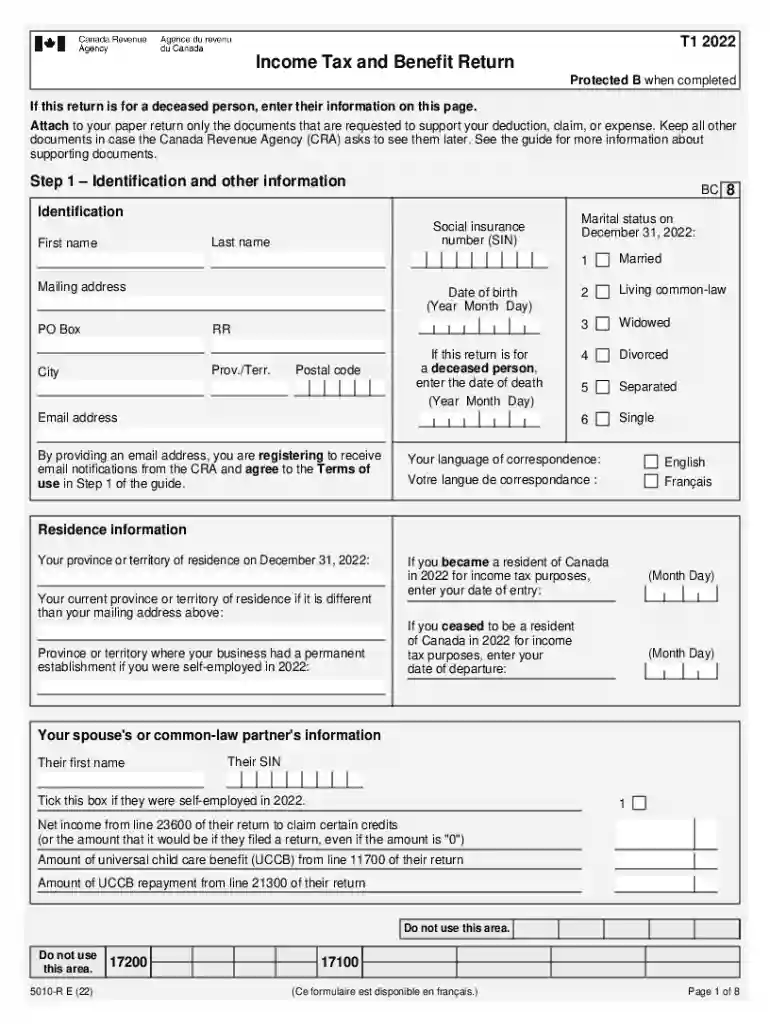
5010-R Income Tax and Benefit Return (for BC only)-2026

Get Form
income tax benefit return t1 form Preview on Page 1

Here's how it works

01. Edit your income tax benefit return t1 form online
Type text, add images, blackout confidential details, add comments, highlights and more.

02. Sign it in a few clicks
Draw your signature, type it, upload its image, or use your mobile device as a signature pad.

03. Share your form with others
Send income tax benefit return revenue t1 doc via email, link, or fax. You can also download it, export it or print it out.

How to use or fill out 5010-R Income Tax and Benefit Return (for BC only) with DocHub

Form edit decoration
9.5
Ease of Setup
DocHub User Ratings on G2
9.0
Ease of Use
DocHub User Ratings on G2
  1. Click ‘Get Form’ to open the 5010-R Income Tax and Benefit Return in our editor.
  2. Begin with Step 1, where you will enter your identification details. Fill in your Social Insurance Number (SIN), last name, first name, mailing address, and date of birth. If applicable, provide the date of death for a deceased person.
  3. Continue to residency information by indicating your province or territory of residence on December 31, 2022. If you were self-employed, include details about your spouse's income as well.
  4. Move to Step 2 to report total income from all sources. Carefully input amounts from various slips such as T4s and T4As into the designated fields.
  5. In Step 3, calculate your net income by entering deductions like RRSP contributions and child care expenses. Ensure accuracy to avoid discrepancies.
  6. Finally, review all entries before submitting. Use our platform’s features to save or print your completed form for submission.

Start using our platform today for free to simplify filling out your tax return!

See more 5010-R Income Tax and Benefit Return (for BC only) versions

We've got more versions of the 5010-R Income Tax and Benefit Return (for BC only) form. Select the right 5010-R Income Tax and Benefit Return (for BC only) version from the list and start editing it straight away!
Versions Form popularity Fillable & printable
2022 4.8 Satisfied (37 Votes)
be ready to get more

Complete this form in 5 minutes or less

Get form

Got questions?

We have answers to the most popular questions from our customers. If you can't find an answer to your question, please contact us.
Contact us
A nil corporate tax return is filed when a corporation had no activity or income during the tax year. Its important to note that even if your company had no financial activity, you may still be required by the Canada Revenue Agency (CRA) to file a nil return.
Line 15000 is where you report your total income on your tax return. This is your total income before any deductions have been subtracted.
B.C. tax reduction credit The maximum tax reduction credit is available to individuals who have a net income below the threshold amount for a tax year, and is reduced by a percentage of an individuals net income over the threshold amount. The tax reduction credit will be zero once the maximum net income is docHubed.
You should file your personal Income Tax and Benefit Return (tax return) after the year has ended to report your total income and calculate your tax payable. You can reduce or eliminate the amount of income tax you need to pay by claiming tax credits and certain expenses.
These include deductions for student loan interest, traditional individual retirement account (IRA) contributions, contributions to Health Savings Accounts, and more. All these deductions lower taxes by reducing taxable income and possibly lowering your tax bracket.

Security and compliance

At DocHub, your data security is our priority. We follow HIPAA, SOC2, GDPR, and other standards, so you can work on your documents with confidence.

Learn more
ccpa2
pci-dss
gdpr-compliance
hipaa
soc-compliance

People also ask

Youre eligible to claim the sales tax credit for a tax year if you were a resident of B.C. on December 31 of the tax year and you: Were 19 years of age or older, or. Had a spouse or common-law partner, or. Were a parent.
The T1 form, known as the General Income Tax and Benefit Return, is the most common tax return form for individuals and unincorporated small businesses. Corporations use a different form. The T1 also summarizes all the other ancillary tax forms and schedules you need to fill out, depending on your personal situation.

income tax benefit return sample