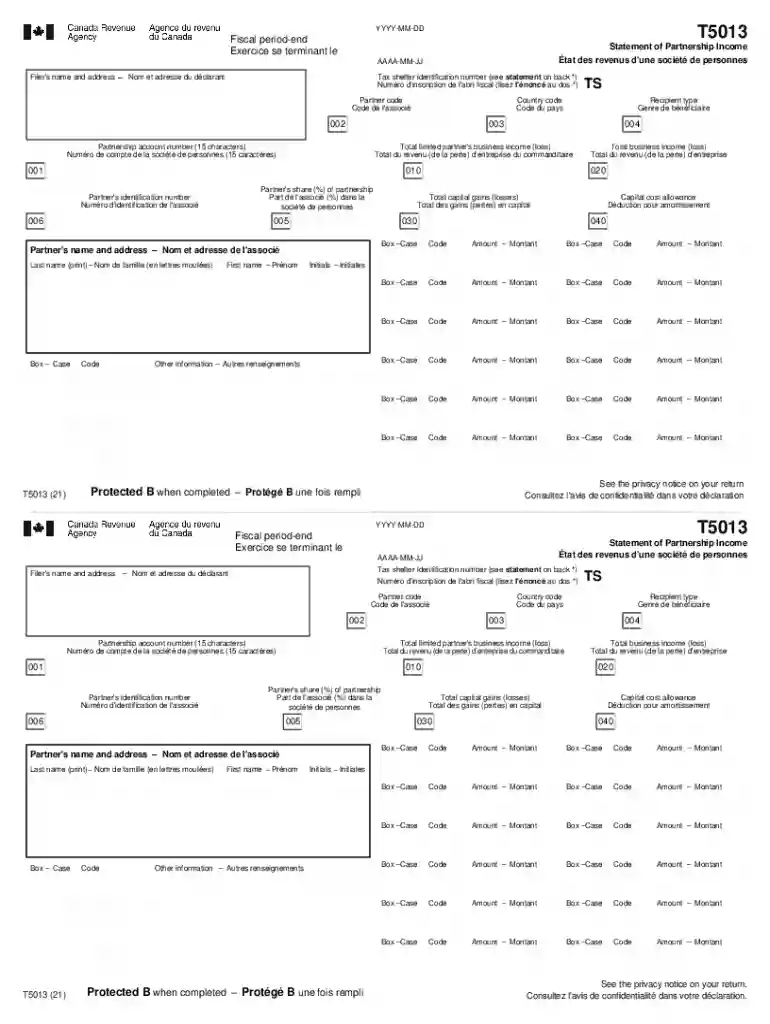
t5013 statement partnership income Preview on Page 1

Fiscal period-end 2026

Here's how it works

  • 01. Edit your t5013 statement partnership income online

    Type text, add images, blackout confidential details, add comments, highlights and more.

  • 02. Sign it in a few clicks

    Draw your signature, type it, upload its image, or use your mobile device as a signature pad.

  • 03. Share your form with others

    Send it via email, link, or fax. You can also download it, export it or print it out.

How to use or fill out Fiscal period-end with our platform

Form edit decoration
9.5
Ease of Setup
DocHub User Ratings on G2
9.0
Ease of Use
DocHub User Ratings on G2
  1. Click ‘Get Form’ to open the Fiscal period-end document in the editor.
  2. Begin by entering the fiscal period-end date in the format YYYY-MM-DD. This is crucial for accurate reporting.
  3. Fill in the Filer's name and address, ensuring all details are correct to avoid any processing issues.
  4. Input the Tax shelter identification number if applicable, as indicated on the back of the form.
  5. Complete the Partner code and Recipient type fields accurately to identify your partnership status.
  6. Enter the Total limited partner's business income (loss) and Partnership account number, ensuring they match your records.
  7. For each partner, provide their share percentage, identification number, and relevant amounts in the designated boxes.
  8. Review all entries for accuracy before saving or exporting your completed form for submission.

Start using our platform today to streamline your Fiscal period-end documentation effortlessly!

See more t5013 statement partnership income versions

We've got more versions of the t5013 statement partnership income form. Select the right t5013 statement partnership income version from the list and start editing it straight away!

VersionsForm popularityFillable & printable
20214.6 Satisfied (27 Votes)

be ready to get more

Complete this form in 5 minutes or less

Security and compliance

At DocHub, your data security is our priority. We follow HIPAA, SOC2, GDPR, and other standards, so you can work on your documents with confidence.

Related links

Understanding Fiscal Years and Fiscal Periods

At UC Irvine, the fiscal year begins on July 1 and ends on June 30. Because the fiscal year straddles two different calendar years, the calendar year and fiscalRead more

Learn more
Tax years | Internal Revenue Service

Jan 27, 2026 Fiscal year 12 consecutive months ending on the last day of any month except December. A 52-53-week tax year is a fiscal tax year that variesRead more

Learn more
If you believe that this page should be taken down, please follow our DMCA take down process here