Re: my valid Canadian HST GST number is not b 2026

Get Form
Re: my valid Canadian HST GST number is not b Preview on Page 1

Here's how it works

01. Edit your form online
Type text, add images, blackout confidential details, add comments, highlights and more.

02. Sign it in a few clicks
Draw your signature, type it, upload its image, or use your mobile device as a signature pad.

03. Share your form with others
Send it via email, link, or fax. You can also download it, export it or print it out.

How to use or fill out Re: my valid Canadian HST GST number is not b with our platform

Form edit decoration
9.5
Ease of Setup
DocHub User Ratings on G2
9.0
Ease of Use
DocHub User Ratings on G2
  1. Click ‘Get Form’ to open it in the editor.
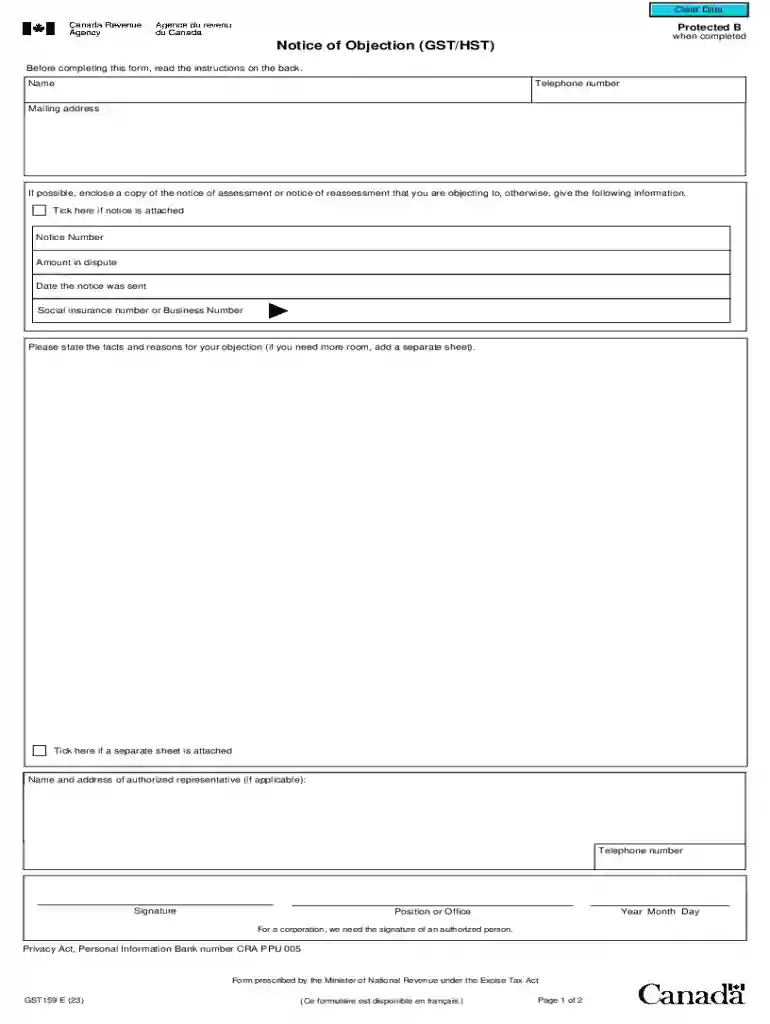
  2. Begin by entering your name and telephone number in the designated fields. Ensure that your contact information is accurate for any follow-up communications.
  3. Fill in your mailing address. This is where you will receive any correspondence regarding your objection.
  4. If you have a copy of the notice of assessment or reassessment, tick the box indicating it is attached. If not, provide the notice number, amount in dispute, and the date the notice was sent.
  5. Enter your Social Insurance Number or Business Number as required.
  6. Clearly state the facts and reasons for your objection in the provided space. If you need more room, indicate that a separate sheet is attached.
  7. If applicable, provide the name and address of an authorized representative along with their telephone number.
  8. Finally, sign and date the form. For corporations, ensure that an authorized person signs it.

Start using our platform today to easily complete your form for free!

See more Re: my valid Canadian HST GST number is not b versions

We've got more versions of the Re: my valid Canadian HST GST number is not b form. Select the right Re: my valid Canadian HST GST number is not b version from the list and start editing it straight away!
Versions Form popularity Fillable & printable
2023 4.3 Satisfied (24 Votes)
2014 4.8 Satisfied (183 Votes)
2011 4.4 Satisfied (205 Votes)
be ready to get more

Complete this form in 5 minutes or less

Get form

Got questions?

We have answers to the most popular questions from our customers. If you can't find an answer to your question, please contact us.
Contact us
You can look up an HST number by business name using the Canada Revenue Agencys GST/HST Registry. Simply enter the business name in the search tool to find the associated HST number. Is GST registry search free of cost? The GST registry search is free of cost.
The GST/HST is not the same as a business number. The 9-digit business number always stays the same, and the goods and services tax (GST)/harmonized sales tax (HST) number is appended to the end of it.
The GSTIN search tool helps you with online verification and authenticity of a GST Identification number free of cost anywhere and anytime. You can easily spot GSTIN with just a single click now.
Most businesses in Canada have to register for a GST number. In fact, registering for a GST number is mandatory for all Canadian businesses unless the Canada Revenue Agency deems the business a small supplier.
Step-by-Step Process to Verify a BN on the Official Canada Portal Visit the CRA GST/HST Registry: Go to the CRAs official GST/HST Registry portal. Enter the Business Number (BN): Input the 9-digit BN of the business you wish to verify. Add the Business Name: You can enter the business name for better match accuracy.

Security and compliance

At DocHub, your data security is our priority. We follow HIPAA, SOC2, GDPR, and other standards, so you can work on your documents with confidence.

Learn more
ccpa2
pci-dss
gdpr-compliance
hipaa
soc-compliance
be ready to get more

Complete this form in 5 minutes or less

Get form

People also ask

1- The GST registration number. 2- The federal account number. The format for both numbers is 123456789RT1234 (15 characters, no spaces).
How to confirm a GST/HST account number. Use the GST/HST Registry to confirm that the business charging you GST/HST is registered. This will help ensure that your claims for input tax credits only include GST/HST charged by someone who is registered for GST/HST. To confirm a QST number, go to Revenu Qubec.

Related links