




Here's how it works



How to use or fill out CANNERY LICENSE APPLICATION CDPH 8597 with our platform

- Click ‘Get Form’ to open the CANNERY LICENSE APPLICATION CDPH 8597 in the editor.
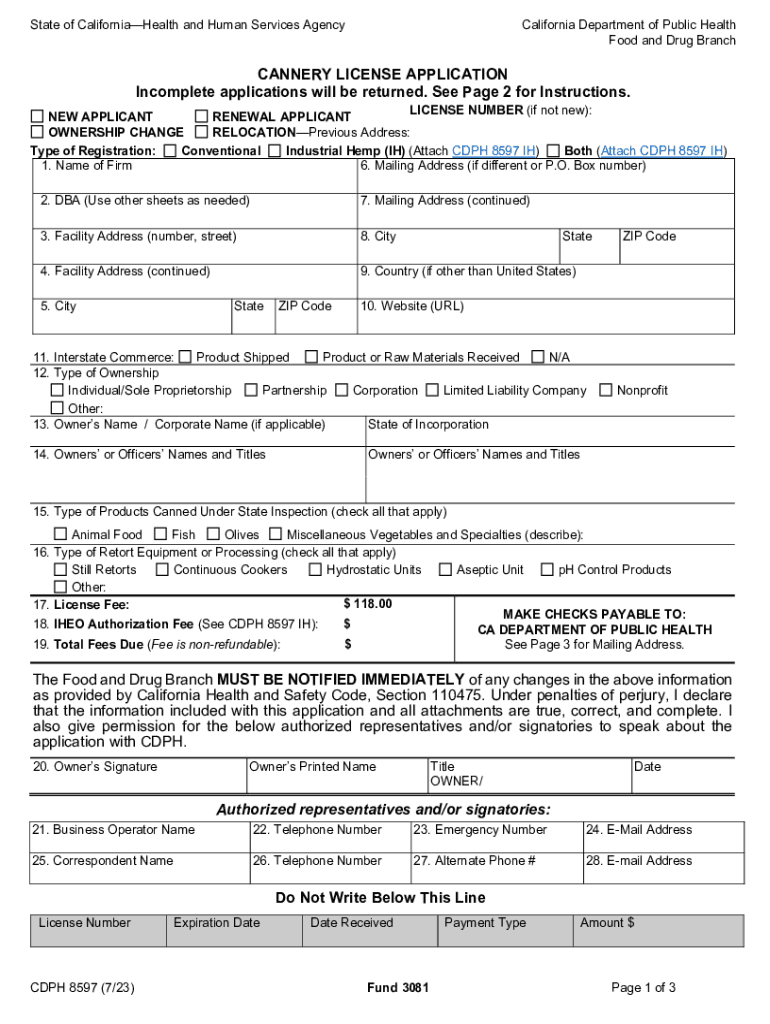
- Indicate whether you are a new applicant, renewal applicant, or if there has been an ownership change by checking the appropriate box.
- Fill in the 'Name of Firm' field with the full name of your business and provide any DBA (Doing Business As) names as needed.
- Enter the facility address, including number, street, city, state, and ZIP code. If your mailing address differs from this, complete that section as well.
- Select your type of registration (Conventional, Industrial Hemp, or Both) and indicate your interstate commerce activities.
- Complete ownership details by selecting the type of ownership and providing owner’s names and titles.
- Check all applicable boxes for types of products canned and retort equipment used at your facility.
- Calculate total fees due by adding the license fee and any additional authorization fees before signing and dating the application.
Start filling out your CANNERY LICENSE APPLICATION today using our platform for free!
It's free
See more CANNERY LICENSE APPLICATION CDPH 8597 versions
Got questions?
How do I sign my CANNERY LICENSE APPLICATION CDPH 8597 without printing?
eSignatures are an excellent replacement for traditional signing, as they save time, effort, and costs people spend on printing, scanning, and paper delivery. You can electronically sign your CANNERY LICENSE APPLICATION CDPH 8597 utilizing a trustworthy and powerful online document processing tool like DocHub. It complies with primary eSignature regulations (ESIGN and UETA), so all documents approved there are legally binding and have the same validity as manually signed ones.
How do you edit CANNERY LICENSE APPLICATION CDPH 8597 in Chrome?
If you are using Chrome, there are two easy ways to edit your CANNERY LICENSE APPLICATION CDPH 8597 online. First, go to the DocHub website, add your document, and edit it utilizing our toolbar. You can also set up our Chrome extension and edit any document by dragging and dropping it in your browser window.
Who regulates restaurants in California?
Who needs a cannery license in California?
What is a cannery license?
Security and compliance
At DocHub, your data security is our priority. We follow HIPAA, SOC2, GDPR, and other standards, so you can work on your documents with confidence.
Learn more


