




Here's how it works



How to use or fill out Arizona Form 600 B Claim for Unclaimed Property - Deceased Owner with our platform

- Click ‘Get Form’ to open it in the editor.
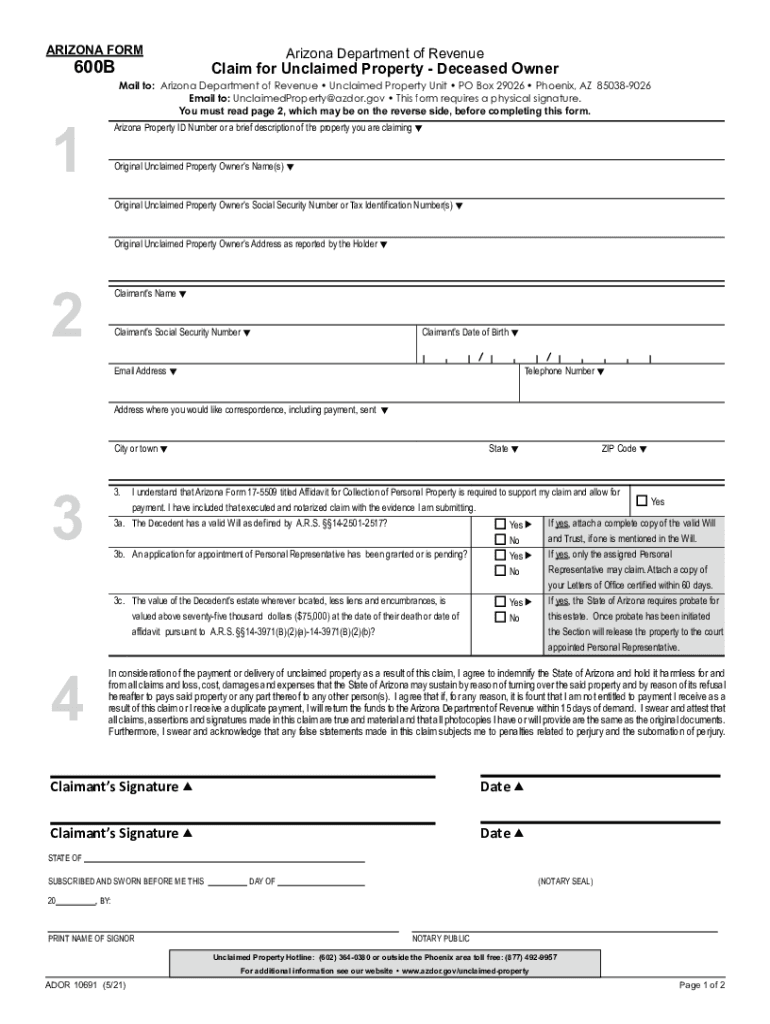
- In Section 1, provide the Arizona Property ID Number or a brief description of the property you are claiming. If unknown, this section can be left blank.
- Complete Section 2 with your name, Social Security Number, date of birth, email address, and contact information. Ensure accuracy as this will be used for correspondence regarding your claim.
- In Section 3, answer questions about the decedent’s estate and attach the required Affidavit for Collection of Personal Property (Form 17-5509).
- Sign and date the form in Section 4. You may choose to have it notarized or provide a photocopy of valid identification.
Start using our platform today to easily complete your Arizona Form 600 B Claim for Unclaimed Property!
It's free
See more Arizona Form 600 B Claim for Unclaimed Property - Deceased Owner versions
Got questions?
What is the simplest way to electronically sign my Arizona Form 600 B Claim for Unclaimed Property - Deceased Owner?
Many software applications are available out there for document editing and signing. DocHub is one of the most in-demand online solutions that comply with all data protection and compliance standards and guarantees your eSigned paperwork is legally enforceable. All you need to give it a try is to register an account, add your Arizona Form 600 B Claim for Unclaimed Property - Deceased Owner, fill out the required details, and click Sign. Create your electronic signature by typing, drawing it, uploading its picture to your document, or scanning a unique QR code.
What browser do I need to edit Arizona Form 600 B Claim for Unclaimed Property - Deceased Owner online?
If you need to edit your Arizona Form 600 B Claim for Unclaimed Property - Deceased Owner online swiftly, it does not matter what internet browser you use. DocHub’s simple editing tools are available using any internet browser. Simply open the appropriate tab in the editor, add your file, and fill it out without stress.
Security and compliance
At DocHub, your data security is our priority. We follow HIPAA, SOC2, GDPR, and other standards, so you can work on your documents with confidence.
Learn more




