




Here's how it works



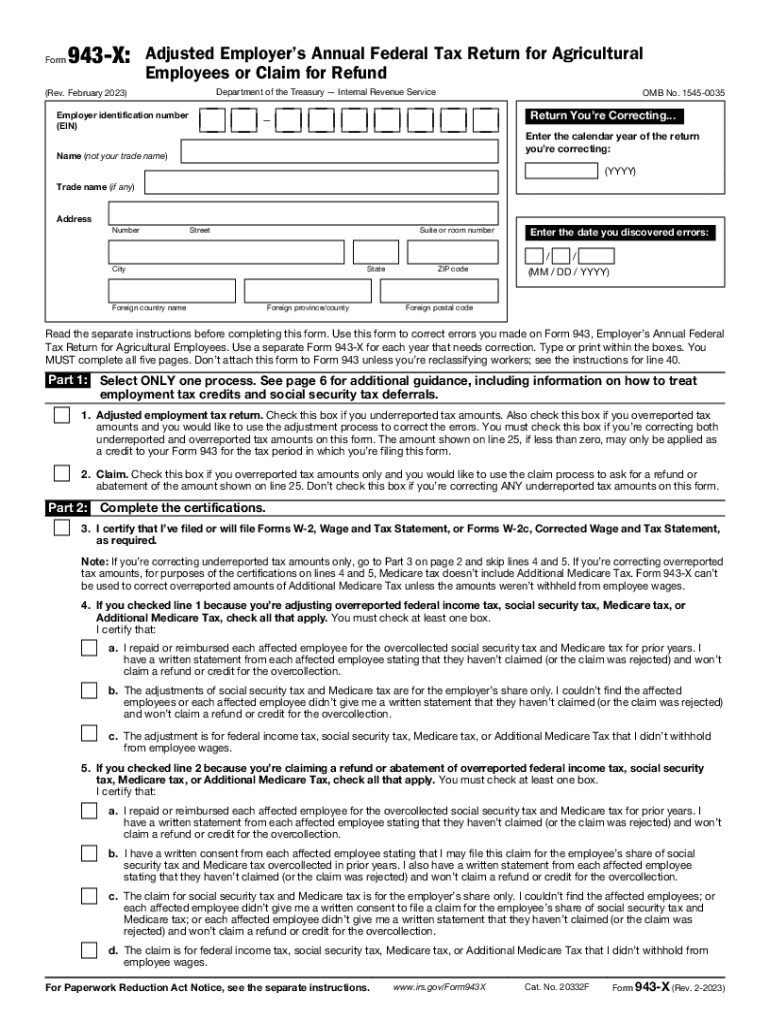
How to use or fill out Form 943-X (Rev February 2023) Adjusted Employer's Annual Federal Tax Return for Agricultural Employ with our platform

- Click ‘Get Form’ to open it in the editor.
- Begin by entering your Employer Identification Number (EIN) and the calendar year of the return you’re correcting at the top of the form.
- Fill in your name, trade name (if applicable), and address details accurately. Ensure all information is typed or printed clearly within the designated boxes.
- In Part 1, select only one process: check either the box for 'Adjusted employment tax return' if correcting underreported amounts or 'Claim' if overreported amounts are being addressed.
- Proceed to Part 2 and complete the certifications based on your selected process. Make sure to check all relevant boxes that apply to your situation.
- In Part 3, enter corrections for each applicable line item. Use columns to indicate total corrected amounts, previously reported amounts, and differences.
- Finally, provide a detailed explanation of corrections in Part 4 and sign the form in Part 5 before submitting it.
Start using our platform today for free to streamline your form completion process!
It's free
See more Form 943-X (Rev February 2023) Adjusted Employer's Annual Federal Tax Return for Agricultural Employ versions
Got questions?
Can I use DocHub to generate legal eSignatures on my irs form 943 fillable?
Yes, you can use DocHub for signing any business and personal documentation, including your irs form 943 fillable. All eSignatures you generate with our service are legally binding and court-admissible, as DocHub complies with criteria required by ESIGN and UETA. Save your accomplished paperwork with a detailed Audit Trail if needed.
How to manage my form 943 for 2024 from Gmail?
If your go-to electronic mail service is Gmail, you can easily incorporate your DocHub editor in your work. Edit your form 943 for 2024 with DocHub tools and connect it to your drafts in Gmail. See how straightforward it is to exchange papers and collaborate with a swift PDF editing solution at hand.
Security and compliance
At DocHub, your data security is our priority. We follow HIPAA, SOC2, GDPR, and other standards, so you can work on your documents with confidence.
Learn more


