Type text, add images, blackout confidential details, add comments, highlights and more.

02. Sign it in a few clicks
Draw your signature, type it, upload its image, or use your mobile device as a signature pad.

03. Share your form with others
Send it via email, link, or fax. You can also download it, export it or print it out.

How to use or fill out MI-1041 - Fiduciary Income Tax Return with DocHub
Ease of Setup
DocHub User Ratings on G2
Ease of Use
DocHub User Ratings on G2
Click ‘Get Form’ to open the MI-1041 in our editor.
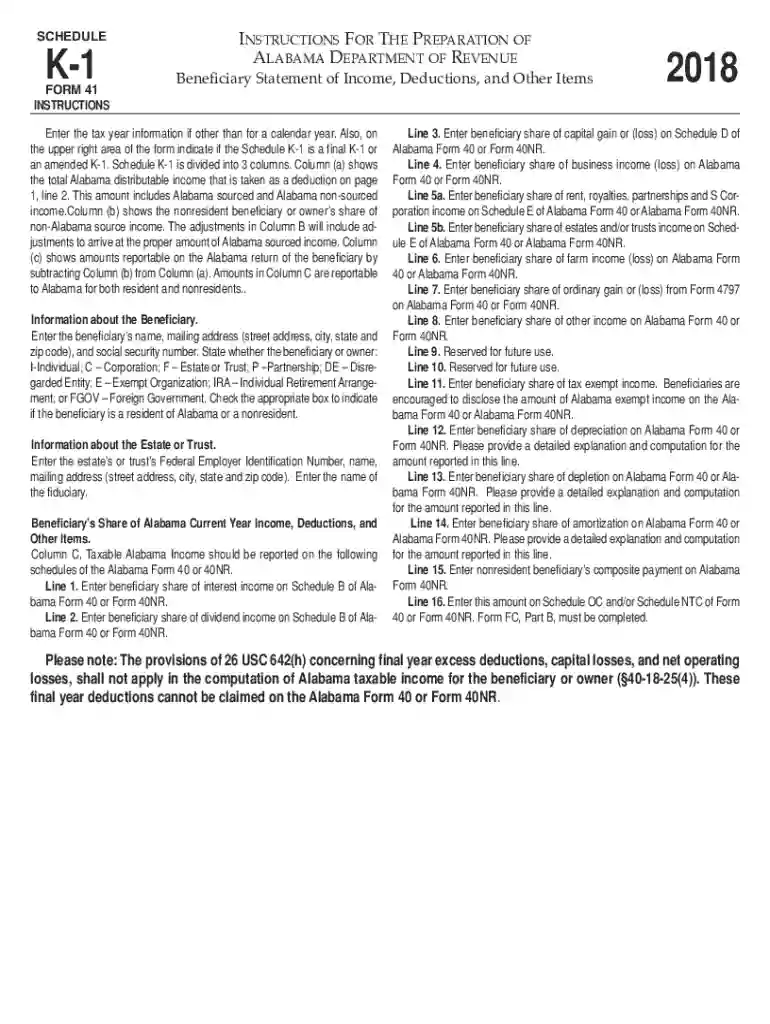
Begin by entering the tax year information at the top of the form. If applicable, indicate whether this is a final or amended K-1 in the upper right area.
In Section A, provide details about the beneficiary, including their name, mailing address, and social security number. Select the appropriate designation for the beneficiary (e.g., Individual, Corporation).
Next, fill out Section B with information about the estate or trust. Enter its Federal Employer Identification Number and mailing address.
Proceed to Section C where you will report the beneficiary’s share of Alabama current year income. Complete each line carefully, ensuring that amounts are reported on the correct schedules of Alabama Form 40 or 40NR.
Start using our platform today to easily complete your MI-1041 form online for free!
Fill out MI-1041 - Fiduciary Income Tax Return online It's free
See more MI-1041 - Fiduciary Income Tax Return versions
We've got more versions of the MI-1041 - Fiduciary Income Tax Return form. Select the right MI-1041 - Fiduciary Income Tax Return version from the list and start editing it straight away!
Cookie consent notice
This site uses cookies to enhance site navigation and personalize your experience.
By using this site you agree to our use of cookies as described in our Privacy Notice.
You can modify your selections by visiting our Cookie and Advertising Notice.