




Here's how it works

01. Edit your rpd 41284 online
Type text, add images, blackout confidential details, add comments, highlights and more.

02. Sign it in a few clicks
Draw your signature, type it, upload its image, or use your mobile device as a signature pad.

03. Share your form with others
Send new mexico quarterly oil gas proceeds witholding fillable via email, link, or fax. You can also download it, export it or print it out.
How to use or fill out withholding oil gas with our platform

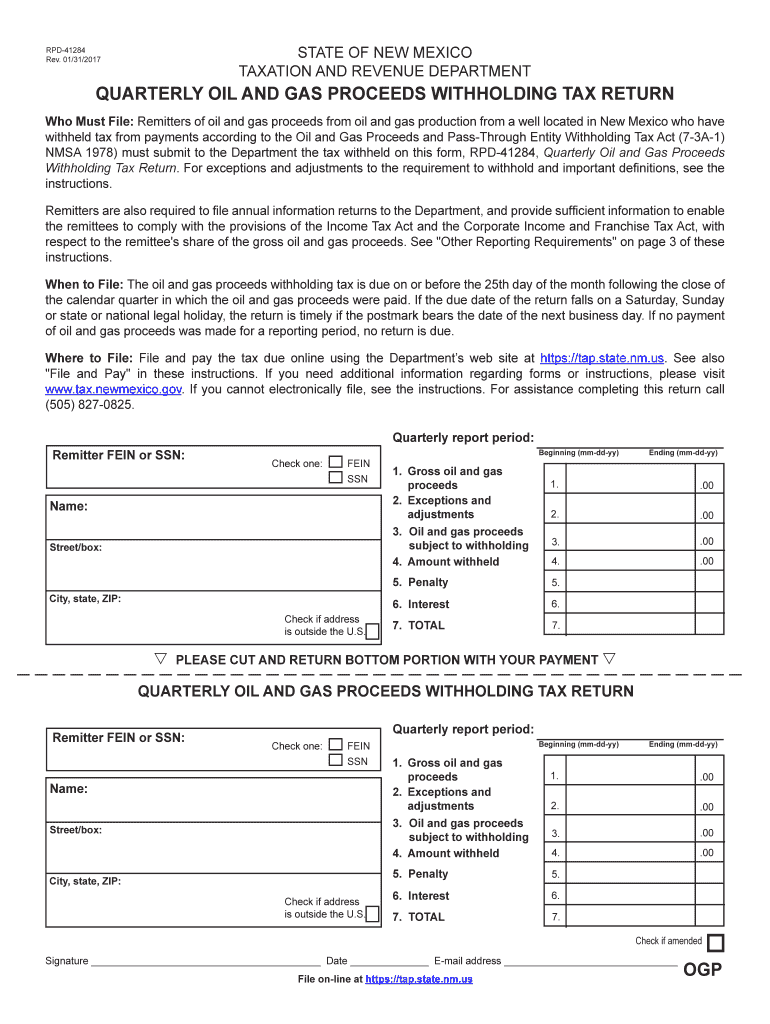
- Click ‘Get Form’ to open the Quarterly Oil and Gas Proceeds Withholding Tax Return in the editor.
- Enter your Remitter FEIN or SSN at the top of the form, ensuring you check the appropriate box for identification type.
- Fill in your name and mailing address. If your address is outside the U.S., mark the corresponding box.
- Specify the quarterly report period by entering the beginning and ending dates in mm-dd-yy format.
- In Line 1, input the total gross oil and gas proceeds paid during the reporting period. Round amounts to the nearest whole dollar.
- For Line 2, enter any exceptions or adjustments that apply to your situation as outlined in the instructions.
- Calculate Line 3 by subtracting Line 2 from Line 1 to determine proceeds subject to withholding.
- On Line 4, calculate and enter the amount withheld based on current tax rates applied to Line 3's amount.
- Complete Lines 5 (penalty) and 6 (interest) if applicable, then sum these with Line 4 for a total due on Line 7.
- Sign and date the form before submitting it online through our platform or via mail if necessary.
Start using our platform today for free to streamline your document editing and submission process!
Fill out withholding oil gas online
It's free
It's free
See more withholding oil gas versions
We've got more versions of the withholding oil gas form. Select the right withholding oil gas version from the list and start editing it straight away!
Security and compliance
At DocHub, your data security is our priority. We follow HIPAA, SOC2, GDPR, and other standards, so you can work on your documents with confidence.
Learn more


