Tax finance 2026

Get Form
application homeowners Preview on Page 1

Here's how it works

01. Edit your application homeowners online
Type text, add images, blackout confidential details, add comments, highlights and more.

02. Sign it in a few clicks
Draw your signature, type it, upload its image, or use your mobile device as a signature pad.

03. Share your form with others
Send tax benefits application via email, link, or fax. You can also download it, export it or print it out.

How to use or fill out tax finance with our platform

Form edit decoration
9.5
Ease of Setup
DocHub User Ratings on G2
9.0
Ease of Use
DocHub User Ratings on G2
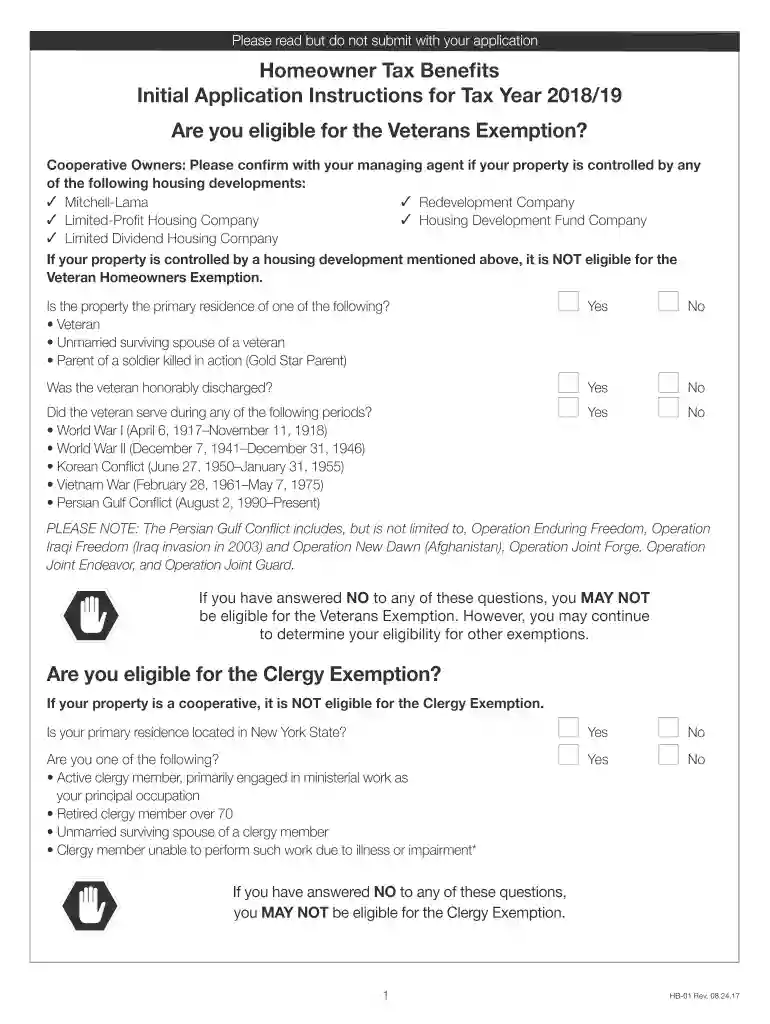
  1. Click ‘Get Form’ to open the Homeowner Tax Benefits application in the editor.
  2. Begin by filling out the property information section. Provide the complete address, borough, block, and lot (BBL) number of your property. Ensure you include the date you purchased the property.
  3. Next, complete the owner(s) information section. Include names, dates of birth, Social Security or ITIN numbers, and confirm if this is their primary residence.
  4. Indicate which exemption(s) you are applying for by checking the appropriate boxes for Veterans or Clergy exemptions.
  5. Review all sections to ensure accuracy and completeness. Attach any required documentation as specified in the instructions.
  6. Finally, sign and date the certification section at the end of the application before submitting it via mail.

Start using our platform today to streamline your tax finance form completion for free!

See more tax finance versions

We've got more versions of the tax finance form. Select the right tax finance version from the list and start editing it straight away!
Versions Form popularity Fillable & printable
2018 4.8 Satisfied (30 Votes)
2017 4.4 Satisfied (350 Votes)
2016 4.3 Satisfied (115 Votes)
be ready to get more

Complete this form in 5 minutes or less

Get form

Got questions?

We have answers to the most popular questions from our customers. If you can't find an answer to your question, please contact us.
Contact us

If you regularly work with documents kept in your Google Drive, DocHub is a superb solution for you to easily and quickly fill out, modify, and sign them. This editor integrates well with Google services, so you can export your 2018 ny application from your Google Drive to the editor without downloading and re-uploading it. Right-click on your document, choose Open With → DocHub PDF Sign and Edit. In our editor, add and assign Signature Fields for all parties involved, then click on the Menu option above → Send → select how you want to share your paperwork.

If your go-to email service is Gmail, it is simple to integrate your DocHub editor in your work. Edit your what tax benefit did i get in 2018 with DocHub tools and attach it to your drafts in Gmail. See how easy it can be to exchange documents and collaborate having a swift PDF editing solution at hand.

While taxation accounting is mainly concerned with taxes and government compliance, financial accounting aims to present an accurate picture of a companys financial performance for decision-making purposes.
The business tax return is nothing more than a financial statement with similar components, but with a different format and structure.
Tax returns must be filed annually with tax agencies and include critical information regarding taxable income, claimed deductions, and claimed tax credits, which ends with their tax liability. The IRS Form 1040 (or 1040-SR) is used for individual returns.

Security and compliance

At DocHub, your data security is our priority. We follow HIPAA, SOC2, GDPR, and other standards, so you can work on your documents with confidence.

Learn more
ccpa2
pci-dss
gdpr-compliance
hipaa
soc-compliance

People also ask

Typically, tax advisors have more experience and education than accountants and are well-versed not only in accounting, but in tax law, finance, and business strategy. In addition to being a certified public accountant (CPA), they may also have an enrolled agent designation or a financial advisor certification.
A tax return is a form filed with a tax authority that reports a taxpayers income, expenses, and other pertinent information. It allows a taxpayer to calculate their tax liability so they may either schedule a payment or request a refund.
The money you receive in your tax refund is the amount of money you overpaid to the IRS throughout the year. Typically, this happens when your employer over-withheld taxes from your paycheck.
We may communicate with you by mail for many reasons, including: to send you a check for your refund or an additional payment; to let you know we adjusted your refund; to request information that supports what you reported on a return; and.
A tax return is a document filed with a tax authority that reports income, expenses, and other relevant financial information. On tax returns, taxpayers calculate their tax liability, schedule tax payments, or request refunds for the overpayment of taxes. In most places, tax returns must be filed annually.

ny state income tax forms 2018