




Here's how it works



How to use or fill out ST-12B Purchaser's Claim for Sales Tax Refund Affidavit with DocHub

- Click ‘Get Form’ to open the ST-12B Purchaser's Claim for Sales Tax Refund Affidavit in our editor.
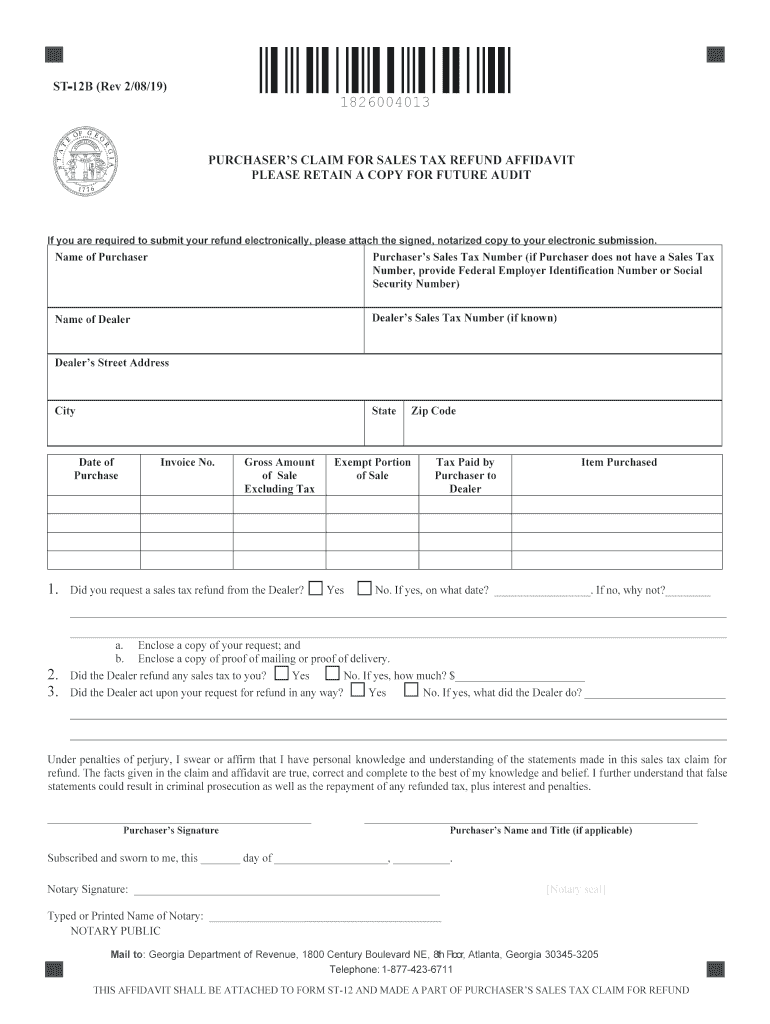
- Begin by entering your name and Sales Tax Number in the designated fields. If you do not have a Sales Tax Number, provide your Federal Employer Identification Number or Social Security Number.
- Fill in the dealer's information, including their name, Sales Tax Number (if known), street address, city, state, and zip code.
- Input the date of purchase and invoice number. Then, specify the gross amount of sale excluding tax and indicate whether you requested a sales tax refund from the dealer.
- If applicable, provide details about any refund received from the dealer and include any supporting documents as required.
- Finally, sign the affidavit at the bottom and ensure it is notarized before submission. Attach this affidavit to Form ST-12 for your sales tax claim.
Start using our platform today to easily complete your ST-12B form online for free!
It's free
See more ST-12B Purchaser's Claim for Sales Tax Refund Affidavit versions
Got questions?
Can I complete and sign my ST-12B Purchaser's Claim for Sales Tax Refund Affidavit online?
Sure, and it’s really straightforward! DocHub is an online PDF editor with advanced document management capabilities that allow you quickly modify your documents, complete blank fields and drop new ones for others to fill out, and create eSignatures in several ways. Import your ST-12B Purchaser's Claim for Sales Tax Refund Affidavit, provide information as required, and decide how you want to eSign your document - by typing your name, drawing your signature, uploading its image, or utilizing a QR code.
How to manage my ST-12B Purchaser's Claim for Sales Tax Refund Affidavit from Gmail?
In case your go-to email service is Gmail, you can easily integrate your DocHub editor into your work. Edit your ST-12B Purchaser's Claim for Sales Tax Refund Affidavit with DocHub tools and attach it to your drafts in Gmail. See how easy it is to exchange documents and work together having a swift PDF editing solution at hand.
Can you claim back tax in the US?
What is the statute of limitations on sales tax refunds in Georgia?
How do I claim tax refund in USA for tourists?
Security and compliance
At DocHub, your data security is our priority. We follow HIPAA, SOC2, GDPR, and other standards, so you can work on your documents with confidence.
Learn more




