Get Form IT 601 Claim For EZ Wage Tax Credit Tax Year - Fill 2026

Get Form
Get Form IT 601 Claim For EZ Wage Tax Credit Tax Year - Fill Preview on Page 1

Here's how it works

01. Edit your form online
Type text, add images, blackout confidential details, add comments, highlights and more.

02. Sign it in a few clicks
Draw your signature, type it, upload its image, or use your mobile device as a signature pad.

03. Share your form with others
Send it via email, link, or fax. You can also download it, export it or print it out.

How to use or fill out Get Form IT 601 Claim For EZ Wage Tax Credit Tax Year - Fill with our platform

Form edit decoration
9.5
Ease of Setup
DocHub User Ratings on G2
9.0
Ease of Use
DocHub User Ratings on G2
  1. Click ‘Get Form’ to open it in the editor.
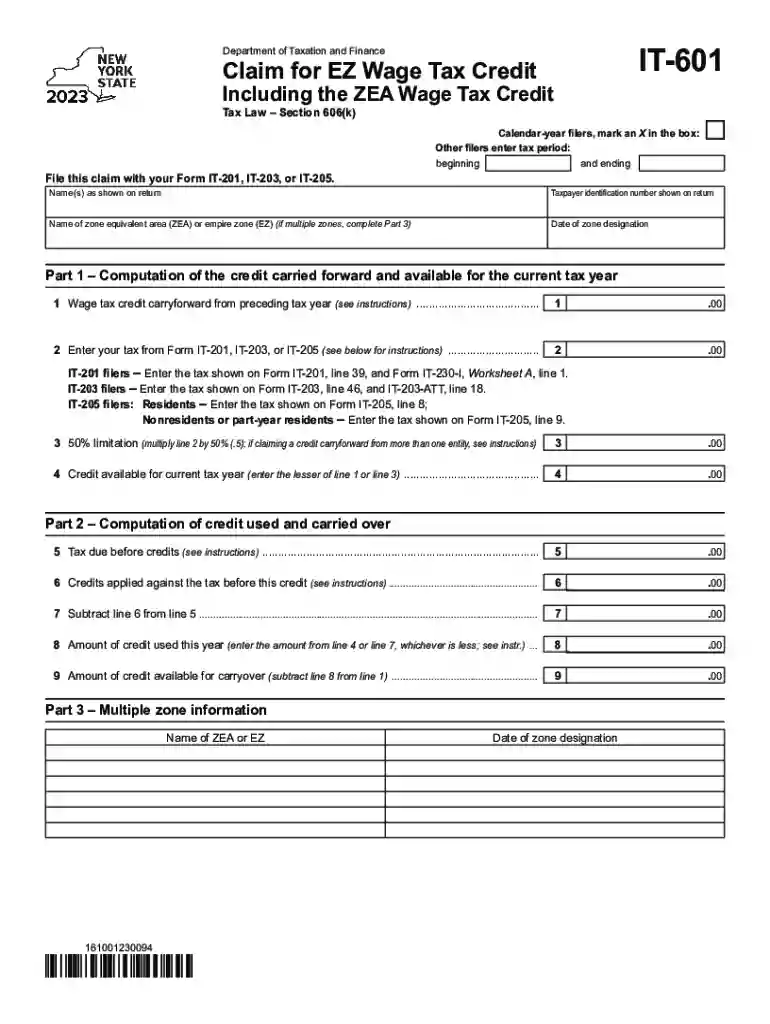
  2. Begin by marking the appropriate box for calendar-year filers or entering your tax period dates. This ensures your claim is processed correctly.
  3. Fill in your name as shown on your return and provide your taxpayer identification number. Accurate information here is crucial for verification.
  4. Identify the name of the zone equivalent area (ZEA) or empire zone (EZ) you are claiming. If applicable, complete Part 3 for multiple zones.
  5. In Part 1, compute the credit carried forward from the previous year and enter it in line 1. Follow the instructions carefully for accurate calculations.
  6. Continue filling out lines 2 through 9, ensuring that you follow the specific instructions based on your form type (IT-201, IT-203, or IT-205).

Start using our platform today to fill out your form easily and for free!

See more Get Form IT 601 Claim For EZ Wage Tax Credit Tax Year - Fill versions

We've got more versions of the Get Form IT 601 Claim For EZ Wage Tax Credit Tax Year - Fill form. Select the right Get Form IT 601 Claim For EZ Wage Tax Credit Tax Year - Fill version from the list and start editing it straight away!
Versions Form popularity Fillable & printable
2023 4.4 Satisfied (41 Votes)
2022 4.4 Satisfied (24 Votes)
2021 4.8 Satisfied (181 Votes)
2020 4.4 Satisfied (110 Votes)
be ready to get more

Complete this form in 5 minutes or less

Get form

Got questions?

We have answers to the most popular questions from our customers. If you can't find an answer to your question, please contact us.
Contact us
Form 67 can only be submitted online on the e-Filing portal. After logging into the e-Filing portal, select Form 67, prepare and submit the form.
Form 8862, Information to Claim Earned Income Credit After Disallowance, is needed when your claim for the Earned Income Credit (EIC) has been disallowed or reduced in a previous year.
Specifically, the Child Tax Credit was revised in the following ways for 2021: The credit amount was increased for 2021. The American Rescue Plan increased the amount of the Child Tax Credit from $2,000 to $3,600 for qualifying children under age 6, and $3,000 for other qualifying children under age 18.
Form 26AS helps in the computation of income and to claim the tax credits at the time of filing Income Tax Return (ITR) on income. A taxpayer can confirm the verification of refunds during the applicable financial or assessment year using Form 26AS.
Use Form 5695 to figure and take your residential energy credits. The residential energy credits are: The residential clean energy credit, and. The energy efficient home improvement credit.

Security and compliance

At DocHub, your data security is our priority. We follow HIPAA, SOC2, GDPR, and other standards, so you can work on your documents with confidence.

Learn more
ccpa2
pci-dss
gdpr-compliance
hipaa
soc-compliance
be ready to get more

Complete this form in 5 minutes or less

Get form

People also ask

Check online tax credit statements provided by the Income Tax Department for the tax payers. The tax credit details can be accessed by the registered users through online Form 26AS. Users have to provide their user ID and PAN number for check the tax credits.
Who is eligible to receive a 1098-T form? A form will be generated and sent to the student if: You, your dependent or a third party paid qualified education expenses for higher education, and. The student was enrolled at an eligible educational institution , and.

Related links