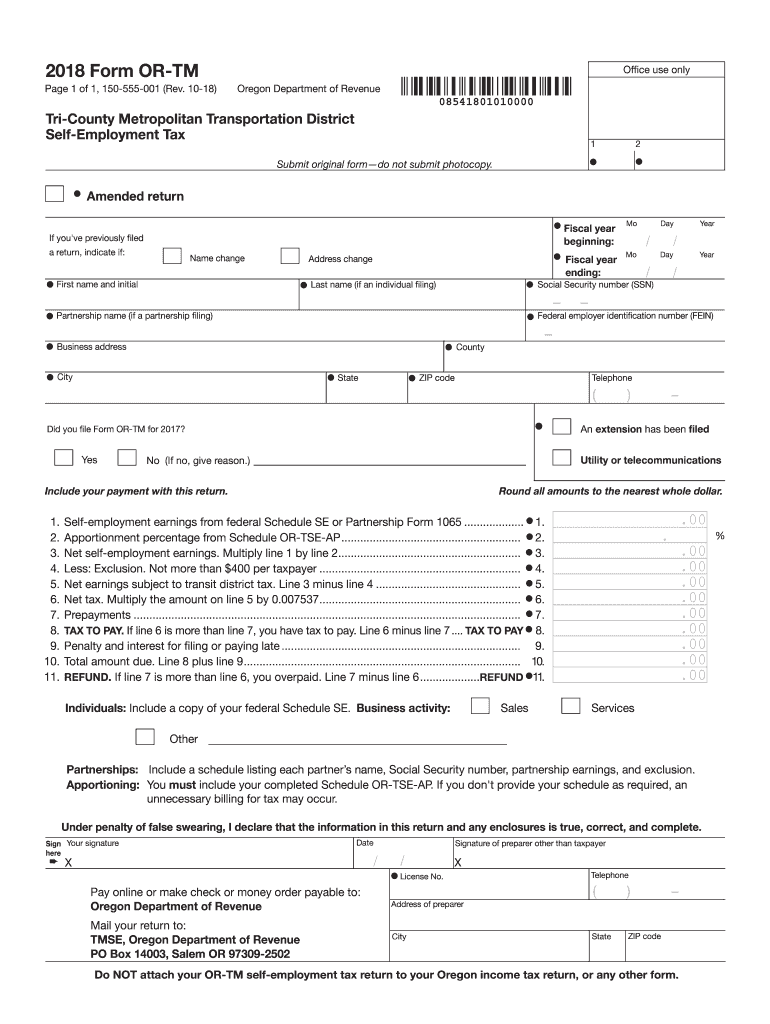
2018 form or tm-2026

Get Form
1099 g oregon Preview on Page 1

Here's how it works

01. Edit your 1099 g oregon online
Type text, add images, blackout confidential details, add comments, highlights and more.
02. Sign it in a few clicks
Draw your signature, type it, upload its image, or use your mobile device as a signature pad.
03. Share your form with others
Send it via email, link, or fax. You can also download it, export it or print it out.

How to use or fill out 2018 Form OR-TM with our platform

Form edit decoration
9.5
Ease of Setup
DocHub User Ratings on G2
9.0
Ease of Use
DocHub User Ratings on G2
  1. Click ‘Get Form’ to open the 2018 Form OR-TM in the editor.
  2. Begin by entering your personal information. Fill in your first name, last name, and Social Security number (SSN) in the designated fields.
  3. Update your address if necessary. Ensure you provide your complete business address, including city, state, and ZIP code.
  4. Indicate the fiscal year for which you are filing by entering the beginning and ending dates.
  5. Complete the self-employment earnings section by referencing your federal Schedule SE or Partnership Form 1065. Input the amounts as required.
  6. Calculate your net tax by following the instructions on lines 5 and 6. Make sure to round all amounts to the nearest whole dollar.
  7. Sign and date the form at the bottom. If applicable, include a signature from a preparer other than yourself.

Start using our platform today to fill out your 2018 Form OR-TM easily and for free!

See more 2018 form or tm versions

We've got more versions of the 2018 form or tm form. Select the right 2018 form or tm version from the list and start editing it straight away!
Versions Form popularity Fillable & printable
2022 4.2 Satisfied (21 Votes)
2021 4.8 Satisfied (117 Votes)
2020 4.3 Satisfied (87 Votes)
2019 4.4 Satisfied (187 Votes)
2018 4.2 Satisfied (73 Votes)
2017 4.2 Satisfied (60 Votes)
2016 1 Satisfied (18619 Votes)
2012 4.3 Satisfied (115 Votes)
be ready to get more

Complete this form in 5 minutes or less

Get form

Got questions?

We have answers to the most popular questions from our customers. If you can't find an answer to your question, please contact us.
Contact us
Lane Transit District. The Oregon Department of Revenue administers tax programs for the Lane County Mass Transit District (LTD). Nearly every employer who pays wages for services performed in this district must pay transit payroll tax.
The 2022 Form OR-TM is essential for reporting self-employment taxes in Oregon.
Transit district taxes The transit tax is imposed directly on the employer. The tax is figured only on the amount of gross payroll for services performed within the TriMet or Lane Transit Districts. This includes traveling sales representatives and employees working from home.
The tax is one-tenth of one percent (0.001), or $1 per $1,000 of wages. The STI tax is calculated on wages earned by an employee who is an Oregon resident regardless of where the work is performed, or an employee who is a nonresident who performs services in Oregon.
You can file you TriMet tax return using Revenue Online at Oregon.gov or you can mail in your OR-TM form to the Oregon Department of Revenue. If you pay someone to file your federal and state taxes, they can also file your TriMet tax return electronically.
be ready to get more

Complete this form in 5 minutes or less

Get form

People also ask

Oregon Transit Tax In addition to state income tax, Oregon imposes a statewide transit tax. This tax is 0.1% of wages and net earnings from self-employment. Its used to fund public transportation projects across the state. Ensure you account for this tax when calculating your state tax obligations.
Who must file and pay? All employers, including nonresident employers, who are paying wages earned in the TriMet districts must register and file with the Oregon Department of Revenue. Wages include all salaries, commissions, tips, bonuses, fees, payments to a deferred compensation plan, or other items of value.

Related links