Type text, add images, blackout confidential details, add comments, highlights and more.
02. Sign it in a few clicks
Draw your signature, type it, upload its image, or use your mobile device as a signature pad.
03. Share your form with others
Send scholar withdrawal request form via email, link, or fax. You can also download it, export it or print it out.
How to use or fill out scholar withdrawal request with our platform
Ease of Setup
DocHub User Ratings on G2
Ease of Use
DocHub User Ratings on G2
Click ‘Get Form’ to open the scholar withdrawal request in the editor.
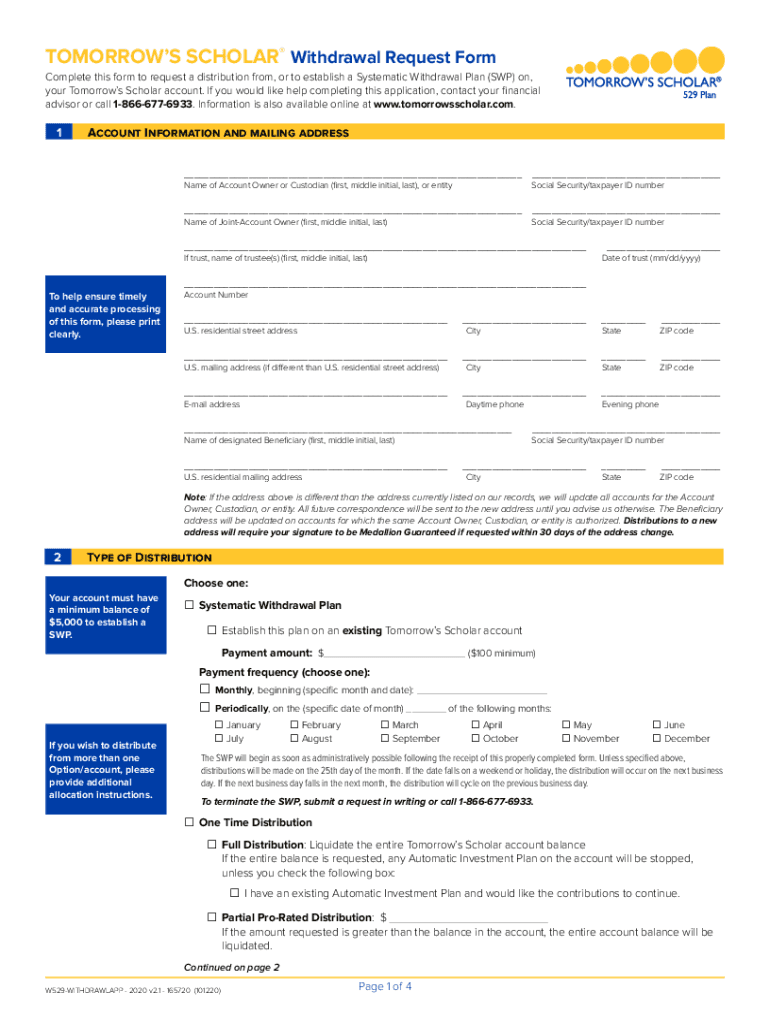
Begin by filling out the 'Account Information and Mailing Address' section. Clearly print your name, Social Security number, and contact details to ensure accurate processing.
In the 'Type of Distribution' section, select whether you want a Systematic Withdrawal Plan or a one-time distribution. Specify the payment amount and frequency as needed.
For payment methods, choose how you would like to receive your funds. Options include direct payments to educational institutions or electronic transfers. Ensure you attach any required documents like voided checks.
Finally, review all information for accuracy before signing in the 'Agreement and Signature(s)' section. A Medallion Signature Guarantee may be necessary for certain requests.
Start using our platform today to complete your scholar withdrawal request effortlessly!
Fill out scholar withdrawal request online It's free
We've got more versions of the scholar withdrawal request form. Select the right scholar withdrawal request version from the list and start editing it straight away!
Prior to making any changes to their enrollment, scholars may request to withdraw from class(es) by submitting the Scholarship Withdrawal Request Form.
Cookie consent notice
This site uses cookies to enhance site navigation and personalize your experience.
By using this site you agree to our use of cookies as described in our Privacy Notice.
You can modify your selections by visiting our Cookie and Advertising Notice.