




Here's how it works

01. Edit your dental patient intake form online
Type text, add images, blackout confidential details, add comments, highlights and more.

02. Sign it in a few clicks
Draw your signature, type it, upload its image, or use your mobile device as a signature pad.

03. Share your form with others
Send lyons intake form via email, link, or fax. You can also download it, export it or print it out.
How to use or fill out new patient intake form dental with our platform

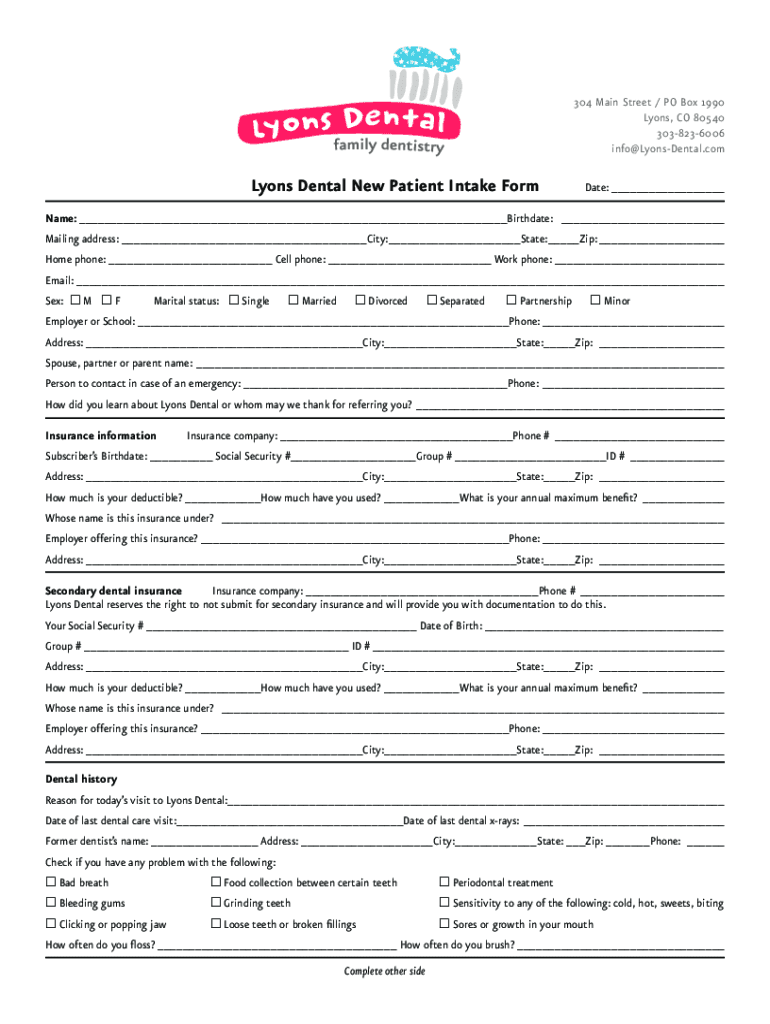
- Click ‘Get Form’ to open the new patient intake form dental in the editor.
- Begin by entering the date at the top of the form. This helps establish your visit timeline.
- Fill in your personal information, including your name, birthdate, and mailing address. Ensure accuracy for effective communication.
- Provide your contact numbers (home, cell, work) and email address. This is crucial for appointment reminders and follow-ups.
- Indicate your sex and marital status by checking the appropriate boxes. This information assists in creating a comprehensive patient profile.
- Complete the insurance information section thoroughly, including details about your primary and secondary insurance providers.
- In the dental history section, describe the reason for your visit and any previous dental care experiences. Be honest about any issues you may have faced.
- Proceed to fill out the medical history section carefully, noting any medications or allergies that may affect your treatment.
- Finally, review all entered information for accuracy before signing at the bottom of the form to authorize its contents.
Start filling out your new patient intake form dental online for free today!
Fill out new patient intake form dental online
It's free
It's free
See more new patient intake form dental versions
We've got more versions of the new patient intake form dental form. Select the right new patient intake form dental version from the list and start editing it straight away!
Got questions?
We have answers to the most popular questions from our customers. If you can't find an answer to your question, please contact us.
Contact us
How do I create a fillable intake form in Word?
Intake forms can be made in Word by following these steps: Step 1 : Open Microsoft Word. Step 2 : Make a new document. Step 3: Add form fields. Step 4: Customize the details of the form. Step 5: Keep the form safe. Step 6: Send it out and save it.
What is a new patient intake form?
Patient intake forms furnish essential information demographics, history of present illness, medical history, etc. to give the physician a well-rounded picture of the patients health so they can provide the best diagnosis and treatment.
What is the first task in the dental exam for a new patient?
Your Comprehensive Exam As a new patient, you will first see the dentist for a comprehensive exam. During this exam the dentist will discuss your health history, any concerns you may have, and may take your blood pressure to ensure you are in good health.
How to create an intake form on Google?
How to create a sample intake form with Google Forms Step 1: Create a new Google Form. Navigate to your Google Forms. Step 2: Enter fields for personal information. Step 3: Collect necessary background information. Step 4: Ask how they heard about you. Step 5: Create a PDF intake form.
How do you welcome a dental patient?
Train your receptionist to use the new patients name to greet them as soon as they arrive. Your front desk staff should welcome each patient with a smile, state his or her name, and ask the patients name. Whenever possible, approach new patients before they get to the reception area and shake their hand.
Security and compliance
At DocHub, your data security is our priority. We follow HIPAA, SOC2, GDPR, and other standards, so you can work on your documents with confidence.
Learn more


People also ask
How do I create a custom intake form?
How to create your own intake forms Step 1: Choose between printable and online forms. Step 2: Request basic client information. Step 3: Collect information about the brand. Step 4: Ask about the potential clients goals and challenges. Step 5: Assess your potential clients competitors.
How do I create a custom fillable form?
How to create fillable PDF files: Open Acrobat: Click on the Tools tab and select Prepare Form. Select a file or scan a document: Acrobat will automatically analyze your document and add form fields. Add new form fields: Use the top toolbar and adjust the layout using tools in the right pane. Save your fillable PDF:
How do I create a personal information form?
A standard personal information form consists of multiple categories of information, such as the persons identity, contact details, educational history, work experience, medical status, and emergency contact information.