Patient letter oncology form 2026

Get Form
clinical patient letter Preview on Page 1

Here's how it works

01. Edit your clinical patient letter online
Type text, add images, blackout confidential details, add comments, highlights and more.
02. Sign it in a few clicks
Draw your signature, type it, upload its image, or use your mobile device as a signature pad.
03. Share your form with others
Send patient letter oncology via email, link, or fax. You can also download it, export it or print it out.

How to use or fill out patient letter oncology form with our platform

Form edit decoration
9.5
Ease of Setup
DocHub User Ratings on G2
9.0
Ease of Use
DocHub User Ratings on G2
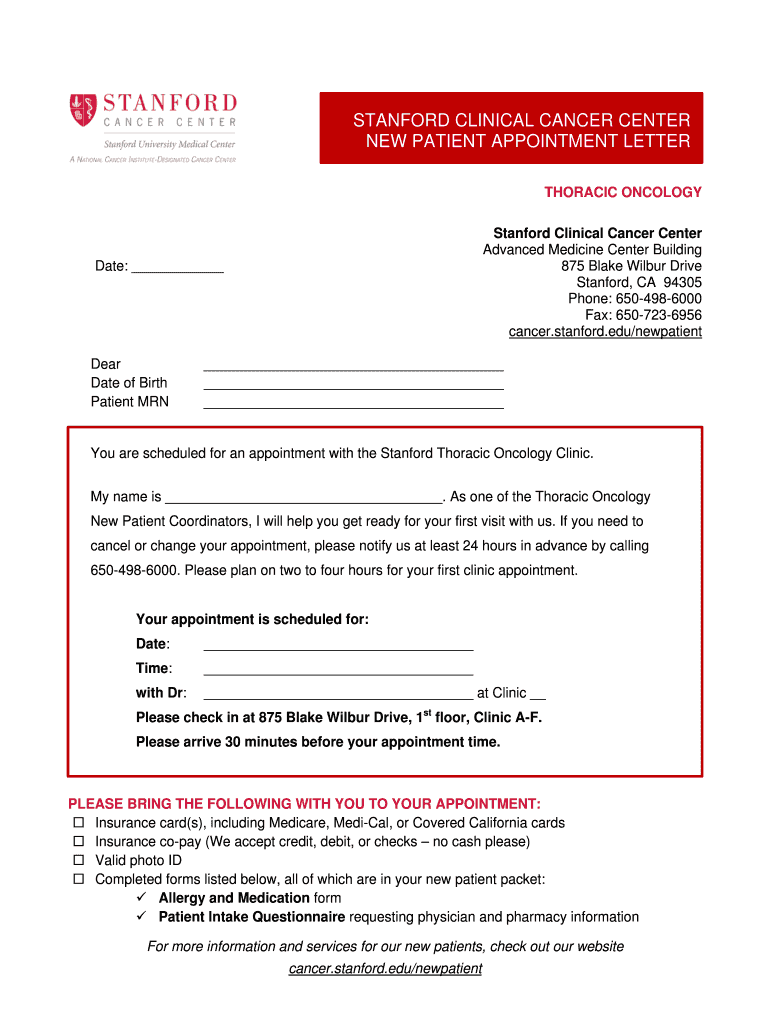
  1. Click ‘Get Form’ to open the patient letter oncology form in the editor.
  2. Begin by entering the date at the top of the form. This is essential for record-keeping and appointment scheduling.
  3. Fill in your personal details, including your name, date of birth, and MRN (Medical Record Number) in the designated fields.
  4. Review the appointment details section carefully. Ensure that you note down the scheduled date, time, and physician's name.
  5. In the checklist section, mark all items you need to bring to your appointment, such as insurance cards and completed forms.
  6. Complete any additional forms required, like the Allergy and Medication Form and Patient Intake Questionnaire. Make sure to provide accurate information about allergies and current medications.
  7. Once all sections are filled out, review your entries for accuracy before saving or printing your completed forms.

Start using our platform today for free to streamline your document editing and ensure a smooth appointment process!

be ready to get more

Complete this form in 5 minutes or less

Get form

Got questions?

We have answers to the most popular questions from our customers. If you can't find an answer to your question, please contact us.
Contact us

Sure, electronically drawing your signature is appropriate, but only if you use a tool that complies with industry regulations and policies. Try DocHub, which ensures eSignature validity under ESIGN and UETA requirements. All you need to approve your clinical patient letter trial electronically is an account with DocHub and an internet connection. Once you open your paperwork in our editor, click Sign and select the Draw option.

You can easily edit fill out your patient letter oncology sample on any iOS device. Open an internet browser of your liking, visit the DocHub site, authorize or create a new account, add your file for editing, and make your required alterations. Our service is mobile-friendly, so using its features on your smartphone will be a no-brainer, even on the first try.

Providing updates on their medical condition A letter can be an effective way to keep them informed. Be sure to include any new developments or changes in their treatment plan. Additionally, you should highlight any progress made and discuss what to expect in the future.
Physicians will require a patient to sign a records release form to transfer records. If you have followed the requirements outlined in the Health Safety Code and the physician has not complied with your request, you may file a complaint with the Medical Board. Please include a copy of your written request(s).
Begin by specifying your name, the entity authorized to disclose information, and the individuals or entities you authorize to receive it. Indicate the specific information and purpose for which it will be disclosed, add an expiration date or event, and sign and date the form to confirm your consent.

Security and compliance

At DocHub, your data security is our priority. We follow HIPAA, SOC2, GDPR, and other standards, so you can work on your documents with confidence.

Learn more
ccpa2
pci-dss
gdpr-compliance
hipaa
soc-compliance
be ready to get more

Complete this form in 5 minutes or less

Get form

People also ask

A HIPAA-compliant HIPAA release form must, at the very least, contain the following information: A description of the information that will be used/disclosed. The purpose for which the information will be disclosed. The name of the person or entity to whom the information will be disclosed.
How to create a HIPAA compliant medical records release form Provide instructions. Name the patient and individual authorized to use or disclose their PHI. Describe the information. Specify recipients. Specify the purpose of disclosure. Specify the time period. Detail their revocation rights. Obtain the patients signature.

new patient letter oncology form