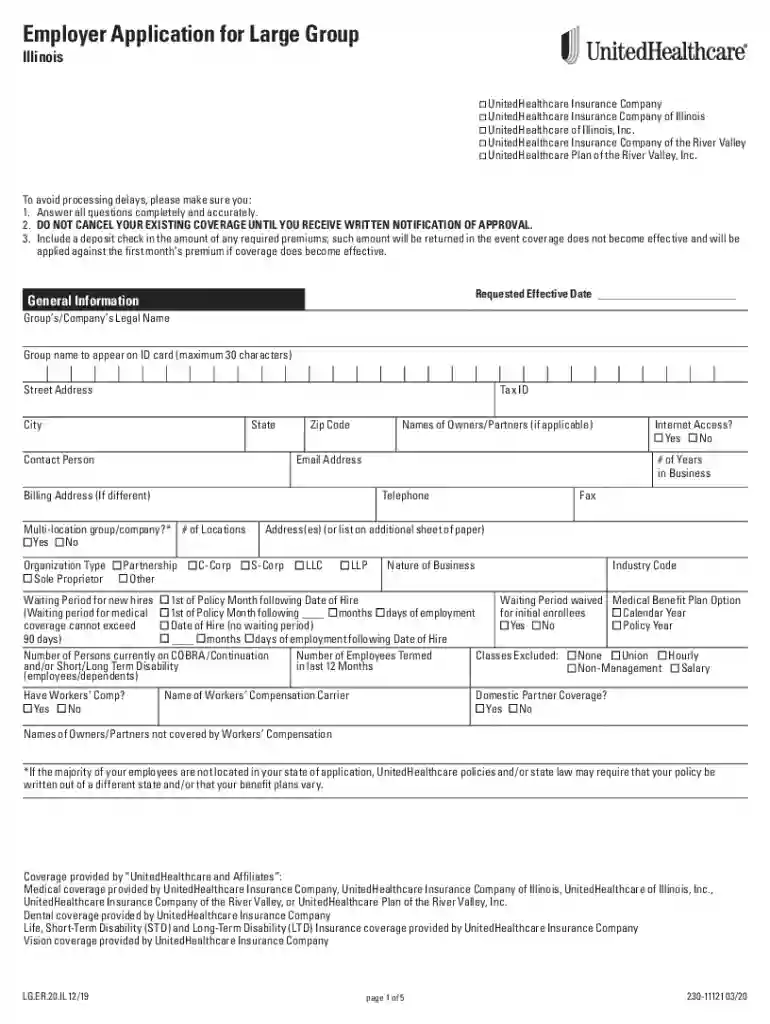
Employer Application - 51+ Illinois 2026

Get Form
Employer Application - 51+ Illinois Preview on Page 1

Here's how it works

01. Edit your form online
Type text, add images, blackout confidential details, add comments, highlights and more.

02. Sign it in a few clicks
Draw your signature, type it, upload its image, or use your mobile device as a signature pad.

03. Share your form with others
Send it via email, link, or fax. You can also download it, export it or print it out.

How to use or fill out Employer Application - 51+ Illinois with our platform

Form edit decoration
9.5
Ease of Setup
DocHub User Ratings on G2
9.0
Ease of Use
DocHub User Ratings on G2
  1. Click ‘Get Form’ to open the Employer Application - 51+ Illinois in the editor.
  2. Begin by filling out the General Information section. Enter your Group’s/Company’s Legal Name, Tax ID, and contact details accurately to avoid processing delays.
  3. Complete the sections regarding your organization type and number of locations. Indicate if you have internet access and provide a billing address if different from the main address.
  4. In the Coverage section, specify the number of employees applying for various benefits like Medical, Dental, and Vision. Ensure you include any relevant waiting periods for new hires.
  5. Review the Disclosures section carefully. Answer all questions truthfully regarding employee health status and previous insurance claims.
  6. Finally, sign and date the application at the end of the document to certify that all information is complete and accurate before submitting it.

Start using our platform today to streamline your form completion process for free!

See more Employer Application - 51+ Illinois versions

We've got more versions of the Employer Application - 51+ Illinois form. Select the right Employer Application - 51+ Illinois version from the list and start editing it straight away!
Versions Form popularity Fillable & printable
2020 4.8 Satisfied (115 Votes)
2018 4.3 Satisfied (45 Votes)
be ready to get more

Complete this form in 5 minutes or less

Get form

Got questions?

We have answers to the most popular questions from our customers. If you can't find an answer to your question, please contact us.
Contact us
Generally, employers must pay both state and Federal unemployment taxes if: (1) they pay wages to employees totaling $1,500, or more, in any quarter of a calendar year; or, (2) they had at least one employee during any day of a week during 20 weeks in a calendar year, regardless of whether or not the weeks were
Illinois Employment Service Registration Requirement: You must complete registration with Illinois Employment Services at IllinoisJobLink.com before unemployment insurance benefits can be paid. Once completing your registration at IllinoisJobLink.com, you can create a resume and search for work.
Your newly-created business (employing unit) must register with IDES within 30 days of start-up. Employers can register electronically through the MyTax Illinois ​website. Submit a completed and signed REG-UI-1 form, Report to Determine Liability Under the Illinois Unemployment Insurance Act.
Understand how Unemployment Insurance (UI) works UI benefits are financed by employer payroll contributions and are charged accordingly when claimants are determined eligible to collect benefits. Be sure to accurately report information to ensure you receive the benefits you qualify for.
The best way to complete your certification is online from 3:00am - 7:30pm on your designated certification day, including holidays. Thursdays and Fridays are make-up days if you miss your certification day. You may also docHub by Tele-Serve at (312) 338-4337 (3:00am - 7:30pm, Monday - Friday).

Security and compliance

At DocHub, your data security is our priority. We follow HIPAA, SOC2, GDPR, and other standards, so you can work on your documents with confidence.

Learn more
ccpa2
pci-dss
gdpr-compliance
hipaa
soc-compliance