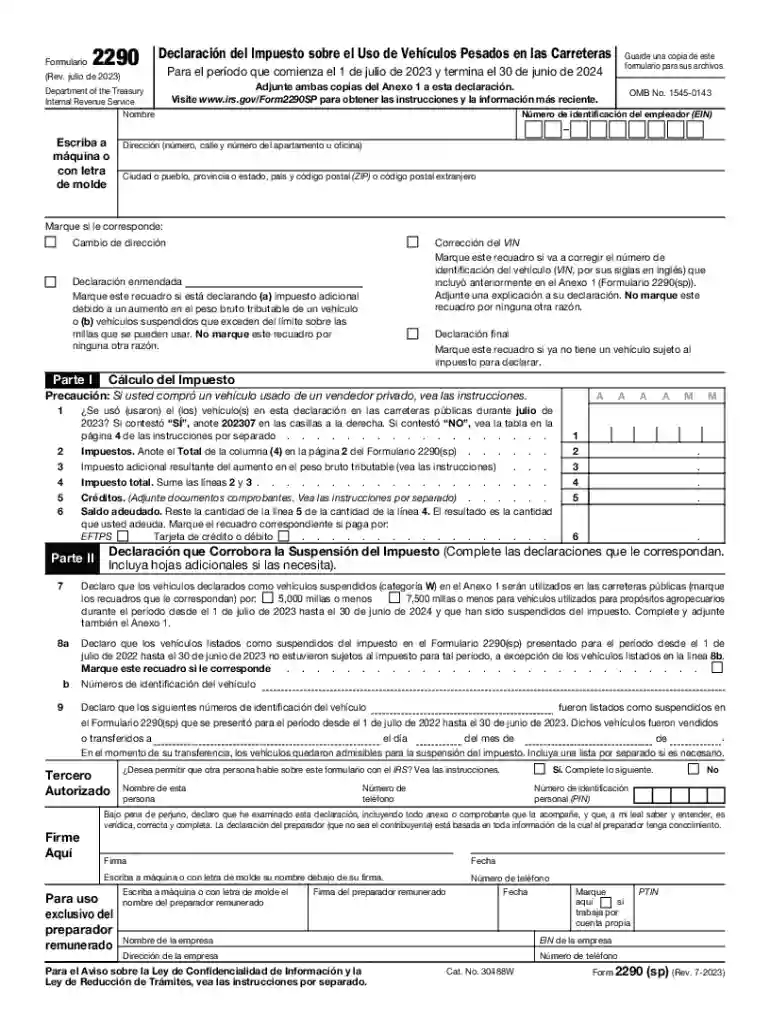
Form 2290 (sp) (Rev July 2023)-2026

Get Form
formulario 2290 pdf Preview on Page 1

Here's how it works

01. Edit your formulario 2290 pdf online
Type text, add images, blackout confidential details, add comments, highlights and more.

02. Sign it in a few clicks
Draw your signature, type it, upload its image, or use your mobile device as a signature pad.

03. Share your form with others
Send 2023 formulario vehiculos via email, link, or fax. You can also download it, export it or print it out.

How to use or fill out Form 2290 (sp) (Rev July 2023) with DocHub

Form edit decoration
9.5
Ease of Setup
DocHub User Ratings on G2
9.0
Ease of Use
DocHub User Ratings on G2
  1. Click ‘Get Form’ to open it in the editor.
  2. Begin by entering your Employer Identification Number (EIN) and address in the designated fields. Ensure that all information is accurate and typed clearly.
  3. Indicate if you are correcting a Vehicle Identification Number (VIN) or changing your address by checking the appropriate boxes. If applicable, attach an explanation for corrections.
  4. In Part I, answer whether the vehicle was used on public roads during July 2023. If yes, enter '202307' in the provided space.
  5. Calculate your tax based on the weight of your vehicle as outlined in the form. Enter totals from each section into the corresponding fields.
  6. Complete Part II regarding suspended vehicles, ensuring to list any vehicles that qualify for suspension and their respective details.
  7. Finally, sign and date the form at the bottom. Make sure to print your name below your signature for clarity.

Start using our platform today to fill out Form 2290 (sp) effortlessly and for free!

See more Form 2290 (sp) (Rev July 2023) versions

We've got more versions of the Form 2290 (sp) (Rev July 2023) form. Select the right Form 2290 (sp) (Rev July 2023) version from the list and start editing it straight away!
Versions Form popularity Fillable & printable
2023 4.8 Satisfied (27 Votes)
2022 4.1 Satisfied (59 Votes)
2021 4.8 Satisfied (95 Votes)
2020 4.2 Satisfied (59 Votes)
2019 3.9 Satisfied (27 Votes)
be ready to get more

Complete this form in 5 minutes or less

Get form

Got questions?

We have answers to the most popular questions from our customers. If you can't find an answer to your question, please contact us.
Contact us
The penalty for failing to file your IRS Form 2290 by the deadline is equal to 4.5% of the total tax amount due, and the penalty will increase monthly for up to five months.
What is the Tax Form 2290 Bracket? Vehicle Gross Weight (lbs)Taxable Gross Weight CategoryAnnual Tax (USD) 64,000 65,999 Category F $210 66,000 67,999 Category G $232 68,000 69,999 Category H $254 70,000 71,999 Category I $27610 more rows Oct 28, 2024
Form 2290 must be filed annually by August 31st for vehicles used on the road in July. For newly purchased vehicles, the deadline is the last day of the month following the month of first use.
Form 2290 Due Dates for Vehicles Placed Into Service During Reporting Period Month New Vehicle Is First UsedMonth Form 2290 Must Be Filed December 2024 January 31, 2025 January 2025 February 28, 2025 February 2025 March 31, 2025 March 2025 April 30, 20258 more rows
You can also request a copy of your Form 2290 from the IRS by faxing a request to 855-386-5124.

Security and compliance

At DocHub, your data security is our priority. We follow HIPAA, SOC2, GDPR, and other standards, so you can work on your documents with confidence.

Learn more
ccpa2
pci-dss
gdpr-compliance
hipaa
soc-compliance

People also ask

How to renew Form 2290? Step 1: Register with eForm2290.com and enter your business details. Step 2: Enter tax period details and provide vehicle information. Step 3: Choose your HVUT payment method. Step 4: Review your information, pay the e-filing service fee, and submit Form 2290. Step 5: Receive your Schedule 1.

Related links