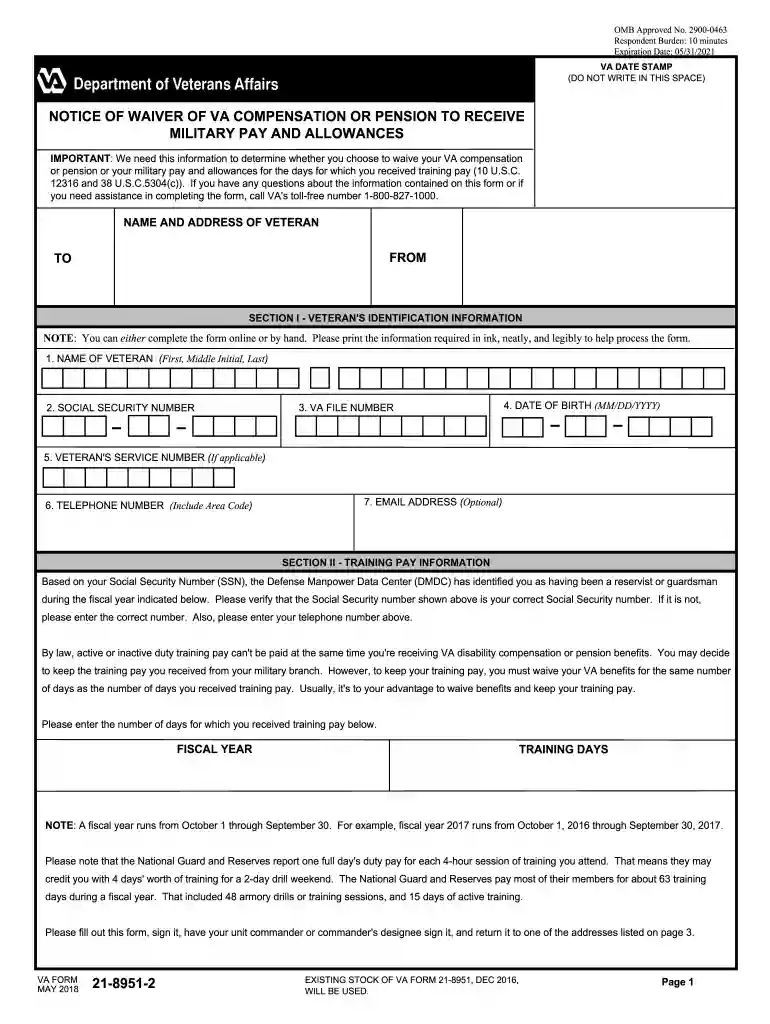
Va form 21 8951-2026

Get Form
21 8951 2 Preview on Page 1

Here's how it works

01. Edit your 21 8951 2 online
Type text, add images, blackout confidential details, add comments, highlights and more.

02. Sign it in a few clicks
Draw your signature, type it, upload its image, or use your mobile device as a signature pad.

03. Share your form with others
Send va 21 8951 2 via email, link, or fax. You can also download it, export it or print it out.

How to use or fill out VA Form 21-8951 with our platform

Form edit decoration
9.5
Ease of Setup
DocHub User Ratings on G2
9.0
Ease of Use
DocHub User Ratings on G2
  1. Click ‘Get Form’ to open VA Form 21-8951 in the editor.
  2. Begin by filling out Section I, which includes your identification information. Enter your name, Social Security number, VA file number, date of birth, service number (if applicable), telephone number, and email address.
  3. Proceed to Section II to provide training pay information. Verify your Social Security number and enter the fiscal year and the number of training days you received pay for.
  4. In Section III, check the appropriate boxes regarding your agreement with the training days listed and indicate whether you elect to waive VA benefits or military pay.
  5. Finally, complete Section IV by signing the form and obtaining your unit commander's signature. Ensure all dates are filled in correctly before submission.

Start using our platform today to fill out VA Form 21-8951 easily and for free!

See more va form 21 8951 versions

We've got more versions of the va form 21 8951 form. Select the right va form 21 8951 version from the list and start editing it straight away!
Versions Form popularity Fillable & printable
2020 4.8 Satisfied (80 Votes)
2018 4.2 Satisfied (42 Votes)
2005 4 Satisfied (37 Votes)
be ready to get more

Complete this form in 5 minutes or less

Get form

Got questions?

We have answers to the most popular questions from our customers. If you can't find an answer to your question, please contact us.
Contact us
The answer is yes, it is possible, but only under certain conditions. Retired veterans who have a disability rating of 50% or higher, or qualify for Combat Related Special Compensation (CRSC), are eligible to receive both benefits in full.
c. However, a Veteran may, on his/her own initiative, notify VA of his/her receipt (or anticipated receipt) of drill pay, and whether he/she chooses to waive VA benefits or drill pay, by completing and submitting VA Form 21-8951-2, Notice of Waiver of VA Compensation or Pension to Receive Military Pay and Allowances.
Yes, you can receive a 100% VA disability rating and military retirement through the Combat-Related Special Compensation (CRSC) or Concurrent Retirement and Disability Pay (CRDP) programs if you qualify.
Veterans receiving Total Disability Individual Unemployability benefits (TDIU) receive compensation at the same rate as those who are considered 100% disabled. However, it is generally easier to be approved for TDIU benefits than it is to earn a 100% rating under the VAs schedular criteria.
What is VA financial hardship? Financial hardship for purposes of requesting expediting of your VA disability claim means that you, the veteran, are unable to earn enough income to pay essential expenses such as housing payments or medical expenses relating to your disability.

Security and compliance

At DocHub, your data security is our priority. We follow HIPAA, SOC2, GDPR, and other standards, so you can work on your documents with confidence.

Learn more
ccpa2
pci-dss
gdpr-compliance
hipaa
soc-compliance
be ready to get more

Complete this form in 5 minutes or less

Get form

People also ask

Concurrent Retirement and Disability Pay (CRDP) allows military retirees to receive both military retired pay and Veterans Affairs (VA) compensation. This was prohibited until the CRDP program began on January 1, 2004. CRDP is a phase in of benefits that gradually restores a retirees VA disability offset.

va form 21 8951 2