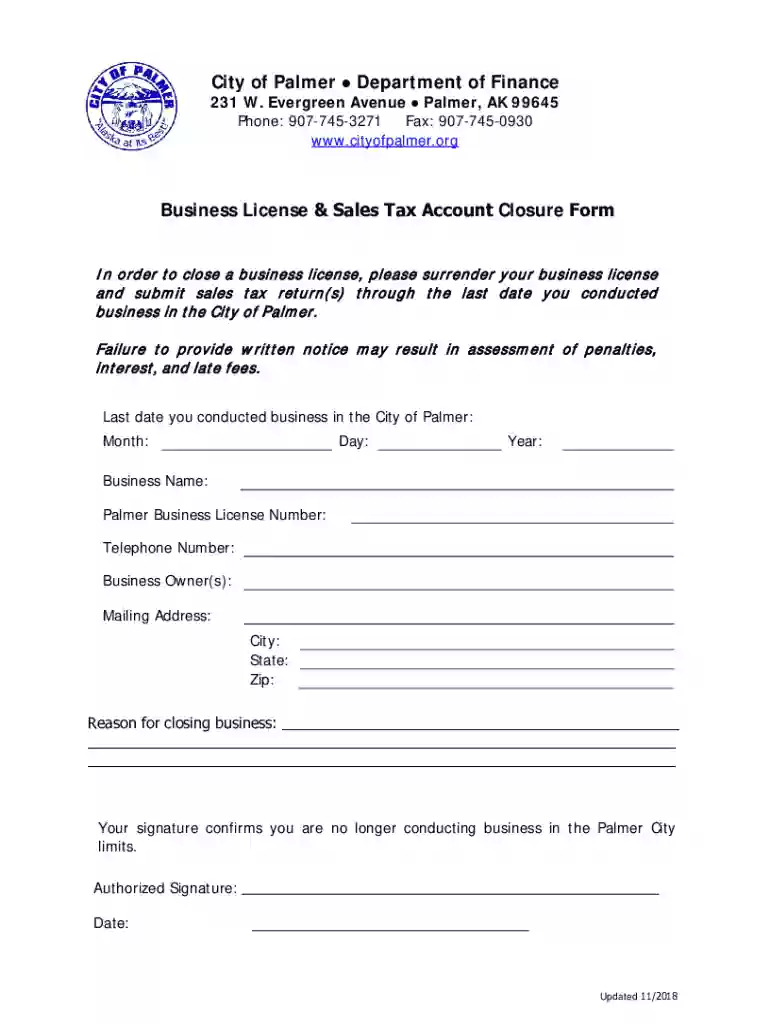
City of Palmer Department of Finance Business License 2026

Get Form
City of Palmer Department of Finance Business License Preview on Page 1

Here's how it works

01. Edit your form online
Type text, add images, blackout confidential details, add comments, highlights and more.

02. Sign it in a few clicks
Draw your signature, type it, upload its image, or use your mobile device as a signature pad.

03. Share your form with others
Send it via email, link, or fax. You can also download it, export it or print it out.

How to use or fill out City of Palmer Department of Finance Business License with our platform

Form edit decoration
9.5
Ease of Setup
DocHub User Ratings on G2
9.0
Ease of Use
DocHub User Ratings on G2
  1. Click ‘Get Form’ to open the Business License & Sales Tax Account Closure Form in the editor.
  2. Begin by entering the last date you conducted business in the City of Palmer. Fill in the Month, Day, and Year fields accurately.
  3. Next, provide your Business Name and Palmer Business License Number. Ensure these details match your official documents for consistency.
  4. Input your Telephone Number for any follow-up communications regarding your closure.
  5. List the Business Owner(s) names clearly to confirm who is responsible for this closure.
  6. Fill out your Mailing Address, including City, State, and Zip Code, so that any correspondence can reach you without delay.
  7. In the designated area, explain the Reason for closing your business. Be as detailed as necessary to avoid any confusion.
  8. Finally, sign and date the form to confirm that you are no longer conducting business within Palmer City limits.

Start using our platform today to easily complete and submit your Business License Closure Form online for free!

See more City of Palmer Department of Finance Business License versions

We've got more versions of the City of Palmer Department of Finance Business License form. Select the right City of Palmer Department of Finance Business License version from the list and start editing it straight away!
Versions Form popularity Fillable & printable
2018 4.8 Satisfied (128 Votes)
be ready to get more

Complete this form in 5 minutes or less

Get form

Got questions?

We have answers to the most popular questions from our customers. If you can't find an answer to your question, please contact us.
Contact us
Your business license number (sometimes called a company license number) can be found on your business license and is part of what allows you to legally operate. Your EIN (also called a tax ID) is a different number that the IRS uses to identify your business.
Virtually all businesses need an EIN, but its important to note that an EIN is a type of business registration number. So, what is a business registration number (BRN)? There are different types of BRNs depending on the type of business and the location where it is registered.
No matter what type of business you start in Alaska, you will be required to obtain a state of Alaska Business license​. This is a requirement for all types of business entities (Sole Proprietor, Partnership, LLC, S Corporation, Non Profit, etc.)
The purpose of a business license is to claim the right to own and operate a business. In contrast, business permits are a type of licensure devoted to a certain aspect of public safety.
To renew or reapply for a business license, please login to your MUNIRevs account here. If your account is inactive, closed, you need your activation code or you do not have a renewal in your Open Task list, please contact the City at salestax@palmerak.org or 907-745-3271 to assist you.

Security and compliance

At DocHub, your data security is our priority. We follow HIPAA, SOC2, GDPR, and other standards, so you can work on your documents with confidence.

Learn more
ccpa2
pci-dss
gdpr-compliance
hipaa
soc-compliance

People also ask

A business license number is issued by state or local governments to authorize operations, while an Employer Identification Number (EIN) is issued by the IRS for tax purposes. 4.

Related links