Type text, add images, blackout confidential details, add comments, highlights and more.

02. Sign it in a few clicks
Draw your signature, type it, upload its image, or use your mobile device as a signature pad.

03. Share your form with others
Send carrier common via email, link, or fax. You can also download it, export it or print it out.

How to use or fill out what is form op 1 with our platform
Ease of Setup
DocHub User Ratings on G2
Ease of Use
DocHub User Ratings on G2
Click ‘Get Form’ to open it in the editor.
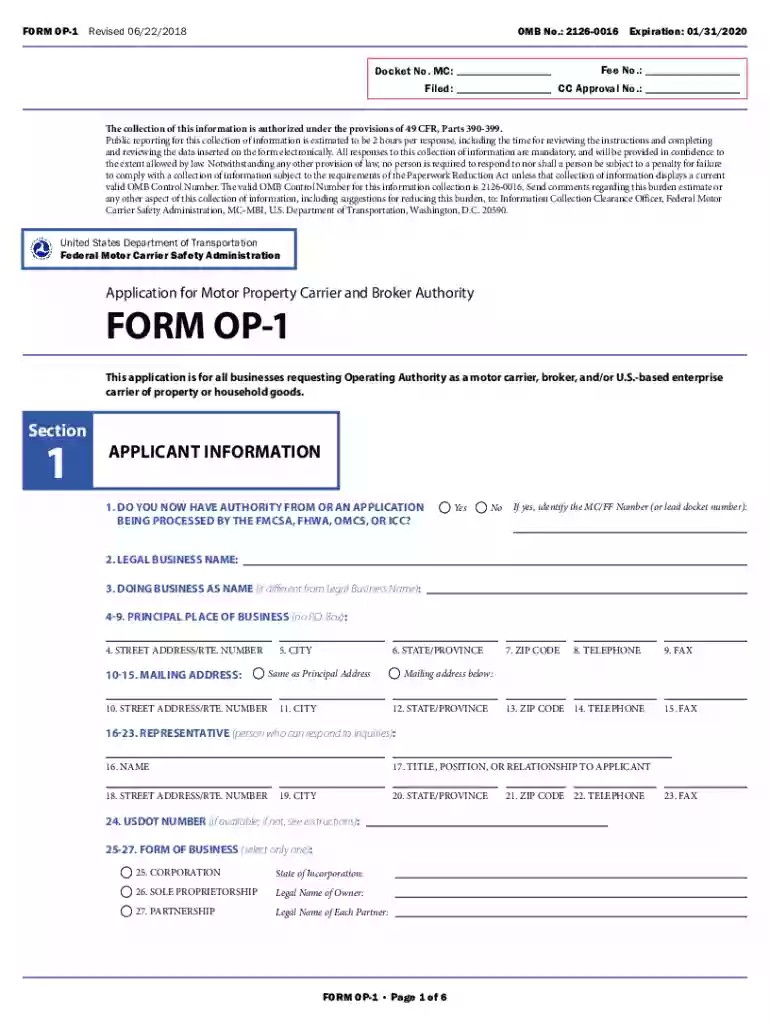
Begin by filling out Section 1, 'Applicant Information.' Enter your legal business name, doing business as name (if applicable), and principal place of business. Ensure that the information matches your insurance documents to avoid delays.
In Section 2, 'Type of Operating Authority,' check all applicable boxes for the type of authority you are requesting. Remember, each box checked incurs a $300 fee.
Proceed to Section 3, 'Insurance Information.' If you will operate vehicles over 10,000 pounds, select the appropriate insurance coverage options based on the commodities you will transport.
Complete Section 4 regarding safety certification if applicable. This ensures compliance with federal regulations for vehicle operation.
Finally, review all sections for accuracy and completeness before submitting your application through our platform or by mail.
Start using our platform today to streamline your form completion process for free!
What is form op 1 pdfWhat is form op 1 onlineWhat is form op 1 for fmcsaOP-1 form onlineFMCSA applicants Oath form pdfForm op 1 ffForm op 1 nnaOP 1 instructions
Security and compliance
At DocHub, your data security is our priority. We follow HIPAA, SOC2, GDPR, and other standards, so you can work on your documents with confidence.
365.105T Starting the application process: Form OP-1.
Form OP-1 must be filed when requesting authority to operate as a motor property carrier, a broker of general freight, or a broker of household goods.Read more
Feb 8, 2018 Your employer must give you a Form W-2 (or similar statement), showing in box 10 the total amount of dependent care benefits provided to you.Read more
Cookie consent notice
This site uses cookies to enhance site navigation and personalize your experience.
By using this site you agree to our use of cookies as described in our Privacy Notice.
You can modify your selections by visiting our Cookie and Advertising Notice.