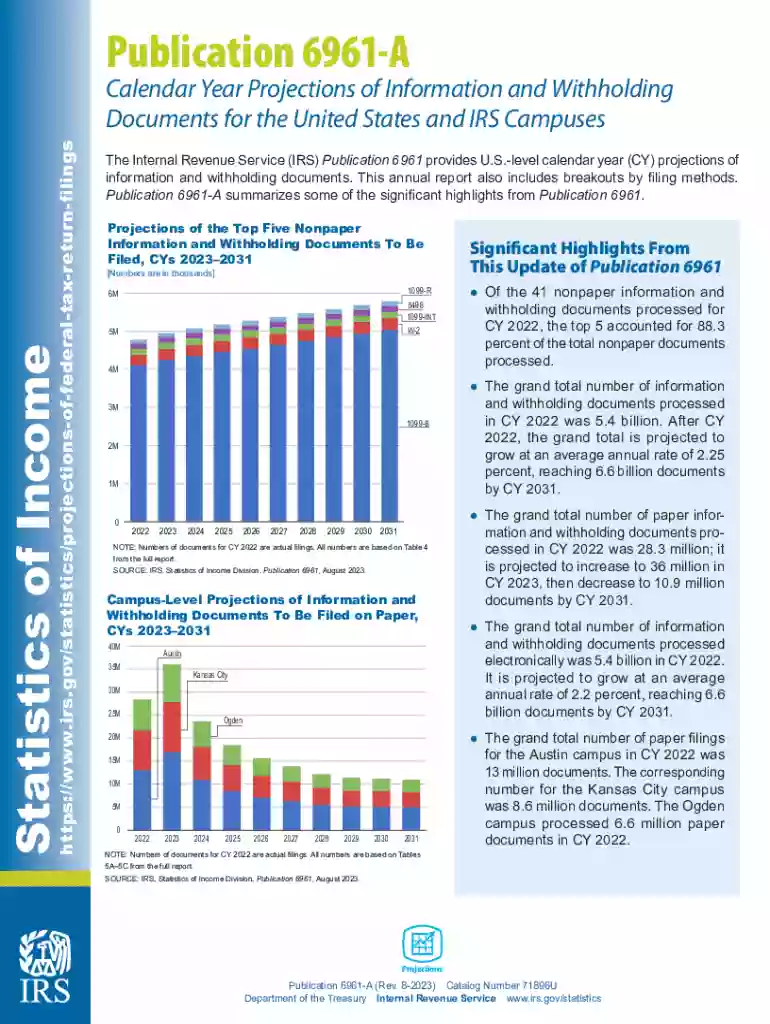
Publication 6961 - Calendar Year Projections-2026

Get Form
Publication 6961 - Calendar Year Projections Preview on Page 1

Here's how it works

01. Edit your form online
Type text, add images, blackout confidential details, add comments, highlights and more.

02. Sign it in a few clicks
Draw your signature, type it, upload its image, or use your mobile device as a signature pad.

03. Share your form with others
Send it via email, link, or fax. You can also download it, export it or print it out.

How to use or fill out Publication 6961 - Calendar Year Projections with our platform

Form edit decoration
9.5
Ease of Setup
DocHub User Ratings on G2
9.0
Ease of Use
DocHub User Ratings on G2
  1. Click ‘Get Form’ to open Publication 6961 in the editor.
  2. Begin by reviewing the introduction section, which outlines the purpose of the publication and its significance in understanding federal tax return projections.
  3. Navigate to the projections table for nonpaper information and withholding documents. Here, you can input your own data or notes directly into the fields provided.
  4. Examine the campus-level projections section. Use our platform's annotation tools to highlight key figures or add comments relevant to your analysis.
  5. Finally, ensure all sections are completed accurately. Utilize our platform’s save feature to keep your progress secure before exporting or sharing your filled document.

Start using our platform today for free to streamline your document editing and completion process!

See more Publication 6961 - Calendar Year Projections versions

We've got more versions of the Publication 6961 - Calendar Year Projections form. Select the right Publication 6961 - Calendar Year Projections version from the list and start editing it straight away!
Versions Form popularity Fillable & printable
2023 4.1 Satisfied (43 Votes)
2021 4.8 Satisfied (42 Votes)
2020 4.4 Satisfied (141 Votes)
be ready to get more

Complete this form in 5 minutes or less

Get form

Got questions?

We have answers to the most popular questions from our customers. If you can't find an answer to your question, please contact us.
Contact us
A tax year is an annual accounting period for keeping records and reporting income and expenses. An annual accounting period does not include a short tax year. The tax years you can use are: Calendar year 12 consecutive months beginning January 1 and ending December 31.
File Form 1128 to request a change in tax year.
Key Takeaways. A calendar year is a one-year period between January 1 and December 31, based on the Gregorian calendar. The calendar year commonly coincides with the fiscal year for individual and corporate taxation.
Generally, taxpayers filing a version of Form 1040 use the calendar year. An individual can adopt a fiscal year if the individual maintains his or her books and records on the basis of the adopted fiscal year. Fiscal year comprises 12 full months, but not in the same calendar year.
A tax year refers to the 12-month period that a tax return covers. Most filers are subject to a calendar tax year beginning January 1 and ending December 31. Tax returns for the year are usually due on April 15 of the following year. Business taxes may be filed using a calendar year or a fiscal year.

Security and compliance

At DocHub, your data security is our priority. We follow HIPAA, SOC2, GDPR, and other standards, so you can work on your documents with confidence.

Learn more
ccpa2
pci-dss
gdpr-compliance
hipaa
soc-compliance

People also ask

A fiscal year, unlike a calendar year, can begin and end in any month. It is used by businesses and governments to synchronize business and tax planning.
Return due date 15th day of the 4th month after the close of your tax year.
If youre a calendar year filer and your tax year ends on December 31, the due date for filing your federal individual income tax return is generally April 15 of each year.

Related links