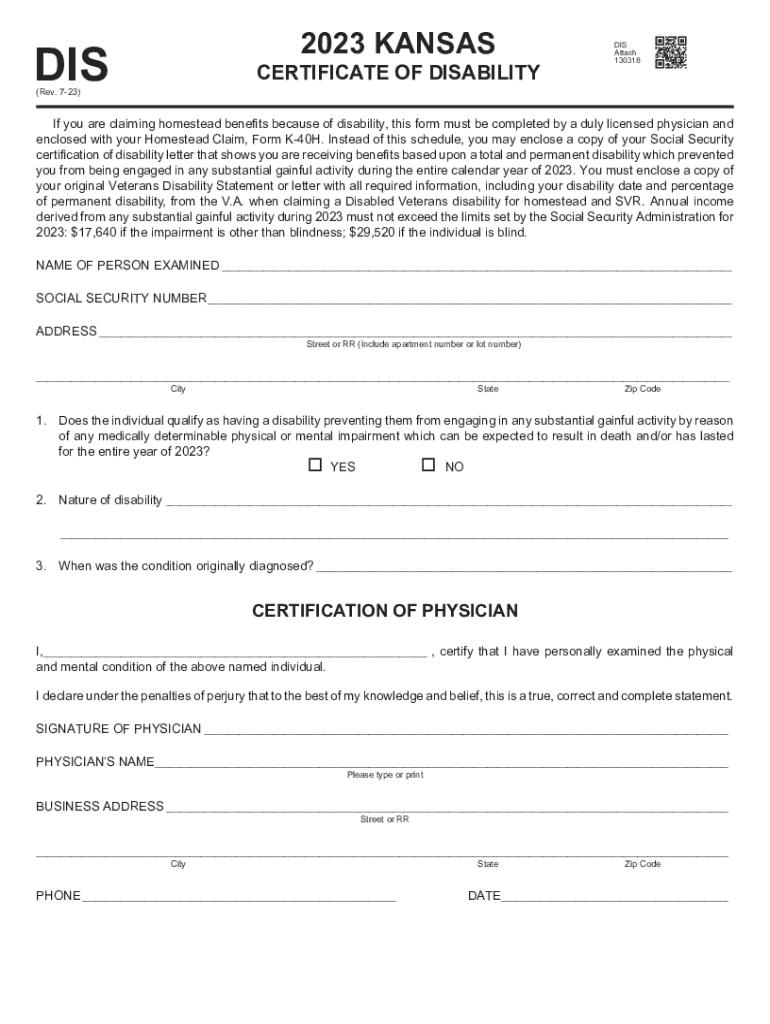
Disability Homestead - Physicians Statement 2026

Get Form
Disability Homestead - Physicians Statement Preview on Page 1

Here's how it works

01. Edit your form online
Type text, add images, blackout confidential details, add comments, highlights and more.
02. Sign it in a few clicks
Draw your signature, type it, upload its image, or use your mobile device as a signature pad.
03. Share your form with others
Send it via email, link, or fax. You can also download it, export it or print it out.

How to use or fill out Disability Homestead - Physicians Statement with our platform

Form edit decoration
9.5
Ease of Setup
DocHub User Ratings on G2
9.0
Ease of Use
DocHub User Ratings on G2
  1. Click ‘Get Form’ to open the Disability Homestead - Physicians Statement in the editor.
  2. Begin by entering the name of the person examined in the designated field. Ensure accuracy as this information is crucial for identification.
  3. Input the Social Security Number and address, including street, city, state, and zip code. Double-check for any typos to avoid processing delays.
  4. Respond to question 1 regarding the individual's disability status by selecting 'YES' or 'NO'. This is essential for determining eligibility.
  5. In section 2, describe the nature of the disability clearly and concisely. This helps provide context for your claim.
  6. Indicate when the condition was originally diagnosed in section 3. Accurate dates are important for verification purposes.
  7. The physician must complete their certification by signing and providing their name, business address, phone number, and date at the bottom of the form.

Start using our platform today to fill out your Disability Homestead - Physicians Statement online for free!

See more Disability Homestead - Physicians Statement versions

We've got more versions of the Disability Homestead - Physicians Statement form. Select the right Disability Homestead - Physicians Statement version from the list and start editing it straight away!
Versions Form popularity Fillable & printable
2023 4.9 Satisfied (57 Votes)
2022 4.6 Satisfied (34 Votes)
2021 4.8 Satisfied (213 Votes)
2020 4.3 Satisfied (88 Votes)
be ready to get more

Complete this form in 5 minutes or less

Get form

Got questions?

We have answers to the most popular questions from our customers. If you can't find an answer to your question, please contact us.
Contact us
Let Your Doctor Know About Your Disabling Conditions Bring a copy of your written limitations with you to your doctors appointment. Once youre in the doctors office, mention that youve made a list of the problems you have with doing certain things and give it to your doctor.
A well-written doctor letter can: Confirm your diagnosis and describe the severity of your condition. Explain how your symptoms affect your ability to perform daily activities and work tasks. Clarify inconsistencies or gaps in your records.
What Information Do I Need to File a Claim? The only information you need from your doctor to apply for disability is their name and contact information. However, we recommend submitting other information to help your case. First, you will need to supply the name and contact information for all of your doctors.
An Attending Physician Statement (APS) is a form questionnaire from the insurance company that your treating doctor must complete. The purpose of the APS is for your doctor to docHub your inability to work.
Simply stating that the patient is disabled or the patient is prohibited from working is not sufficient to advance your claim. The letter should address your specific problems, including limitations related to your physical activity, cognitive abilities, and other impairments.

Security and compliance

At DocHub, your data security is our priority. We follow HIPAA, SOC2, GDPR, and other standards, so you can work on your documents with confidence.

Learn more
ccpa2
pci-dss
gdpr-compliance
hipaa
soc-compliance