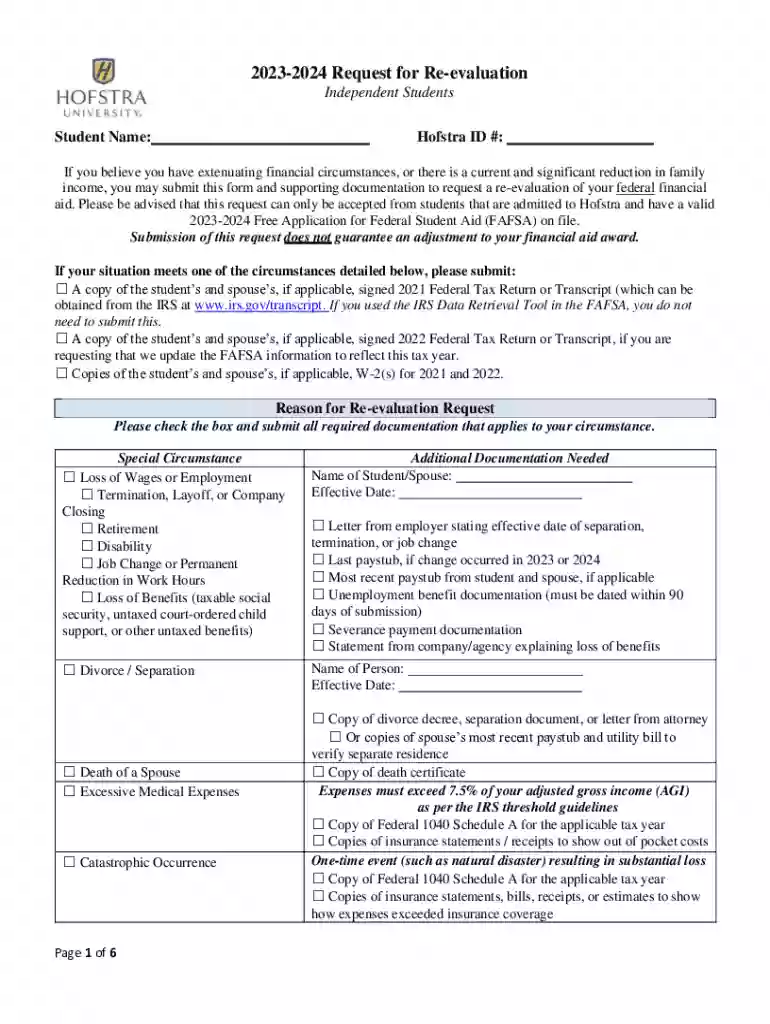
2023-2024 Request for Re-evaluation - Independent Students-2026

Get Form
2023-2024 Request for Re-evaluation - Independent Students Preview on Page 1

Here's how it works

01. Edit your form online
Type text, add images, blackout confidential details, add comments, highlights and more.

02. Sign it in a few clicks
Draw your signature, type it, upload its image, or use your mobile device as a signature pad.

03. Share your form with others
Send it via email, link, or fax. You can also download it, export it or print it out.

How to use or fill out 2023-2024 Request for Re-evaluation - Independent Students with DocHub

Form edit decoration
9.5
Ease of Setup
DocHub User Ratings on G2
9.0
Ease of Use
DocHub User Ratings on G2
  1. Click ‘Get Form’ to open the 2023-2024 Request for Re-evaluation - Independent Students in our editor.
  2. Begin by entering your Student Name and Hofstra ID # at the top of the form. Ensure these details are accurate as they are essential for processing your request.
  3. If applicable, check the boxes under 'Reason for Re-evaluation Request' that correspond to your circumstances, such as loss of wages or excessive medical expenses. Attach any required documentation as specified.
  4. In the 'Estimated 2023 Income Information' section, fill in all income sources accurately. If a source does not apply, enter '0' instead of leaving it blank.
  5. Complete the 'Household Information' section by listing all members residing in your household along with their ages and relationships to you.
  6. Finally, review all entered information for accuracy before signing and dating the certification section at the end of the form.

Start using our platform today to easily complete your re-evaluation request online for free!

See more 2023-2024 Request for Re-evaluation - Independent Students versions

We've got more versions of the 2023-2024 Request for Re-evaluation - Independent Students form. Select the right 2023-2024 Request for Re-evaluation - Independent Students version from the list and start editing it straight away!
Versions Form popularity Fillable & printable
2023 4.3 Satisfied (39 Votes)
2020 4.7 Satisfied (47 Votes)
2016 4.8 Satisfied (32 Votes)
be ready to get more

Complete this form in 5 minutes or less

Get form

Got questions?

We have answers to the most popular questions from our customers. If you can't find an answer to your question, please contact us.
Contact us
When there are unusual situations or special circumstances that impact your federal student aid eligibility, federal regulations give a financial aid administrator discretion or professional judgment on a case-by-case basis and with adequate documentation to make adjustments to the data elements on the Free Application
If youre not able to find the FAFSA form you were invited to after logging in to your account Dashboard, its likely information (such as, your name, Social Security number, or address) in the invitation doesnt exactly match the personal information you provided when creating your StudentAid.gov account.
The history of your 202425 Free Application for Federal Student Aid (FAFSA) form and any corrections youve made to your form are displayed on the Submission History card in My Activity. To access it, select a FAFSA transaction or submission from My Activity or from the My Activity card on your account
How do I view my FAFSA Submission Summary? logging in to StudentAid.gov using your account username and password; selecting your processed FAFSA submission from the My Activity page, which will bring you to the Status Center Details page; and. selecting View FAFSA Submission Summary.
Special financial circumstances may include the following situations: docHub changes to your financial situation, such as loss of employment or pay cuts. Tuition expenses at an elementary or secondary school. High amounts of medical or dental expenses not covered by insurance.

Security and compliance

At DocHub, your data security is our priority. We follow HIPAA, SOC2, GDPR, and other standards, so you can work on your documents with confidence.

Learn more
ccpa2
pci-dss
gdpr-compliance
hipaa
soc-compliance

People also ask

How to View and Print Your Student Aid Report Visit FAFSA and click Log In. Enter your (the students) FSA ID, or enter the students information. Under My FAFSA click the tab for the appropriate academic aid year. Click the hyperlink View or Print your Student Aid Report (SAR)
Getting Your FAFSA Submission Summary logging in to your StudentAid.gov account Dashboard, selecting your processed FAFSA submission from the My Activity section, and. selecting View FAFSA Submission Summary.

Related links