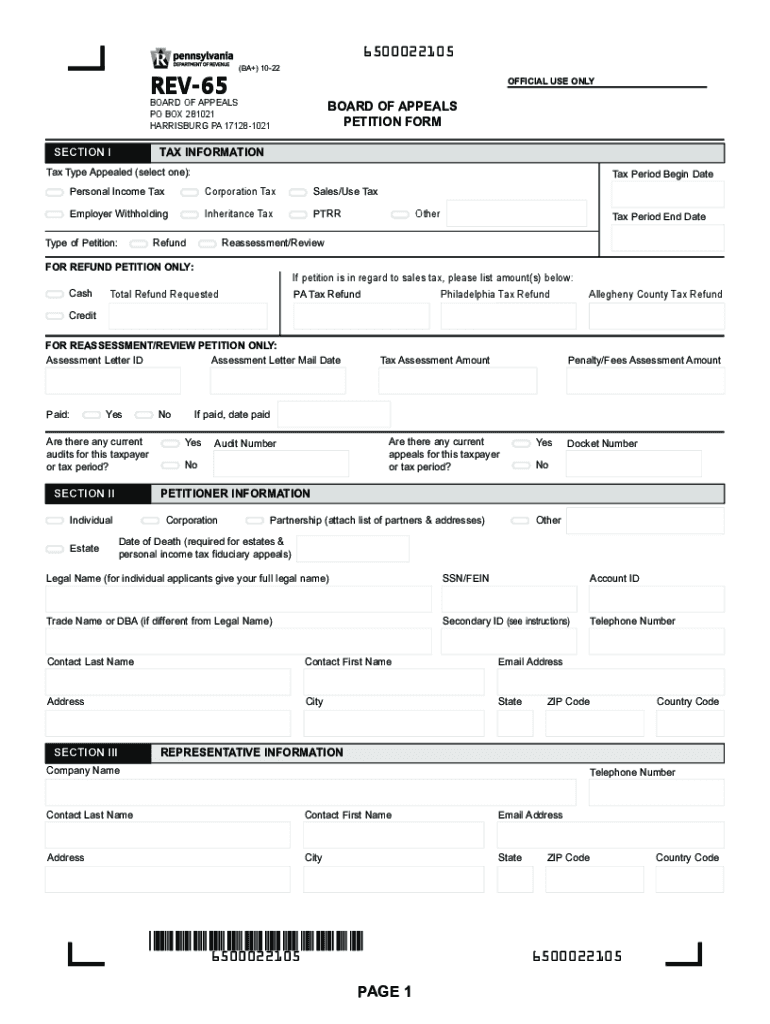
Board of Appeals EPetition Center - Business Tax e-Services 2026

Get Form
Board of Appeals EPetition Center - Business Tax e-Services Preview on Page 1

Here's how it works

01. Edit your form online
Type text, add images, blackout confidential details, add comments, highlights and more.
02. Sign it in a few clicks
Draw your signature, type it, upload its image, or use your mobile device as a signature pad.
03. Share your form with others
Send it via email, link, or fax. You can also download it, export it or print it out.

How to use or fill out Board of Appeals EPetition Center - Business Tax e-Services

Form edit decoration
9.5
Ease of Setup
DocHub User Ratings on G2
9.0
Ease of Use
DocHub User Ratings on G2
  1. Download the form to your computer before starting. Ensure you have a reliable PDF editor ready.
  2. Open the downloaded form in our platform. Begin by filling out Section I, selecting the tax type you are appealing and entering the relevant dates.
  3. In Section II, provide your personal information as the petitioner. This includes your legal name, SSN/FEIN, and contact details.
  4. If applicable, complete Section III with representative information if someone is acting on your behalf.
  5. Proceed to Section IV to indicate whether you are requesting a hearing. Choose your preferred method for correspondence in Section V.
  6. Detail the issues involved in Section VI, providing clear arguments for your appeal. Attach additional sheets if necessary.
  7. Finally, complete Section VII by signing and dating the petition. Ensure all required signatures are included before submission.

Start using our platform today to streamline your petition process effortlessly!

See more Board of Appeals EPetition Center - Business Tax e-Services versions

We've got more versions of the Board of Appeals EPetition Center - Business Tax e-Services form. Select the right Board of Appeals EPetition Center - Business Tax e-Services version from the list and start editing it straight away!
Versions Form popularity Fillable & printable
2022 4.5 Satisfied (23 Votes)
2020 4.8 Satisfied (39 Votes)
2017 4.3 Satisfied (70 Votes)
2015 4.3 Satisfied (120 Votes)
2006 3.7 Satisfied (33 Votes)
be ready to get more

Complete this form in 5 minutes or less

Get form

Got questions?

We have answers to the most popular questions from our customers. If you can't find an answer to your question, please contact us.
Contact us

Electronic signatures are a perfect replacement for traditional signing, as they save time, effort, and costs people spend on printing, scanning, and paper delivery. You can electronically sign your Board of Appeals EPetition Center - Business Tax e-Services using a trustworthy and powerful online document management tool like DocHub. It complies with main eSignature standards (ESIGN and UETA), so all documents approved there are legally binding and have the same validity as manually signed ones.

You can quickly fill out, modify, and even eSign your Board of Appeals EPetition Center - Business Tax e-Services utilizing DocHub. Create a new profile and begin your free trial. After that, you may upload the file with the form and simply make all the necessary edits. No need to print on paper or use a third-party application to sign it, as you can place your electronic signature on your document faster through DocHub.

You may appeal by mail or fax: Wisconsin Department of Revenue PO Box 8903 Madison, WI 53708-8903 FAX: (608) 224-5758 You may appeal online for individual income tax, fiduciary income tax, homestead credit, occasional consumer use tax and miscellaneous motor fuel tax. File an appeal at My Tax Account.
If you disagree with the final determination made by the Comptrollers Office, you may appeal to the Maryland Tax Court for a de novo review within 30 days of the date listed in the notice of final determination. Please see the following link for the tax court: .
(608) 266‑2486 Wisconsin Department of Revenue / Customer service

Security and compliance

At DocHub, your data security is our priority. We follow HIPAA, SOC2, GDPR, and other standards, so you can work on your documents with confidence.

Learn more
ccpa2
pci-dss
gdpr-compliance
hipaa
soc-compliance

People also ask

Filing with the Board of Tax Appeals All BOR decisions can be appealed through the Board of Tax Appeals (BTA) free of charge. You can electronically at or hard copy file with a DTE Form 4. To file online, you will need to create an account with a user name and password.
Usually this is 4 to 7 years from the due date of the return, or the date filed, whichever is later. If you under-report your income on your return by 25% or more, the statute of limitations is 6 years from the due date of the return or the date filed, whichever is later.
First, a property owner must provide the BOR clerk with a written or oral notice of intent to file an objection at least 48 hours before the first scheduled BOR meeting. The property owner must then fill out a written Objection Form for Real Property Assessment (PA-115A).
Overview File via myPATH: An easy, convenient, and secure way to file a business tax return and make payments. Pay your balances with your bank account and routing information or by credit or debit card. File by phone using TeleFile. Call 717-787-1064 to request and submit a TeleFile Request Form.

Related links