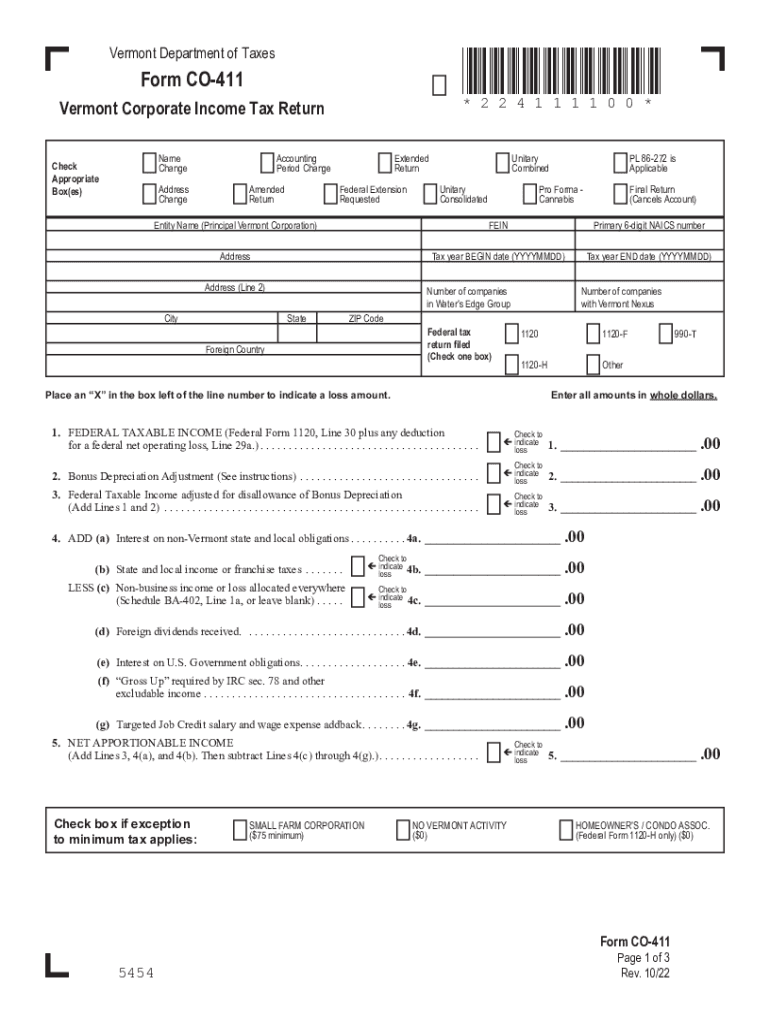
Vermont tax form co-411 - Dana and Rahman Tukan 2026

Get Form
vermont co 411 Preview on Page 1

Here's how it works

01. Edit your vermont co 411 online
Type text, add images, blackout confidential details, add comments, highlights and more.
02. Sign it in a few clicks
Draw your signature, type it, upload its image, or use your mobile device as a signature pad.
03. Share your form with others
Send vermont form co 411 via email, link, or fax. You can also download it, export it or print it out.

How to use or fill out Vermont tax form co-411 - Dana and Rahman Tukan with our platform

Form edit decoration
9.5
Ease of Setup
DocHub User Ratings on G2
9.0
Ease of Use
DocHub User Ratings on G2
  1. Click ‘Get Form’ to open it in the editor.
  2. Begin by entering the Entity Name and FEIN at the top of the form. Ensure that all information is accurate to avoid processing delays.
  3. Fill in the fiscal year ending date in the specified format (YYYYMMDD) to indicate your reporting period.
  4. Complete Section 1 by providing your Federal Taxable Income, including any adjustments for losses. Use checkboxes to indicate if there are any loss amounts.
  5. Proceed to Section 6, where you will calculate your Vermont Percentage. This is crucial for determining your apportioned income.
  6. In Section 11, sum up your Net Vermont Income Allocated and Apportioned. Make sure to double-check calculations for accuracy.
  7. Finally, review all sections before signing at the bottom of the form. Ensure that all required fields are filled out correctly.

Start using our platform today for free to simplify your tax filing process!

See more Vermont tax form co-411 - Dana and Rahman Tukan versions

We've got more versions of the Vermont tax form co-411 - Dana and Rahman Tukan form. Select the right Vermont tax form co-411 - Dana and Rahman Tukan version from the list and start editing it straight away!
Versions Form popularity Fillable & printable
2022 4.1 Satisfied (45 Votes)
2021 4.8 Satisfied (183 Votes)
2019 4.2 Satisfied (101 Votes)
2018 4.4 Satisfied (241 Votes)
2015 4.3 Satisfied (116 Votes)
2014 4.4 Satisfied (461 Votes)
2012 4 Satisfied (48 Votes)
2011 4 Satisfied (23 Votes)
2010 4.2 Satisfied (68 Votes)
be ready to get more

Complete this form in 5 minutes or less

Get form

Got questions?

We have answers to the most popular questions from our customers. If you can't find an answer to your question, please contact us.
Contact us

Yes, you’ll find many different applications for this on the web. Nevertheless, if you need to eSign your vt co 411 without installing additional software, DocHub is the best choice you can make. This robust editor works on mobile devices just as on desktops. Open our editor in any internet browser, register or log in to your account, and start managing your forms.

Apart from an extensive toolset for editing PDFs on mobile phones, DocHub allows you to sign your vermont form co 411 2022 along the way. Open our editor in your web browser, make modifications using DocHub’s toolset, and complete your editing by eSigning the completed form.

Vermont, located in the northeastern region of the United States, is a popular retirement destination for many Americans seeking a peaceful and scenic environment with access to outdoor activities, cultural events, and a moderate climate.
Elderly or Permanently Disabled Tax Credit This is a tax credit to assist seniors and persons who are disabled with minimal tax-exempt retirement or disability income. If you qualify for the federal Credit for the Elderly or the Disabled, then you may qualify for the Vermont credit, which is 24% of the federal amount.
Individuals/entities who fall under the following criteria must file income tax returns. Gross income more than Rs. 2.5 lakhs - The gross annual income of an individual should exceed Rs. 2.5 lakh after applying deductions under various Sections of the Income Tax Act.

Security and compliance

At DocHub, your data security is our priority. We follow HIPAA, SOC2, GDPR, and other standards, so you can work on your documents with confidence.

Learn more
ccpa2
pci-dss
gdpr-compliance
hipaa
soc-compliance
be ready to get more

Complete this form in 5 minutes or less

Get form

People also ask

Vermont Retirement Taxes It taxes most forms of retirement income at rates ranging from 3.35% to 8.75%. This includes Social Security retirement benefits and income from most types of retirement accounts. The only type of retirement income thats exempt from Vermont taxes is federal railroad retirement benefits.
You qualify as a Vermont resident for that part of the taxable year during which: You are domiciled in Vermont, or. You maintain a permanent home in Vermont, and you are present in Vermont for more than 183 days of the taxable year.
You must file an income tax return in Vermont: if you are a resident, part-year resident of Vermont, or a nonresident but earned Vermont income, and. if you are required to file a federal income tax return, and. you earned or received more than $100 in Vermont income, or.
Vermont Retirement Taxes Out-of-state government pensions and other retirement income are taxed at rates from 3.35% to 8.75%. Those who qualify for the federal Credit for the Elderly or the Disabled are entitled to a tax credit.
You must file an income tax return in Vermont: if you are a resident, part-year resident of Vermont, or a nonresident but earned Vermont income, and. if you are required to file a federal income tax return, and. you earned or received more than $100 in Vermont income, or.

co 411