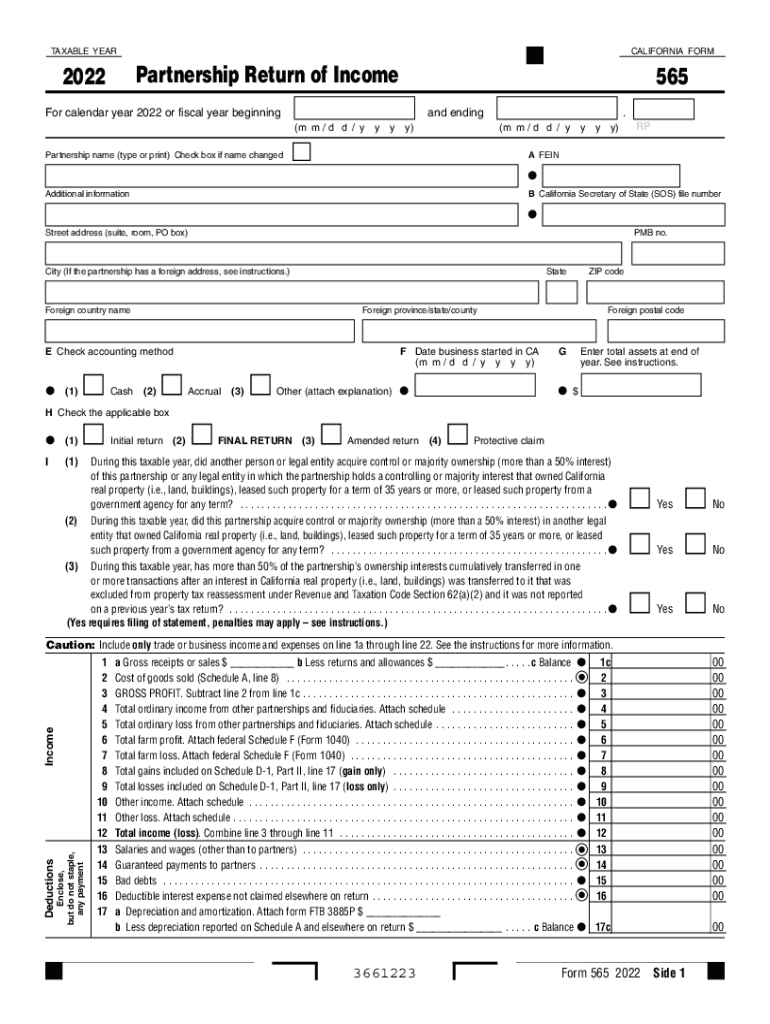
2022 California Form 565 Partnership Return of Income 2022, California Form 565, Partnership Return -2026

Get Form
ca 565 instructions Preview on Page 1

Here's how it works

01. Edit your ca 565 instructions online
Type text, add images, blackout confidential details, add comments, highlights and more.
02. Sign it in a few clicks
Draw your signature, type it, upload its image, or use your mobile device as a signature pad.
03. Share your form with others
Send ca form 565 instructions via email, link, or fax. You can also download it, export it or print it out.

How to use or fill out 2022 California Form 565 Partnership Return of Income 2022 with our platform

Form edit decoration
9.5
Ease of Setup
DocHub User Ratings on G2
9.0
Ease of Use
DocHub User Ratings on G2
  1. Click ‘Get Form’ to open the 2022 California Form 565 in the editor.
  2. Begin by entering the taxable year and partnership name. If there has been a name change, check the appropriate box.
  3. Fill in the Federal Employer Identification Number (FEIN) and California Secretary of State file number, along with the partnership's address details.
  4. Select your accounting method (Cash or Accrual) and indicate if this is an initial, final, or amended return.
  5. Complete the income section by entering gross receipts, cost of goods sold, and calculating gross profit. Ensure to attach any necessary schedules for deductions.
  6. Review all sections carefully for accuracy before submitting. Utilize our platform’s features to save your progress and make edits as needed.

Start filling out your form online for free today!

See more 2022 California Form 565 Partnership Return of Income 2022, California Form 565, Partnership Return versions

We've got more versions of the 2022 California Form 565 Partnership Return of Income 2022, California Form 565, Partnership Return form. Select the right 2022 California Form 565 Partnership Return of Income 2022, California Form 565, Partnership Return version from the list and start editing it straight away!
Versions Form popularity Fillable & printable
2022 4.3 Satisfied (53 Votes)
2021 4.7 Satisfied (33 Votes)
2020 4.8 Satisfied (110 Votes)
2019 4.2 Satisfied (92 Votes)
2018 4.4 Satisfied (73 Votes)
2011 4.3 Satisfied (28 Votes)
be ready to get more

Complete this form in 5 minutes or less

Get form

Got questions?

We have answers to the most popular questions from our customers. If you can't find an answer to your question, please contact us.
Contact us

Signing documents on a mobile device is quick, easy, and doesn’t require software installation if you have an account with DocHub. Log in from any browser, complete your blank fields with your data, and click on Sign → Create your signature. You can draw your electronic signature the same way you usually do on paper, add its picture to your california form 565, or type in your name and stylize its look. Whatever option you choose, your paperwork will be valid.

It is a no-brainer on a computer or via a mobile phone to complete a ca form 565 with DocHub. All you need to do is open any installed web browser on your smartphone and go to the DocHub site. Once authenticated, add your document and open it in editing mode. Use our toolbar to make your edits and save adjustments. Optionally, keep your document in your files or send it to a recipient immediately.

Option 1: Sign into your eFile.com account, modify your Return and download/print your updated CA Form 540/540NR under My Account. Then, complete Schedule X (amended return explanation). Attach Schedule X to your updated Form 540/540NR, sign the amended return and mail it to one of the addresses listed below.
If you need to make a change or adjustment on a return already filed, you can file an amended return. Use Form 1040-X, Amended U.S. Individual Income Tax Return, and follow the instructions.
Previous year amendments can be completed for free, but will need to be mailed in as the IRS does not accept e-filed returns for years that have passed. It does not cost anything to fill in and mail a tax amendment.

Security and compliance

At DocHub, your data security is our priority. We follow HIPAA, SOC2, GDPR, and other standards, so you can work on your documents with confidence.

Learn more
ccpa2
pci-dss
gdpr-compliance
hipaa
soc-compliance
be ready to get more

Complete this form in 5 minutes or less

Get form

People also ask

If an audit is already underway, however, you should not amend your return at that point. You should simply tell the agent conducting the audit about the mistake and explain why it happened. You do not need to file an amended return if you made a mistake in your math.
To produce the amended return on the CA 565 or CA 568, select Amended Return under line G on federal screen 1 (Name, Address, and General Info.). Complete the amended return as necessary.
As a nonresident, you pay tax on your taxable income from California sources. Sourced income includes, but is not limited to: Services performed in California. Rent from real property located in California.
If you decide to file your Partnership Tax Return online, the first thing you need to do is register with our online service and then purchase commercial software. Youll need information about the partnerships business, including any investments.
The California Franchise Tax rates depend on your businesss tax classification: C corporations: 8.84% S corporations: 1.5% Partnerships (such as LLCs, LPs, LLPs, LLLPs): $800.

california 565