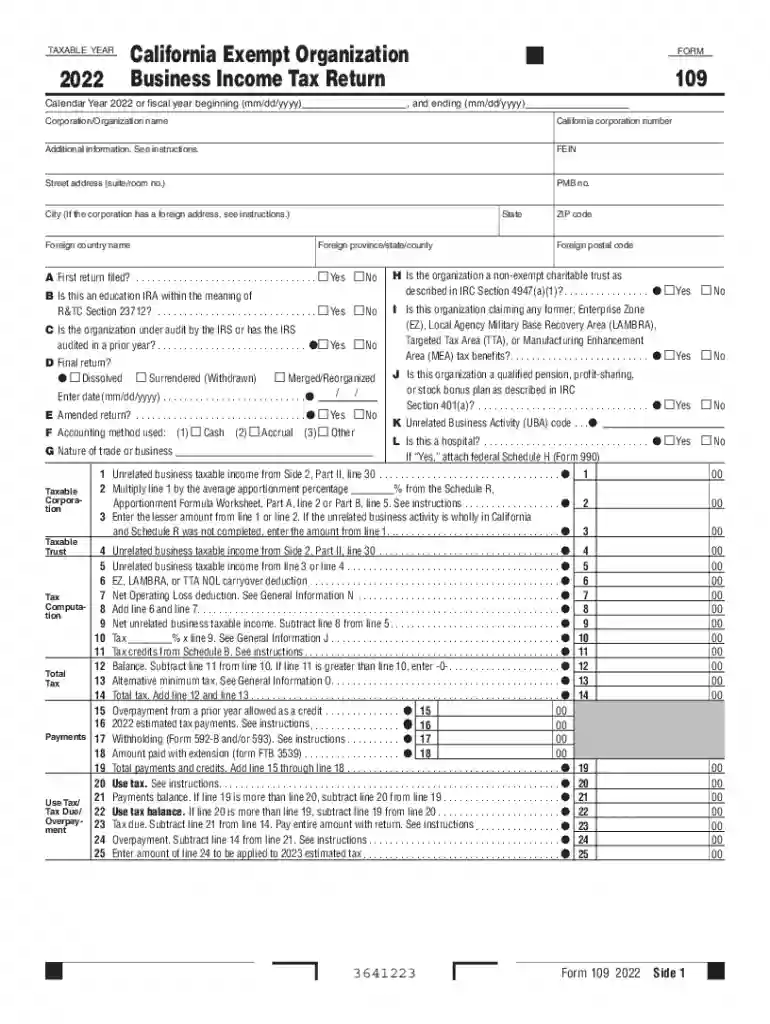
2022 Form 109 - California Exempt Organization Business Income Tax Return 2022 Form 109 - California-2026

Get Form
form 109 online Preview on Page 1

Here's how it works

01. Edit your form 109 online online
Type text, add images, blackout confidential details, add comments, highlights and more.

02. Sign it in a few clicks
Draw your signature, type it, upload its image, or use your mobile device as a signature pad.

03. Share your form with others
Send what is form 109 california via email, link, or fax. You can also download it, export it or print it out.

How to use or fill out 2022 Form 109 - California Exempt Organization Business Income Tax Return with our platform

Form edit decoration
9.5
Ease of Setup
DocHub User Ratings on G2
9.0
Ease of Use
DocHub User Ratings on G2
  1. Click ‘Get Form’ to open the 2022 Form 109 in the editor.
  2. Begin by entering your organization’s name, California corporation number, and FEIN in the designated fields at the top of the form.
  3. Indicate whether this is your first return, if you are under audit, or if it is a final return by checking the appropriate boxes.
  4. Fill out the accounting method used (cash or accrual) and provide details about your nature of trade or business.
  5. Proceed to report unrelated business taxable income on Side 2. Enter gross receipts and any deductions directly connected with that income.
  6. Complete tax computation sections, including any applicable credits and payments made. Ensure all calculations are accurate before submission.
  7. Finally, review all entries for completeness and accuracy before signing and submitting your form electronically through our platform.

Start using our platform today for free to simplify your form completion process!

See more 2022 Form 109 - California Exempt Organization Business Income Tax Return 2022 Form 109 - California versions

We've got more versions of the 2022 Form 109 - California Exempt Organization Business Income Tax Return 2022 Form 109 - California form. Select the right 2022 Form 109 - California Exempt Organization Business Income Tax Return 2022 Form 109 - California version from the list and start editing it straight away!
Versions Form popularity Fillable & printable
2022 4.6 Satisfied (31 Votes)
2021 4.5 Satisfied (53 Votes)
2020 4.8 Satisfied (72 Votes)
2019 4.4 Satisfied (278 Votes)
2018 4.4 Satisfied (205 Votes)
2017 4.1 Satisfied (58 Votes)
2016 4.4 Satisfied (65 Votes)
2015 4.1 Satisfied (27 Votes)
be ready to get more

Complete this form in 5 minutes or less

Get form

Got questions?

We have answers to the most popular questions from our customers. If you can't find an answer to your question, please contact us.
Contact us
You received this form because both of the following happened: You claimed state income tax payments as an itemized deduction on Schedule A of your Federal Income Tax Return for the tax year listed in Box 3. You received a refund, credit, or offset of $10 or more.
Tax-exempt organizations generally operate for charitable or other beneficial purposes and therefore most income that they receive is exempt from tax under the Internal Revenue Code. However, income-producing activities considered unrelated to their exempt purposes may result in taxable income.
To apply for California tax exemption status, use form FTB 3500, Exemption Application. This is a long detailed form, much like the IRS form 1023. If you have already received your 501c3 status from the IRS, use form FTB 3500A, Submission of Exemption Request.
Use Form 109, California Exempt Organization Business Income Tax Return, to figure the tax on the unrelated business income of the organization. Filing Form 109 does not replace the requirement to file Form 199, California Exempt Organization Annual Information Return, or FTB 199N.
CA Form 199, also known as the California Exempt Organization Annual Information Return, is a tax form that must be filed by certain nonprofit organizations that are exempt from federal income tax under Section 501(c) of the Internal Revenue Code.

Security and compliance

At DocHub, your data security is our priority. We follow HIPAA, SOC2, GDPR, and other standards, so you can work on your documents with confidence.

Learn more
ccpa2
pci-dss
gdpr-compliance
hipaa
soc-compliance
be ready to get more

Complete this form in 5 minutes or less

Get form

People also ask

If you cancel your LLC within one year of organizing, you can file Short form cancellation (SOS Form LLC-4/8) with the SOS. Your LLC will not be subject to the annual $800 tax for its first tax year.

form 109