Oregon Form 40-ESV (Estimated Income Tax Payment 2026

Get Form
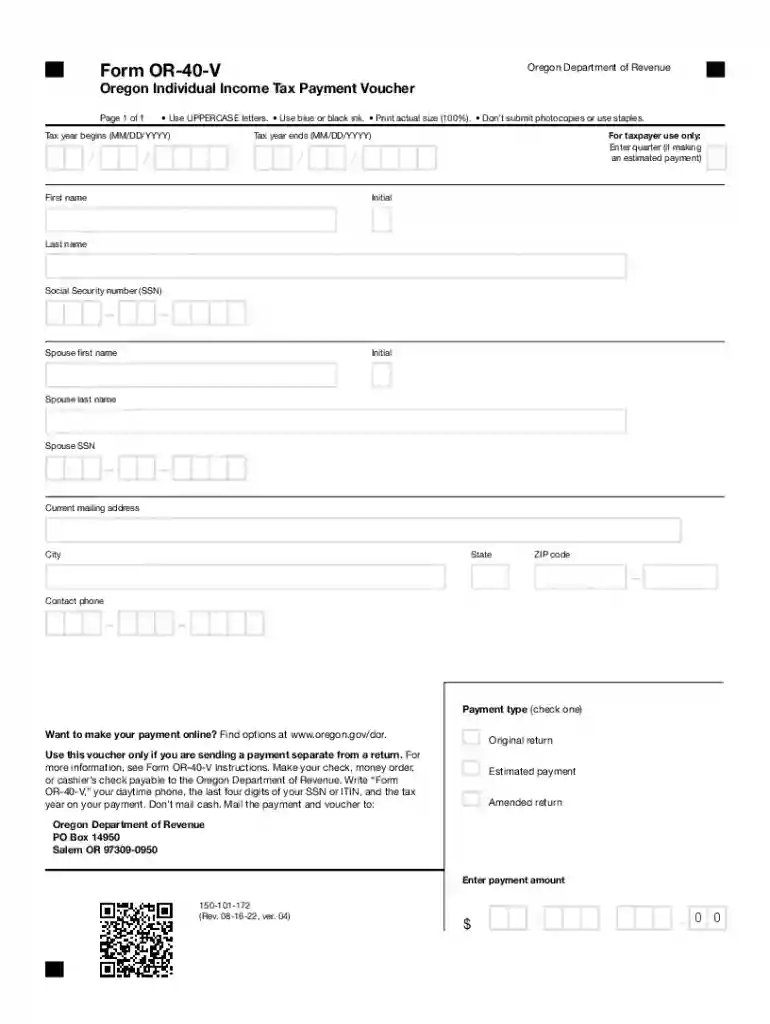
2022 40 payment Preview on Page 1

Here's how it works

01. Edit your 2022 40 payment online
Type text, add images, blackout confidential details, add comments, highlights and more.

02. Sign it in a few clicks
Draw your signature, type it, upload its image, or use your mobile device as a signature pad.

03. Share your form with others
Send 2022 form or v via email, link, or fax. You can also download it, export it or print it out.

How to use or fill out Oregon Form 40-ESV (Estimated Income Tax Payment with our platform

Form edit decoration
9.5
Ease of Setup
DocHub User Ratings on G2
9.0
Ease of Use
DocHub User Ratings on G2
  1. Click ‘Get Form’ to open it in the editor.
  2. Begin by entering the tax year start date in the format MM/DD/YYYY. This is crucial for accurate record-keeping.
  3. Indicate the quarter for which you are making an estimated payment, if applicable.
  4. Fill in your personal information: first name, initial, last name, and Social Security number (SSN). If applicable, also provide your spouse's details.
  5. Enter your current mailing address, including city, state, and ZIP code to ensure proper correspondence.
  6. Select the payment type by checking either 'Original return', 'Estimated payment', or 'Amended return'.
  7. Specify the payment amount clearly in the designated field.
  8. Review all entries for accuracy before saving or printing your completed form.

Start using our platform today to fill out your Oregon Form 40-ESV easily and for free!

See more Oregon Form 40-ESV (Estimated Income Tax Payment versions

We've got more versions of the Oregon Form 40-ESV (Estimated Income Tax Payment form. Select the right Oregon Form 40-ESV (Estimated Income Tax Payment version from the list and start editing it straight away!
Versions Form popularity Fillable & printable
2023 4.5 Satisfied (26 Votes)
2022 4.1 Satisfied (39 Votes)
2021 4.8 Satisfied (32 Votes)
2020 4.8 Satisfied (90 Votes)
2019 4.4 Satisfied (44 Votes)
2018 4.3 Satisfied (171 Votes)
2016 4 Satisfied (23 Votes)
2008 4.3 Satisfied (67 Votes)
be ready to get more

Complete this form in 5 minutes or less

Get form

Got questions?

We have answers to the most popular questions from our customers. If you can't find an answer to your question, please contact us.
Contact us
Or, open your return and choose View/Print/Save my return and a window will open with a PDF copy of your return. The 1040-ES vouchers should be the first pages, after the Filing Instructions page. If you used TurboTax Online, when you Sign In, youll see a link to download your return for the PDF copy.
You should use the D-40ES form when you have a taxable income and expect to owe $100 or more in taxes for the year. This form allows you to report and manage your estimated payments effectively.
Payments can be made using one of these options: Electronic payment using Revenue Online. If paying by mail, send each payment with a Form OR-CAT-V voucher. If paying by ACH credit, submit your application by going to Revenue Online and clicking on Apply for ACH credit.
Follow these steps to print blank estimate vouchers. Go to the. Est. screen in the. Payments. Select the. Print estimate filing instructions with blank amounts with Code 4. field to print the estimate filing instructions as if the estimates were calculated. The filing instructions will print with blank amount fields.
You can pay your estimated taxes for the year in a single payment without penalty as long as all of your payments are received on or before their due dates.

Security and compliance

At DocHub, your data security is our priority. We follow HIPAA, SOC2, GDPR, and other standards, so you can work on your documents with confidence.

Learn more
ccpa2
pci-dss
gdpr-compliance
hipaa
soc-compliance
be ready to get more

Complete this form in 5 minutes or less

Get form

People also ask

Relying on regular mail without tracking is risky. If a tax return isnt received, it may be considered delinquent, leading to penalties. Certified Mail or electronic filing provide confirmation of receipt and/or filing. E-filing is faster, more accurate, and delivers instant receipt confirmation.
You may send estimated tax payments with Form 1040-ES by mail, or you can pay online, by phone or from your mobile device using the IRS2Go app. You can also make your estimated tax payments through your online account, where you can see your payment history and other tax records. Go to IRS.gov/account.

40 v instructions