




Here's how it works



How to use or fill out MOTOR BUS AD VALOREM TAX REPORT GENERAL INSTRUCTIONSVehicle TaxesTitle Ad Valorem Tax (TAVT) and Ann with our platform

- Click ‘Get Form’ to open the MOTOR BUS AD VALOREM TAX REPORT in the editor.
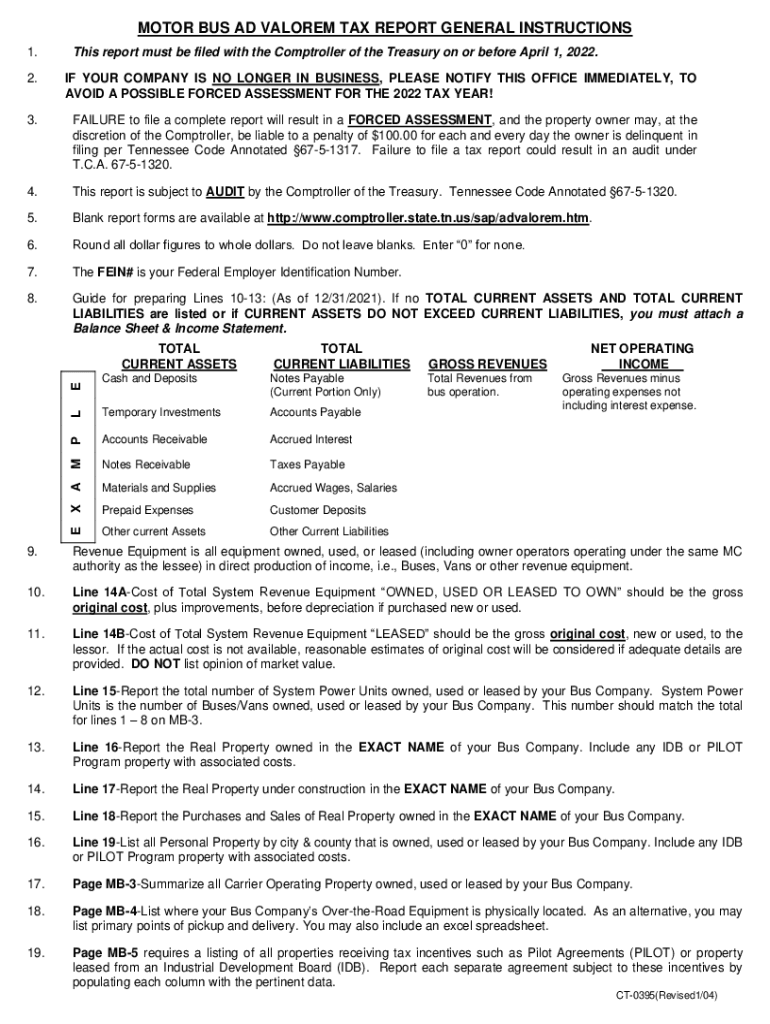
- Begin by entering your company name and FEIN# in the designated fields. Ensure accuracy as this information is crucial for identification.
- Fill out the business address, including street, city, state, and zip code. If your mailing address differs, provide that information as well.
- Complete sections regarding your company's operational status, such as whether you are a common carrier for hire and your motor carrier authority details.
- Proceed to report financial figures: total current assets, liabilities, gross revenues, and net operating income. Remember to round all dollar amounts to whole dollars.
- For property listings, accurately detail real and personal property owned or leased by your bus company in Tennessee. Include original costs and any relevant documentation.
- Review all entries for completeness before submitting. Attach any required balance sheets or income statements if necessary.
Start using our platform today to streamline your form completion process for free!
It's free
See more MOTOR BUS AD VALOREM TAX REPORT GENERAL INSTRUCTIONSVehicle TaxesTitle Ad Valorem Tax (TAVT) and Ann versions
Got questions?
Can I complete and sign my ad valorem tax tennessee online?
Yes, and it’s really easy! DocHub is an online PDF editor with advanced document processing functions that allow you quickly modify your documents, complete empty fields and drop new ones for other people to fill out, and create electronic signatures in several ways. Add your ad valorem tax tennessee, give information as required, and select how you want to eSign your template - by typing your name, drawing your signature, uploading its picture, or utilizing a QR code.
How do you get tennessee motor carrier ad valorem tax?
You can find the latest and most relevant version of the tennessee motor carrier ad valorem tax in our DocHub forms collection. Search it by categories or use the search field to get the exact template that fits your case. You can open this form for editing after you find it.
Security and compliance
At DocHub, your data security is our priority. We follow HIPAA, SOC2, GDPR, and other standards, so you can work on your documents with confidence.
Learn more


