




Here's how it works

01. Edit your mn m 4 online
Type text, add images, blackout confidential details, add comments, highlights and more.

02. Sign it in a few clicks
Draw your signature, type it, upload its image, or use your mobile device as a signature pad.

03. Share your form with others
Send 2023 mn m4 via email, link, or fax. You can also download it, export it or print it out.
How to use or fill out 2023 M4X, Amended Franchise Tax Return Claim for Refund with DocHub

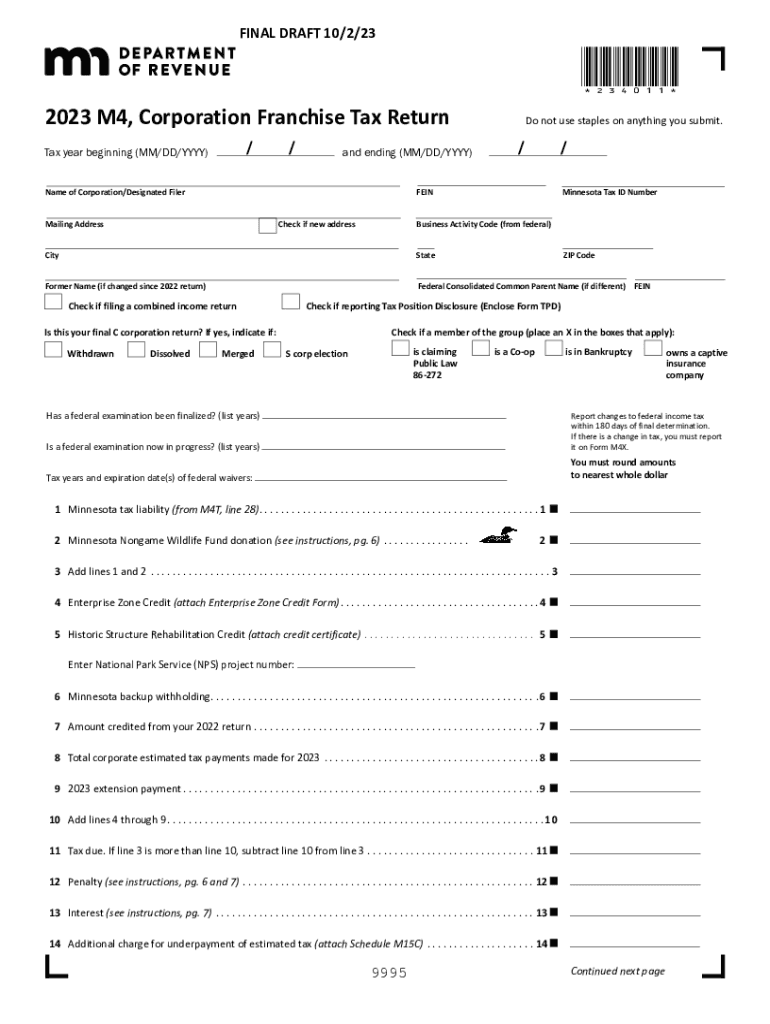
- Click ‘Get Form’ to open the 2023 M4X in our editor.
- Begin by entering the tax year at the top of the form. Ensure you input the correct beginning and ending dates.
- Fill in the corporation's name and mailing address. If there’s a new address, check the appropriate box.
- Provide your FEIN and Minnesota Tax ID Number. Make sure these numbers are accurate to avoid processing delays.
- Complete the sections regarding tax liability, including any donations to the Minnesota Nongame Wildlife Fund and applicable credits.
- If applicable, indicate if this is your final C corporation return and check any relevant boxes regarding your business status.
- Review all entries for accuracy before signing. Use our platform’s tools to add your signature electronically.
Start filling out your 2023 M4X form online for free today!
Fill out 2023 M4X, Amended Franchise Tax Return Claim for Refund online
It's free
It's free
See more 2023 M4X, Amended Franchise Tax Return Claim for Refund versions
We've got more versions of the 2023 M4X, Amended Franchise Tax Return Claim for Refund form. Select the right 2023 M4X, Amended Franchise Tax Return Claim for Refund version from the list and start editing it straight away!
| Versions | Form popularity | Fillable & printable |
|---|---|---|
| 2025 | 4.9 Satisfied (53 Votes) | |
| 2024 | 4.1 Satisfied (39 Votes) | |
| 2023 | 4.3 Satisfied (33 Votes) | |
| 2022 | 4.8 Satisfied (52 Votes) | |
| 2021 | 4.2 Satisfied (53 Votes) | |
| 2020 | 4.4 Satisfied (197 Votes) | |
| 2019 | 4.3 Satisfied (266 Votes) | |
| 2018 | 4 Satisfied (36 Votes) | |
| 2017 | 4.3 Satisfied (103 Votes) | |
| 2008 | 4.3 Satisfied (163 Votes) |
Got questions?
We have answers to the most popular questions from our customers. If you can't find an answer to your question, please contact us.
Contact us
Can I amend my 2023 tax return with TurboTax?
You must first wait until the initial return is completely processed. You will have to use the same TurboTax account that you used for the original tax return. Once you begin your amendment, youll see your original return. Only make changes to the areas of your return that need amending.
Can you still amend a 2023 tax return?
An open year is typically three years after the due date of that tax return year, or two years after taxes are paid in full, whichever is later. So, think of it like this: in 2024, you can amend tax returns for tax years 2021, 2022, and 2023. Do you think you missed claiming that third stimulus check in 2021?
How to change a 2023 tax return?
You can use the Change my return service in your CRA account. You may be able to use the ReFILE service in your certified tax software if: You are using EFILE certified tax software. You are changing a return for the 2023 tax year or later.
Why cant I amend on TurboTax?
The 2023 amended tax return, Form 1040-X, cannot be e-filed when using TurboTax. Only the current tax year, 2024, amended return can be e-filed as long as the original 2024 return has been e-filed and accepted by the IRS.
How long do I have to amend a 2023 tax return?
Generally, to claim a refund, you must file an amended return within 3 years after the date you filed your original return or 2 years after the date you paid the tax, whichever is later.
Security and compliance
At DocHub, your data security is our priority. We follow HIPAA, SOC2, GDPR, and other standards, so you can work on your documents with confidence.
Learn more


People also ask
How much does TurboTax charge to amend your tax return?
There is no additional fee to amend a tax return originally prepared using TurboTax unless the amended return requires an upgrade to the version originally used.
How to amend a 2023 tax return using TurboTax?
If you prepared your original tax return using TurboTax, log in to your account, open the tax return you already filed, and click on the link to amend your return. From there, the software will walk you through the process of filing the amendment.


