M1R taxes state mn us 2026

Get Form
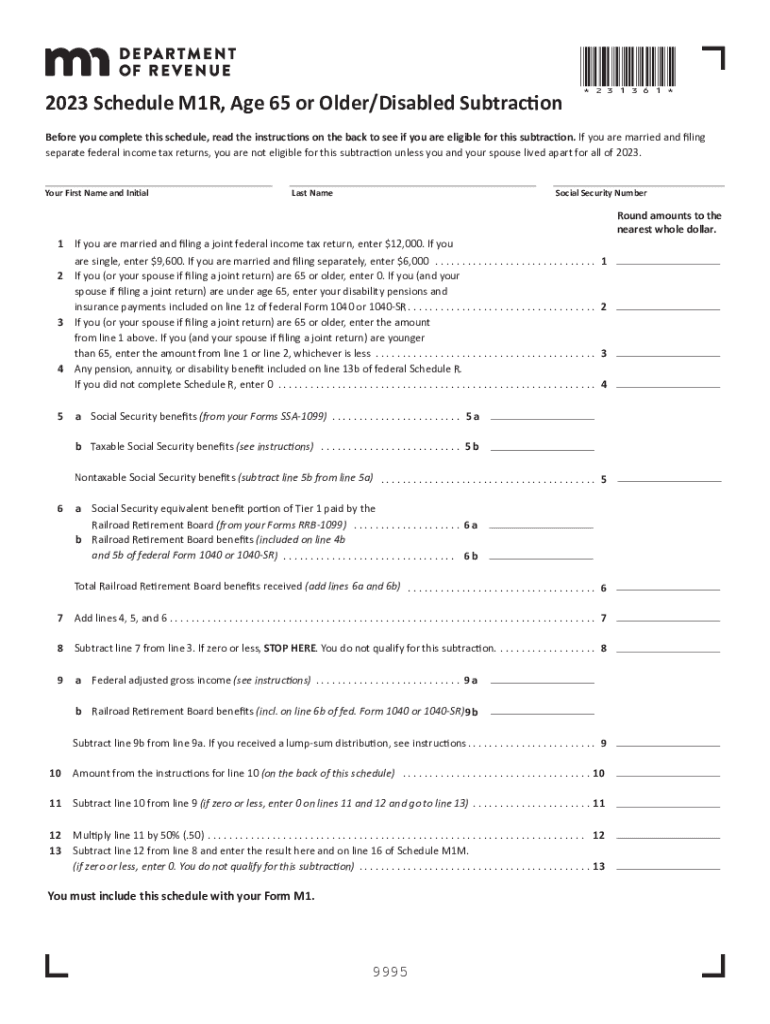
schedule m1r Preview on Page 1

Here's how it works

01. Edit your schedule m1r online
Type text, add images, blackout confidential details, add comments, highlights and more.
02. Sign it in a few clicks
Draw your signature, type it, upload its image, or use your mobile device as a signature pad.
03. Share your form with others
Send 2023 schedule m1r via email, link, or fax. You can also download it, export it or print it out.

How to use or fill out M1R taxes state mn us with our platform

Form edit decoration
9.5
Ease of Setup
DocHub User Ratings on G2
9.0
Ease of Use
DocHub User Ratings on G2
  1. Click ‘Get Form’ to open the M1R tax form in the editor.
  2. Begin by entering your first name, middle initial, and last name in the designated fields. Ensure accuracy as this information is crucial for identification.
  3. Input your Social Security Number in the appropriate field. This is necessary for processing your tax return.
  4. Proceed to line 1 and enter the applicable amount based on your filing status: $12,000 for married joint filers, $9,600 for singles, or $6,000 for married separate filers.
  5. For line 2, if you or your spouse are 65 or older, enter '0'. If under 65, input any disability pensions included on line 1z of federal Form 1040.
  6. Continue filling out lines 3 through 13 as instructed. Pay close attention to each line's requirements and calculations to ensure accuracy.

Start using our platform today to simplify your M1R tax form completion!

See more M1R taxes state mn us versions

We've got more versions of the M1R taxes state mn us form. Select the right M1R taxes state mn us version from the list and start editing it straight away!
Versions Form popularity Fillable & printable
2023 4.3 Satisfied (22 Votes)
2022 4.8 Satisfied (70 Votes)
2021 4.2 Satisfied (82 Votes)
2020 4.3 Satisfied (83 Votes)
be ready to get more

Complete this form in 5 minutes or less

Get form

Got questions?

We have answers to the most popular questions from our customers. If you can't find an answer to your question, please contact us.
Contact us
Form M1 is the individual income tax form in Minnesota.
Looking for your property tax statement? You can get a copy of your property tax statement from the county website or county treasurer where the property is located. For websites and contact information, visit County Websites on Minnesota.gov.
Go to .revenue.state.mn.us to file electronically or download Form M1PR, Homestead Credit Refund (for Homeowners) and Renters Property Tax Refund.
You can get Minnesota tax forms either by mail or in person. To get forms by mail, call 651-296-3781 or 1-800-652-9094 to have forms mailed to you. You can pick up forms at our St. Paul office.
You get these statements from your mortgage loan servicer. Current IRS rules allow you to deduct mortgage interest payments from your taxes when you itemize your deductions.

Security and compliance

At DocHub, your data security is our priority. We follow HIPAA, SOC2, GDPR, and other standards, so you can work on your documents with confidence.

Learn more
ccpa2
pci-dss
gdpr-compliance
hipaa
soc-compliance

People also ask

Minnesota also has a 6.875 percent state sales tax rate and an average combined state and local sales tax rate of 8.04 percent. Minnesota has a 0.98 percent effective property tax rate on owner-occupied housing value. Minnesota has an estate tax.
Your total household income must be less than $139,320. You must be a Minnesota resident or part-year resident to qualify for a property tax refund. For more information, go to .revenue.state.mn.us/residents. You must have owned and occupied your home on January 2, 2025.
The M1PR can be mailed or e-filed (if qualified). Follow these steps to begin your M1PR: Sign in to TurboTax and begin your Minnesota state taxes. Answer all the questions until you get to the Other Forms You May Need screen, and select Property Tax Refund (Form M1PR), then Continue.

minnesota schedule m1r