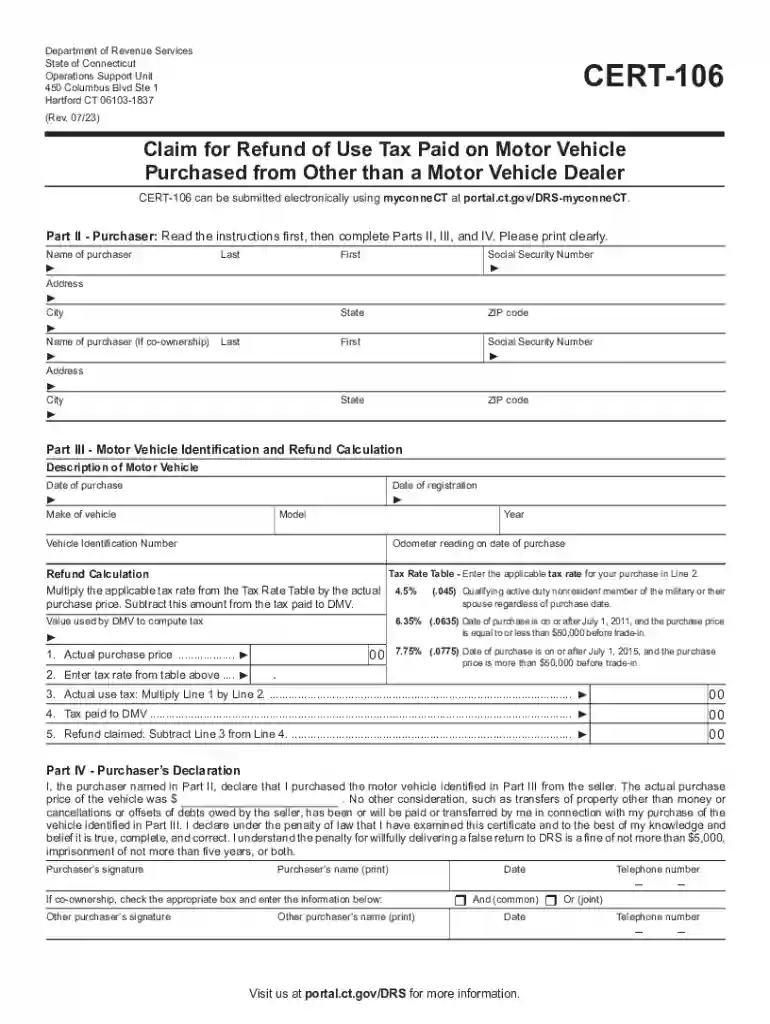
CERT-106, Claim for Refund of Use Tax Paid on Motor 2026

Get Form
ct cert 106 Preview on Page 1

Here's how it works

01. Edit your ct cert 106 online
Type text, add images, blackout confidential details, add comments, highlights and more.

02. Sign it in a few clicks
Draw your signature, type it, upload its image, or use your mobile device as a signature pad.

03. Share your form with others
Send cert 106 tax via email, link, or fax. You can also download it, export it or print it out.

How to use or fill out CERT-106, Claim for Refund of Use Tax Paid on Motor with our platform

Form edit decoration
9.5
Ease of Setup
DocHub User Ratings on G2
9.0
Ease of Use
DocHub User Ratings on G2
  1. Click ‘Get Form’ to open CERT-106 in the editor.
  2. Begin with Part II, where you will enter your name, Social Security Number, and address. Ensure all information is printed clearly.
  3. If applicable, provide details for co-ownership by filling in the second purchaser's information.
  4. In Part III, describe the motor vehicle by entering the make, model, year, and Vehicle Identification Number (VIN). Include purchase and registration dates.
  5. Refer to the Tax Rate Table and enter the appropriate tax rate based on your vehicle's purchase price. Calculate the actual use tax by multiplying the purchase price by this rate.
  6. Complete Part IV by signing and dating the Purchaser’s Declaration. If there is a co-owner, ensure their signature is included as well.

Start using our platform today to easily complete your CERT-106 form online for free!

See more CERT-106, Claim for Refund of Use Tax Paid on Motor versions

We've got more versions of the CERT-106, Claim for Refund of Use Tax Paid on Motor form. Select the right CERT-106, Claim for Refund of Use Tax Paid on Motor version from the list and start editing it straight away!
Versions Form popularity Fillable & printable
2023 4.8 Satisfied (39 Votes)
2022 4.9 Satisfied (40 Votes)
2016 4.2 Satisfied (47 Votes)
2016 4.3 Satisfied (185 Votes)
be ready to get more

Complete this form in 5 minutes or less

Get form

Got questions?

We have answers to the most popular questions from our customers. If you can't find an answer to your question, please contact us.
Contact us
The Form AU-463 is used by Connecticut residents to declare the transfer of ownership and title of a motor vehicle or vessel as a gift. The form includes information about the donor, donee, vehicle details, and a declaration of truthfulness under penalties of false statement.
Go to myconneCT, under Business Registration, click New Business/Need a CT Registration Number? There is a $100 fee for registering to collect sales and use tax. After registering, you will receive a Sales and Use Tax Permit that should be displayed conspicuously for your customers to see.
If you have unpaid motor vehicle taxes, you will not be able to register another vehicle. You must first pay the outstanding taxes and obtain a DMV release.
What is form CERT 119 for? CERT 119 certifies the purchase of any tangible property without sales and use taxes. It informs the seller that these taxes cannot be withheld from the organization and DRS cannot withhold them from the seller as well.

Security and compliance

At DocHub, your data security is our priority. We follow HIPAA, SOC2, GDPR, and other standards, so you can work on your documents with confidence.

Learn more
ccpa2
pci-dss
gdpr-compliance
hipaa
soc-compliance